







Question: Description Further enhance the human resource management program for Continental University. Add more attributes about an employee, including marital family status (single, married without children,
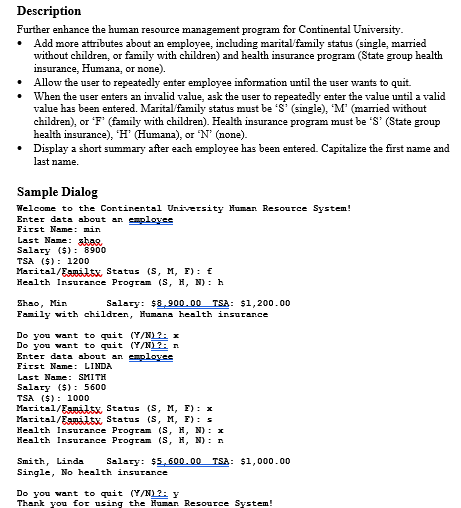
Description Further enhance the human resource management program for Continental University. Add more attributes about an employee, including marital family status (single, married without children, or family with children) and health insurance program (State group health insurance, Humana, or none). Allow the user to repeatedly enter employee information until the user wants to quit. When the user enters an invalid value, ask the user to repeatedly enter the value until a valid value has been entered. Marital family status must be 'S' (single), "M' (married without children), or 'F' (family with children). Health insurance program must be 'S' (State group health insurance), 'H' (Humana), or 'N' (none). Display a short summary after each employee has been entered. Capitalize the first name and last name. Sample Dialog Welcome to the Continental University Human Resource System! Enter data about an employee First Name: min Last Name: shan Salary ($): 8900 TSA ($): 1200 Marital/Camiltx Status (S, M, F): Health Insurance Program (S, H, N): h Shao, Min Salary: $8.900.00 TSA: $1,200.00 Family with children, Humana health insurance Do you want to quit (Y/N)?: x Do you want to quit (Y/?A Enter data about an employee First Name: LINDA Last Name: SMITH Salary ($): 5600 TSA ($): 1000 Marital/Eamilts Status (S, M, E): x Marital/Eamats Status (S, M, E): 5 Health Insurance Program (S, H, N) : x Health Insurance Program (S, H, N): Smith, Linda Salary: $5.600.00 TSA: $1,000.00 Single, No health insurance Do you want to quit (Y/N)?: y Thank you for using the Human Resource System
Step by Step Solution
There are 3 Steps involved in it

Get step-by-step solutions from verified subject matter experts
 Study Help