







Question: Description Upload a single sql file that contains all solutions prefixed with comments for the following exercises. Exercises 1. Write a SELECT statement that returns
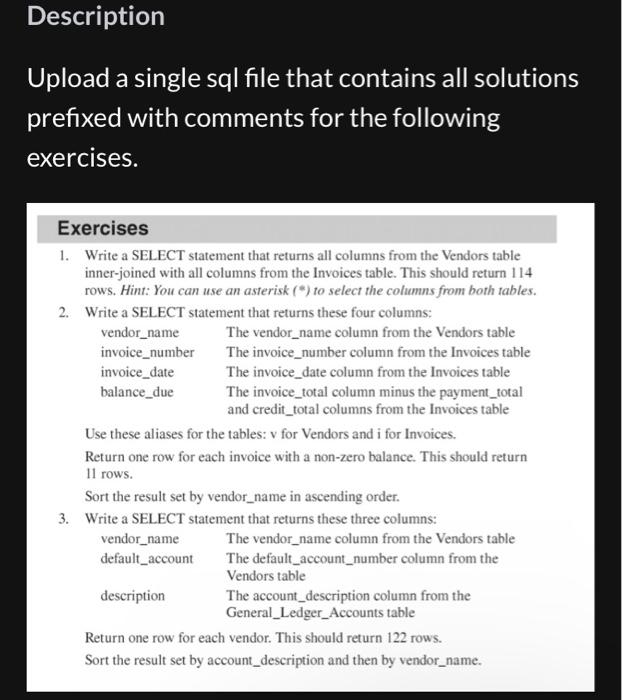
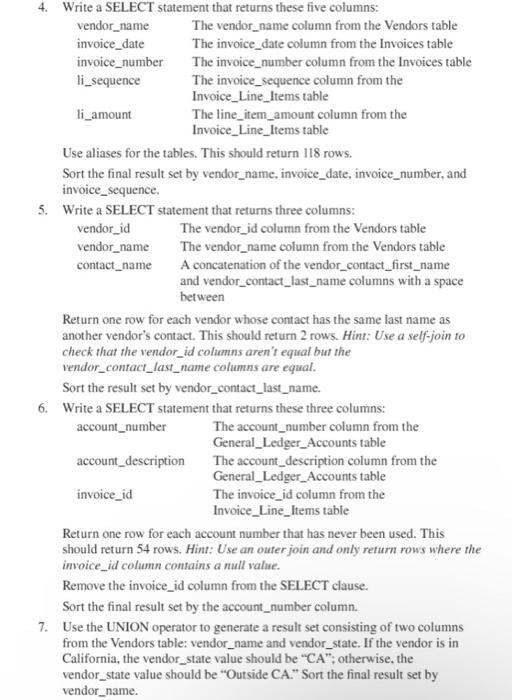
Description Upload a single sql file that contains all solutions prefixed with comments for the following exercises. Exercises 1. Write a SELECT statement that returns all columns from the Vendors table inner-joined with all columns from the Invoices table. This should return 114 rows. Hint: You can use an asterisk (") to select the columns from both tables. 2 Writa a SFI FCT ctatamant that raturnc thace fiur molumne- Use these aliases for the tables: v for Vendors and i for Invoices. Return one row for each invoice with a non-zero balance. This should return 11 rows. Sort the result set by vendor_name in ascending order. 3 Return one row for each vendor. This should return 122 rows. Sort the result set by account_description and then by vendor_name. Use aliases for the tables. This should return 118 rows. Sort the final result set by vendor_name, invoice_date, invoice_number, and invoice_sequence. 5. Write a SELECT statement that returns three columns: vendor_id The vendor_id column from the Vendors table vendor_name The vendor_name column from the Vendors table contact_name A concatenation of the vendor_contact_first_name and vendor_contact_last_name columns with a space between Return one row for each vendor whose contact has the same last name as another vendor's contact. This should return 2 rows. Hint: Use a self-join to check that the vendor_id columns aren't equat but the vendor_contact_last_name columns are equal. Sort the result set by vendor_contact_last_name. Return one row for each account number that has never been used. This should return 54 rows. Hint: Use an outer join and only return rows where the invoice_id column contains a null value. Remove the invoice_id column from the SELECT clause. Sort the final result set by the account_number column. 7. Use the UNION operator to generate a result set consisting of two columns from the Vendors table: vendor_name and vendor_state. If the vendor is in California, the vendor_state value should be " CA "; otherwise, the vendor_state value should be "Outside CA." Sort the final result set by vendor_name
Step by Step Solution
There are 3 Steps involved in it

Get step-by-step solutions from verified subject matter experts
 Study Help