







Question: Descripton: In this homework, you will be working with a database named cst 4 6 7 using Java and JDBC ( Java Database
Descripton:
In this homework, you will be working with a database named cst using Java and JDBC Java
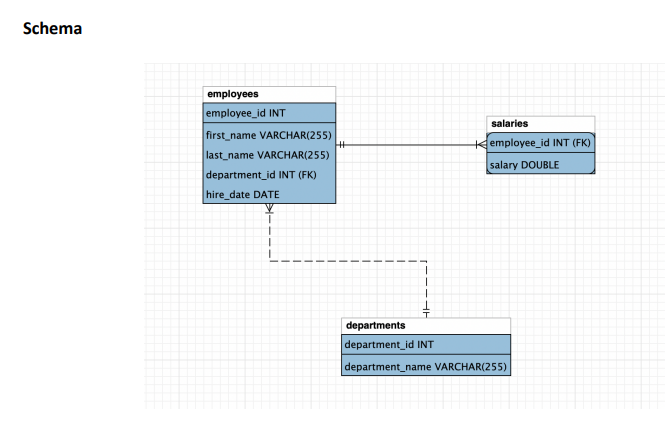
Database ConnecKvity The database consists of three tables related to employee informaKon. Your task
is to write Java code to perform various queries on these tables.
Instrucons:
Create a Java applicaKon project at NetBeans following the naming convenKon: hwlastname
Eg hwkucuk
Assume there exists a user cst on localhost and a MySQL database cst on my end. I will
test your script connecKng on this database. You may create a dummy database on your end
following the schema below. You may populate and insert data as much as you want to the tables
paying aZenKon to the constraints to test your script.
Download UKlsjava class and import it in your project. Do not forget to change the package name.
You will write scripts inside the predefined methods answering the quesKons below.
Refer to the Main method in the HwKucuk.java file. That is how you and I run the program with
the methods defined in the UKls class.
The program should not break at any Kme. If an error occurs, the error message should be displayed.
Aaer compleKng the assignment, zip the project directory hwkucuk.zip and submit it in
Blackboard.
Quesons
Task Create and iniKalize JDBC URL, username and password variables. Make sure that the
variables cannot be updated from the other class.
Task Retrieve and display all records from the employees table in the following format.
Employee ID: Name: Department ID: Hire Date:
Task Display the names and department names of employees in the following format.
Name: Department:
Task Find and display the highest salary in the following format.
Highest Salary: $
Task Retrieve and display employees hired in in the following format.
Name: Department: Hire Date:
Task Update the salary of an employee with a given employee id If the transacKon is successful,
display the informaKon:
Salary updated successfully for Employee ID:
If the transacKon is not successful, display:
Employee not found with ID:
Task Update the salary of an employee with the employees full name. If the transacKon is
successful, display the informaKon:
Salary updated successfully.
If the transacKon is not successful, display:
Employee not found.
Task Delete the employees who were hired before a date. Display the number of employees
deleted.
employees deleted
change the package name!
eg package com.mycompany.hw
package com.mycompany.hwkucuk;
import java.sql;
import java.util.loggingLevel;
import java.util.loggingLogger;
public class Utils
Task : Create and init JDBC URL, username, and password of MySQL server
Task : Retrieve and display all records from the "employees" table
public void displayEmployeesConnection conn
Task : Display names and department names of employees
public void displayEmployeeNamesAndDepartmentsConnection conn
Task : Find and display the highest salary
public void displayHighestSalaryConnection conn
Task : Retrieve employees hired since
public void displayEmployeesHiredinConnection conn
Task : Update the salary of an employee by ID
public void updateEmployeeSalaryConnection conn, int employeeId, double newSalary
Task : Update the salary of an employee by Name
public void updateEmployeeSalaryByNameConnection conn, String employeeFullName, double newSalary
Task : Delete employees hired before a date.
public void deleteEmployeesBeforeTheDateConnection conn, String hiredate
copy and paste the main method and libraries to your project for testing
pay attention to the package and class names
package com.mycompany.hwkucuk;
import java.sql;
import java.util.loggingLevel;
import java.util.loggingLogger;
public class HwKucuk
public static void mainString args
try
Load the driver
Class.forNamecommysqlcjjdbcDriver";
Utils myUtil new Utils;
Connect to the database
Connection conn;
conn DriverManager.getConnectionmyUtilgetURL myUtil.getUSER myUtil.getPASSWORD;
System.out.printlnConnection Successful!";
System.out.println
TASK
Employees Table:";
myUtil.displayEmployeesconn;
System.out.println
TASK
Employee Names and Department Names:";
myUtil.displayEmployeeNamesAndDepartmentsconn;
System.ou
Step by Step Solution
There are 3 Steps involved in it
1 Expert Approved Answer
Step: 1 Unlock

Question Has Been Solved by an Expert!
Get step-by-step solutions from verified subject matter experts
Step: 2 Unlock
Step: 3 Unlock
 Study Help