







Question: Design a multiform Windows Forms Application that can be used to test C# skills. The first form will prompt the user to enter a password
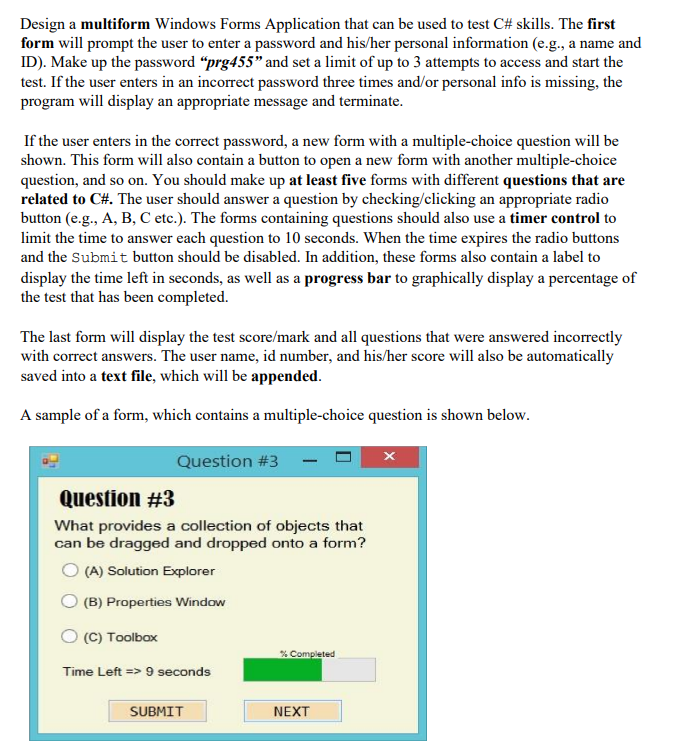
Design a multiform Windows Forms Application that can be used to test C\# skills. The first form will prompt the user to enter a password and his/her personal information (e.g., a name and ID). Make up the password "prg455" and set a limit of up to 3 attempts to access and start the test. If the user enters in an incorrect password three times and/or personal info is missing, the program will display an appropriate message and terminate. If the user enters in the correct password, a new form with a multiple-choice question will be shown. This form will also contain a button to open a new form with another multiple-choice question, and so on. You should make up at least five forms with different questions that are related to CH. The user should answer a question by checking/clicking an appropriate radio button (e.g., A, B, C etc.). The forms containing questions should also use a timer control to limit the time to answer each question to 10 seconds. When the time expires the radio buttons and the Submit button should be disabled. In addition, these forms also contain a label to display the time left in seconds, as well as a progress bar to graphically display a percentage of the test that has been completed. The last form will display the test score/mark and all questions that were answered incorrectly with correct answers. The user name, id number, and his/her score will also be automatically saved into a text file, which will be appended. A sample of a form, which contains a multiple-choice question is shown below. Question \#3 What provides a collection of objects that can be dragged and dropped onto a form? (A) Solution Explorer (B) Properties Window (C) Toolbox Time Left =>9 seconds
Step by Step Solution
There are 3 Steps involved in it

Get step-by-step solutions from verified subject matter experts
 Study Help