







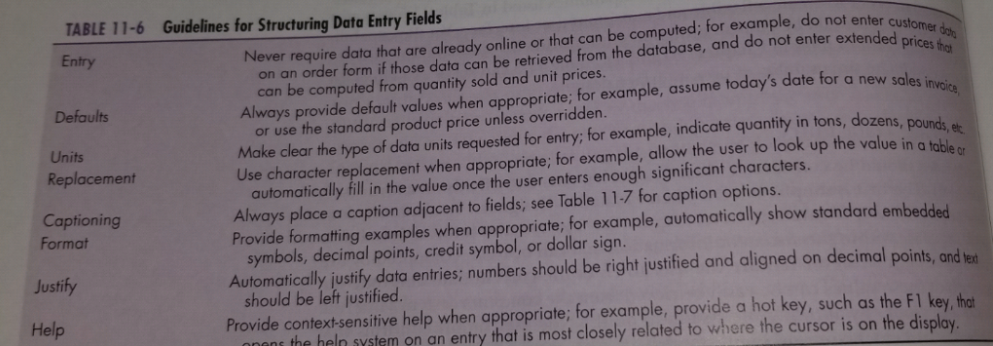
Question: Design a sample data entry screen for a hotel registration system using the data entry guidelines provided in Table 11-6. When possible, support your design
- Design a sample data entry screen for a hotel registration system using the data entry guidelines provided in Table 11-6. When possible, support your design with arguments for the design choices you made.
- For this data entry screen design the help system using the guidelines for designing usable help (see Table 11-11)
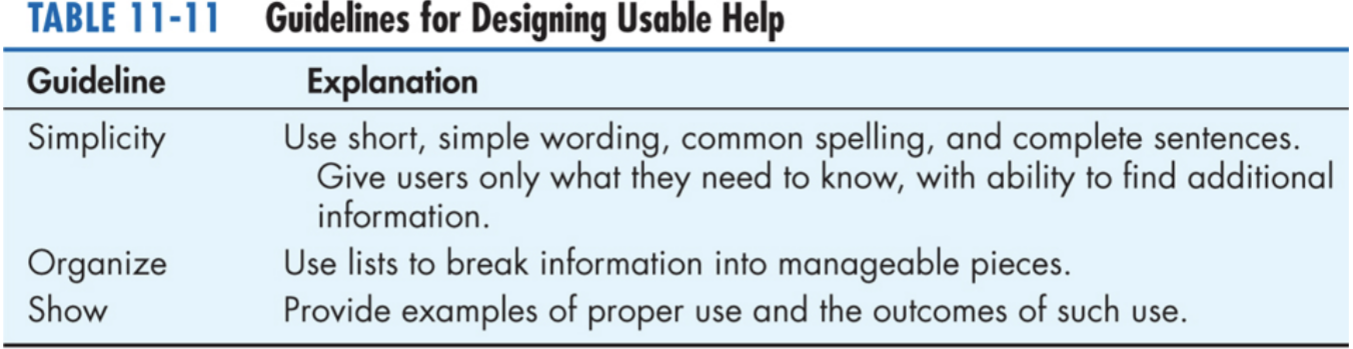
invoice TABLE 11-6 Guidelines for Structuring Data Entry Fields Entry Never require data that are already online or that can be computed; for example, do not enter customer dhe on an order form if those data can be retrieved from the database, and do not enter extended prices that can be computed from quantity sold and unit prices. Defaults Always provide default values when appropriate; for example, assume today's date for a new sales i or use the standard product price unless overridden. Units Make clear the type of data units requested for entry; for example, indicate quantity in tons, dozens, pounds, et Replacement Use character replacement when appropriate; for example, allow the user to look up the value in a table or automatically fill in the value once the user enters enough significant characters. Captioning Always place a caption adjacent to fields; see Table 11.7 for caption options. Format Provide formatting examples when appropriate; for example, automatically show standard embedded symbols, decimal points, credit symbol, or dollar sign. Justify Automatically justify data entries; numbers should be right justified and aligned on decimal points, and her should be left justified. Help Provide context-sensitive help when appropriate; for example, provide a hot key, such as the F1 key, that nons the heln system on an entry that is most closely related to where the cursor is on the display. TABLE 11-11 Guidelines for Designing Usable Help Guideline Explanation Simplicity Use short, simple wording, common spelling, and complete sentences. Give users only what they need to know, with ability to find additional information. Organize Use lists to break information into manageable pieces. Show Provide examples of proper use and the outcomes of such use
Step by Step Solution
There are 3 Steps involved in it
1 Expert Approved Answer
Step: 1 Unlock

Question Has Been Solved by an Expert!
Get step-by-step solutions from verified subject matter experts
Step: 2 Unlock
Step: 3 Unlock
 Study Help