







Question: Design and create a graphical (GUI) application that allows the user to choose a different shape for displaying its area and perimeter. Three choices: Circle
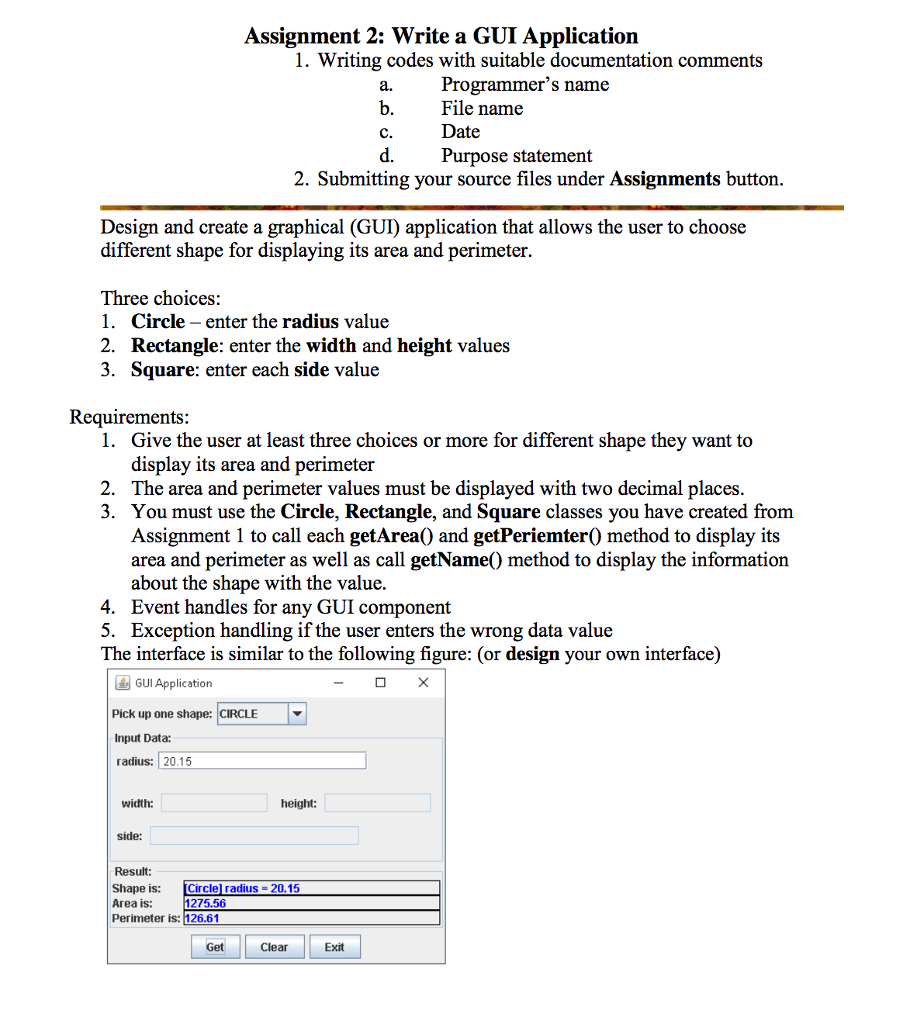
Design and create a graphical (GUI) application that allows the user to choose a different shape for displaying its area and perimeter. Three choices: Circle - enter the radius value Rectangle: enter the width and height values Square: enter each side value Requirements: Give the user at least three choices or more for the different shape they want to display its area and perimeter the area and perimeter values must be displayed with two decimal places. You must use the Circle, Rectangle, and Square classes you have created from Assignment 1 to call each getArea() and getPeriemter() method to display its area and perimeter as well as call getName() method to display the information about the shape with the value. Event handles for any GUI component Exception handling if the user enters the wrong data value the interface is similar to the following figure: (or design your own interface)
Step by Step Solution
There are 3 Steps involved in it

Get step-by-step solutions from verified subject matter experts
 Study Help