







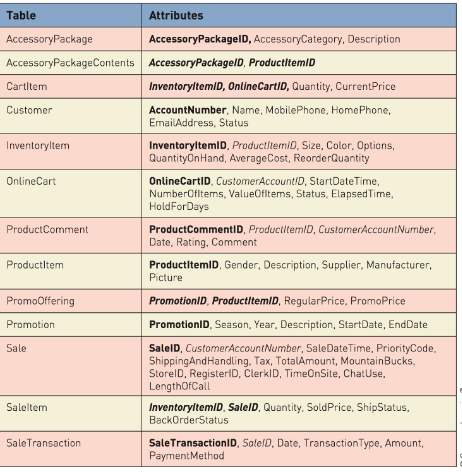
Question: Create a Microsoft Access database based on the subset of RMO's domain class diagram shown in the first image and the set of corresponding tables
Create a Microsoft Access database based on the subset of RMO's domain class diagram shown in the first image and the set of corresponding tables described in the second image.
Include:
All attributes
Primary keys
Compound primary keys Foreign keys Enter sample data in all tables (at least 2 records) You do not have to create tables for the subclasses fore Sale and OnlineCart but all attributes of the sub-classes should be accounted for.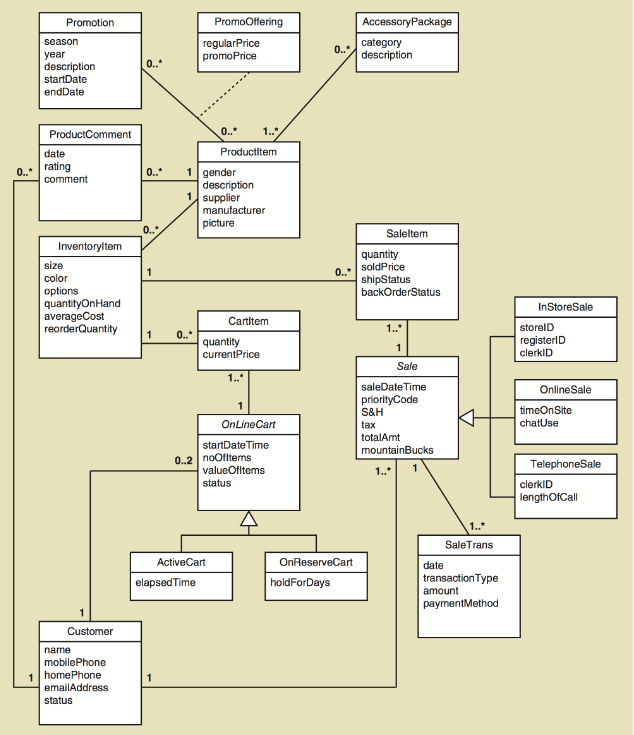
Promotion PromoOffering scason year description regularPrice o.. category endDate ProductComment Productitem date rating O..comment 0. gender description supplier picture Saleltem quantity soldPrice shipStatus backOrderStatus size color options quantityOnHand averageCost reorderQuantity 1 InStoreSale Cartltem storelD registerlD clerkID 0.." quantity currentPrice Sale saleDate Time OnlineSale imeOnSite chatUse S&H tax totalAmt mountainBucks OnLineCart startDate lime 0..2 noofltems valueOfltems status clerkID lengthOfCall SaleTrans ActiveCart date transactionType amount paymentMethod elapsedTime holdForDays name mobilePhone emailAddress status
Step by Step Solution
There are 3 Steps involved in it

Get step-by-step solutions from verified subject matter experts
 Study Help