







Question: - Design and implement a GUI that converts length into different units of measurement. Figure 1 below gives a guideline for the general appearance. -
- Design and implement a GUI that converts length into different units of measurement. Figure 1 below gives a guideline for the general appearance.
- The application will have two classes, ConversionCalculator and ConversionCalculatorDriver. The Driver just holds the main method and instantiates the ConversionCalculator.
- The GUI has JPanels, JLabels, JTextFields, and JButtons.
- You will need to use Layout managers to get the look to be correct. There are a few options on how to get the below look. Dont forget you can nest layouts within each other!
- Close enough is good enough if the exact spacing is a little different, no big deal. Just be sure that your GUI has two columns for the data and then the third column for buttons
- Set the initial value of JTextFields to 0.00.
- When the user clicks on the window close button, exit the application.
- Name your Eclipse project, Lab3A.
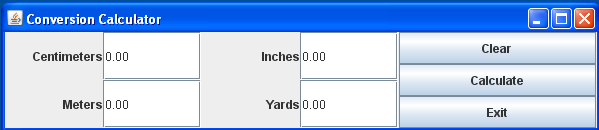
Figure 1. Initial GUI before a users interaction.
- Implement the following event handling routines using Action Listeners, as in the button use during Chapter 12.
- When the user enters 10 at the Inches JTextField and clicks the Calculate button.
a.Using the following equations, convert the entered length to other scales and then display on the corresponding .
1 inch = 2.54 cm
1 inch = 0.0278 yard
1 cm = 0.01 meter
b.All values must be rounded to two decimal places and then displayed. One way to accomplish this would be a DecimalFormat object.
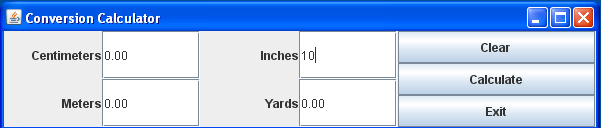
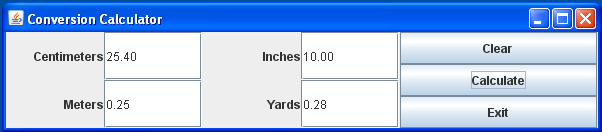
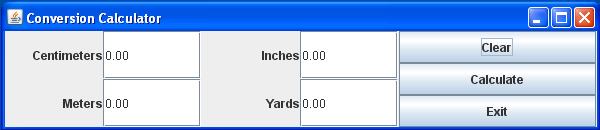
- Below is what happens when the user clicks on the Clear Button: It should clear the content of JTextFields.
- When the user enters 5 in the Meters JTextField and clicks the Calculate button, the following should occur
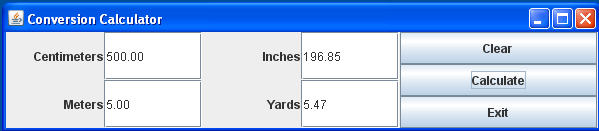
- When the Exit Button is pressed, exit the application.
- Please note that J Unit Tests are not provided for this lab, as there are some issues with it. Namely, at your current level of knowledge, you may not be able to determine with number is the one that should be converted robustly
For this lab, please assume the user hits clear between each calculation, so that the number you convert is the one non-zero one. If you make a more robust system, I may give bonus points.
Conversion Calculator Centimeters 0.00 Meters 0.00 Inches 0.00 Yards 0.00 Clear Calculate Exit
Step by Step Solution
There are 3 Steps involved in it

Get step-by-step solutions from verified subject matter experts
 Study Help