







Question: Design and implement bash script (mybash.sh) to create a few files and directories as shown below (in the current working directory). Create a few directories
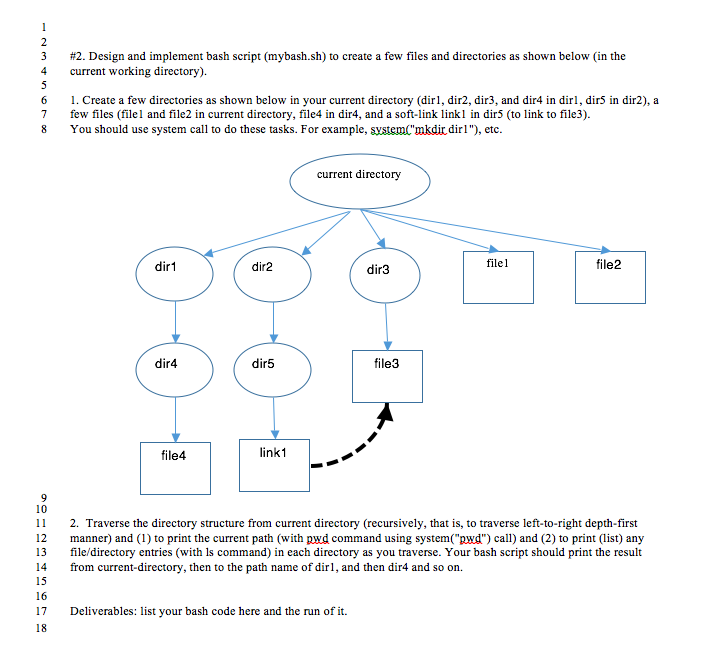
Design and implement bash script (mybash.sh) to create a few files and directories as shown below (in the current working directory). Create a few directories as shown below in your current directory (dir1, dir2, dir3, and dir4 in dir1, dir5 in dir2), a few files (file 1 and file2 in current directory, file 4 in dir 4, and a soft-link link 1 in dir5 (to link to file3). You should use system call to do these tasks. For example ("mkdir dir 1"). etc. Traverse the directory structure from current directory (recursively, that is, to traverse left-to-right depth-first manner) and (1) to print the current path (with command using system call and (2) to print (list) any file/directory entries (with is command) in each directory as you traverse. Your bash script should print the result from current-directory, then to the path name of dir 1, and then dir 4 and so on. Deliverables: list your bash code here and the run of it. Design and implement bash script (mybash.sh) to create a few files and directories as shown below (in the current working directory). Create a few directories as shown below in your current directory (dir1, dir2, dir3, and dir4 in dir1, dir5 in dir2), a few files (file 1 and file2 in current directory, file 4 in dir 4, and a soft-link link 1 in dir5 (to link to file3). You should use system call to do these tasks. For example ("mkdir dir 1"). etc. Traverse the directory structure from current directory (recursively, that is, to traverse left-to-right depth-first manner) and (1) to print the current path (with command using system call and (2) to print (list) any file/directory entries (with is command) in each directory as you traverse. Your bash script should print the result from current-directory, then to the path name of dir 1, and then dir 4 and so on. Deliverables: list your bash code here and the run of it
Step by Step Solution
There are 3 Steps involved in it

Get step-by-step solutions from verified subject matter experts
 Study Help