







Question: Design C-1 (modulo-10 up-counter): Using the behavioral VHDL coding, create an up-counter to count upward. The up counter has the following control inputs En.reset, CLK.
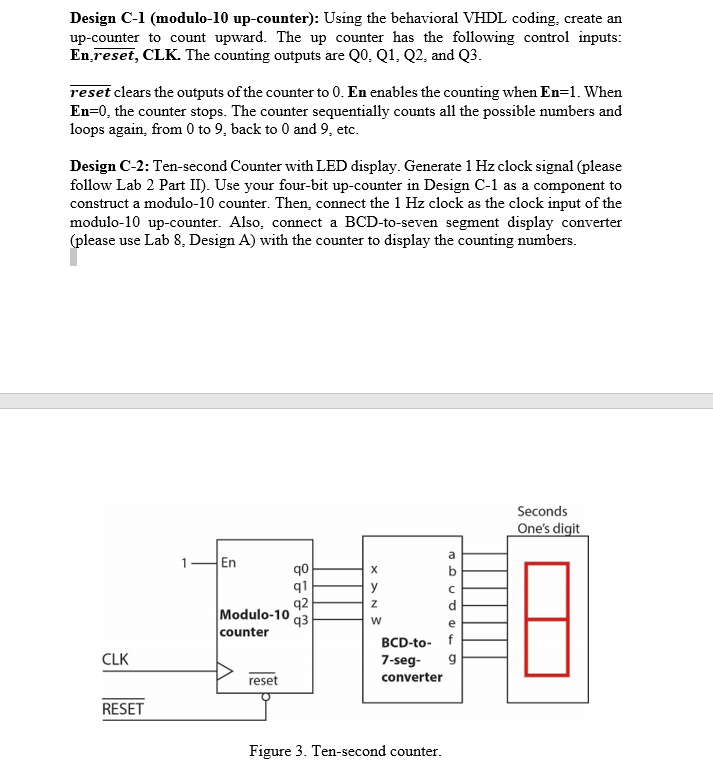
Design C-1 (modulo-10 up-counter): Using the behavioral VHDL coding, create an up-counter to count upward. The up counter has the following control inputs En.reset, CLK. The counting outputs are Q0, O1, Q2. and O3 reset clears the outputs of the counter to 0. En enables the counting when En-1. When En-0, the counter stops. The counter sequentially counts all the possible numbers and loops again, from 0 to 9, back to 0 and 9, etc Design C-2: Ten-second Counter with LED display. Generate 1 Hz clock signal (please follow Lab 2 Part II). Use your four-bit up-counter in Design C-1 as a component to construct a modulo-10 counter. Then, connect the 1 Hz clock as the clock input of the modulo-10 up-counter. Also, connect a BCD-to-seven segment display converter (please use Lab 8, Design A) with the counter to display the counting numbers Seconds One's digit q0 ql Modulo-10 q3 counter BCD-to f 7-seg- 9 converter CLK reset RESET Figure 3. Ten-second counter
Step by Step Solution
There are 3 Steps involved in it

Get step-by-step solutions from verified subject matter experts
 Study Help