







Question: Design ladder diagram for problem description below:- In this application, the work piece condition will be checking by a sensor either GOOD or NO GOOD.
Design ladder diagram for problem description below:- In this application, the work piece condition will be checking by a sensor either GOOD or NO GOOD. Once the defective work pieces are detected, its will be rejected from those being carried on the conveyor. Photoelectric sensor (PH1) (represent by Selector Switch Auto (1)/Manual mode (0)) serves as the data input of the shift register. The signal output from this sensor turns ON (logic 1) when a defective product has been detected; otherwise it remains OFF (logic 0). Photoelectric sensor (PH2) (represent by START pushbutton) is used as a clock generator that serves as the clock input of the shift register. It generates one pulse each time the product, spaced at the fixed interval form each other, and has traveled a predetermined distance. From the moment a defective product is detected by PH1, the system status will be shown by indication lamp, start with Red or Green then Yellow. The Red light is indicating that the part is NG (No Good part), Yellow Light is representing the pusher cylinder to defective box and the Green light is represent the part is Good and forward to next stage which is to Normal box. The user might press STOP button to RESET the system Your control system also must include the interlock function (IL & ILC) in order to run and initialize the system. The interlock function can be initiate once the user press START and STOP button. The system is illustrated as Figure 1. 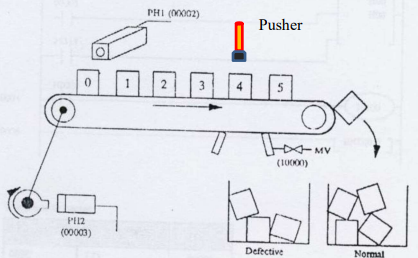 just only do the a) Flow chart. b) Input (I)/Output (O) Point Assignment
PHI (102) Pusher 0 1 2 3 4 5 hom MV (1000) ho PEL2 (00003) Defective Normal
Step by Step Solution
There are 3 Steps involved in it

Get step-by-step solutions from verified subject matter experts
 Study Help