



Question: Design the following Network Creating Topologies PC-PT Customer PC-PT Customer 2 PC-PT Customer 3 Server-PT Host Server PC-PT HR 2960-24TT Sales 2011 Router Device
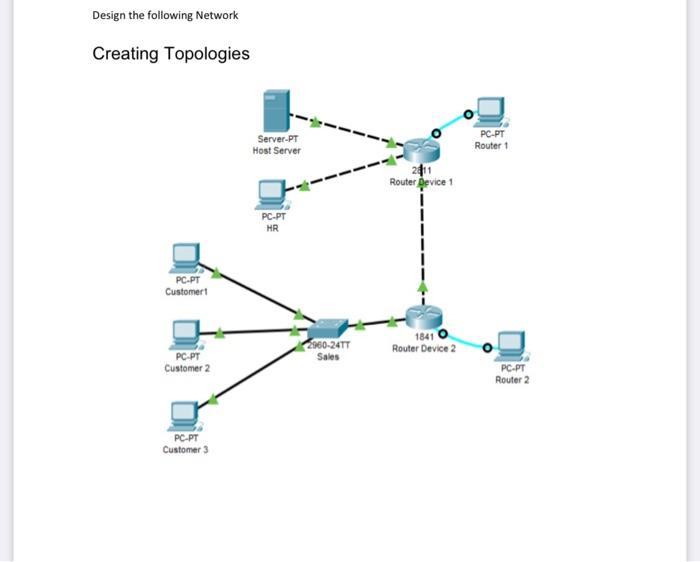
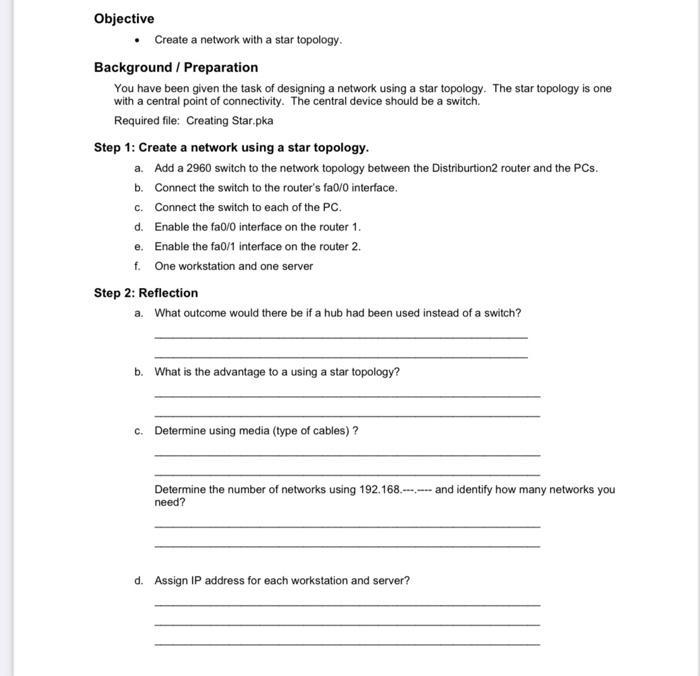
Design the following Network Creating Topologies PC-PT Customer PC-PT Customer 2 PC-PT Customer 3 Server-PT Host Server PC-PT HR 2960-24TT Sales 2011 Router Device 1 I I 1841 Router Device 2 PC-PT Router 1 PC-PT Router 2 Objective Create a network with a star topology. Background / Preparation You have been given the task of designing a network using a star topology. The star topology is one with a central point of connectivity. The central device should be a switch. Required file: Creating Star.pka Step 1: Create a network using a star topology. a. Add a 2960 switch to the network topology between the Distribution2 router and the PCs. b. Connect the switch to the router's fa0/0 interface. c. Connect the switch to each of the PC. d. Enable the fa0/0 interface on the router 1. e. Enable the fa0/1 interface on the router 2. f. One workstation and one server Step 2: Reflection a. What outcome would there be if a hub had been used instead of a switch? b. What is the advantage to a using a star topology? c. Determine using media (type of cables)? Determine the number of networks using 192.168.and identify how many networks you need? d. Assign IP address for each workstation and server?
Step by Step Solution
There are 3 Steps involved in it
The answer provided below has been developed in a clear step by step manner Step 1 Star Potology Sta... View full answer

Get step-by-step solutions from verified subject matter experts