



Question: Design the software in C for a Intelligent Class room light control. Design the block diagram of the hardware based on KL25Z board. No need
Design the software in C for a Intelligent Class room light control. Design the block diagram of the hardware based on KL25Z board.
No need for interface logic. Make necessary assumptions.
| INPUTS |
|
|
| Motion Sensor |
|
|
| Override Light Control | Overrides motion sensor |
|
| Screen Down switch |
|
|
| Screen Up Switch |
|
|
| Turn ON/OFF projector input |
|
|
| OUTPUTS |
|
|
| Turn all lights ON/OFF |
|
|
| Turn Screen Motor On up direction or reverse direction | Screen motor stops on reaching the limit |
|
| Turn Projector power ON |
|
|
|
|
|
|
Hints: If there is no motion for 5 minutes, turn all the lights off and the projector off. i.e. you need to check the motion sensor value every 5 minutes.
Assume that a Logic 1 will control the lights, motor rotation etc. The screen will stop when the end is reached. Assume that there is a Delay Library function in C. Make necessary assumptions.
- Design the block diagram of the Hardware, identify the ports etc. No interface logic is needed.
- Design Software in C. Decide on the number of bits in input port and number of bits in Output port
- Select necessary Mask bits to set DDR of Port
- Main program decides the logic
- Example:
If Motion sensor = 1, then Turn lights ON.
If there is no motion for 5 minutes, turn lights off
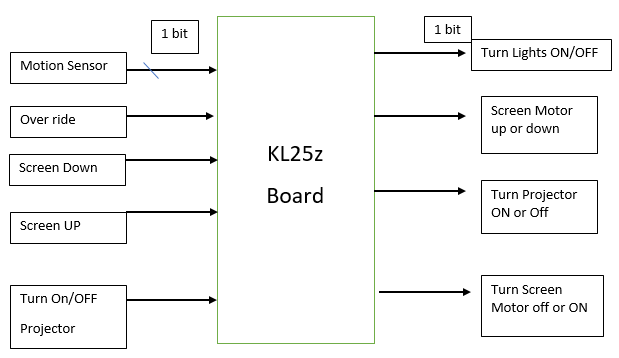
1 bit Turn Lights ON/OFF Motion Sensor Over ride Screen Motor up or down KL25z Screen Down Board Turn Projector ON or Off Screen UP Turn On/OFF Turn Screen Motor off or ON Projector 1 bit Turn Lights ON/OFF Motion Sensor Over ride Screen Motor up or down KL25z Screen Down Board Turn Projector ON or Off Screen UP Turn On/OFF Turn Screen Motor off or ON Projector
Step by Step Solution
There are 3 Steps involved in it

Get step-by-step solutions from verified subject matter experts