







Question: Develop a Doubly-Linked-List, with the given Python file A1B2.py. tailN headN JOA Each node in Doubly-Linked-List has two links: one for the next node
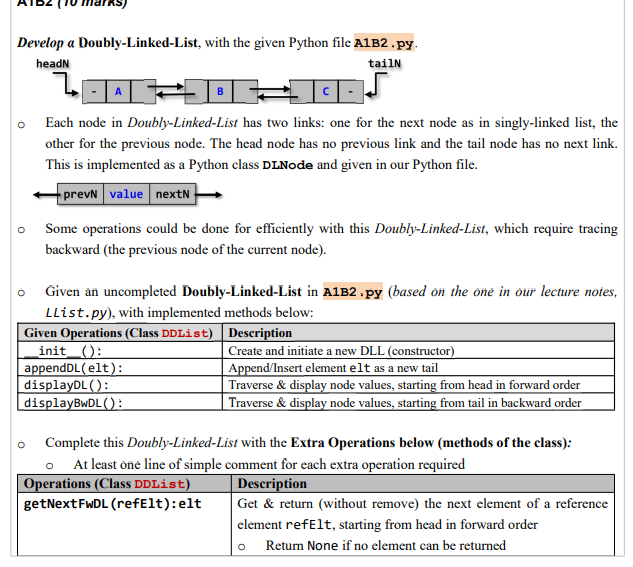
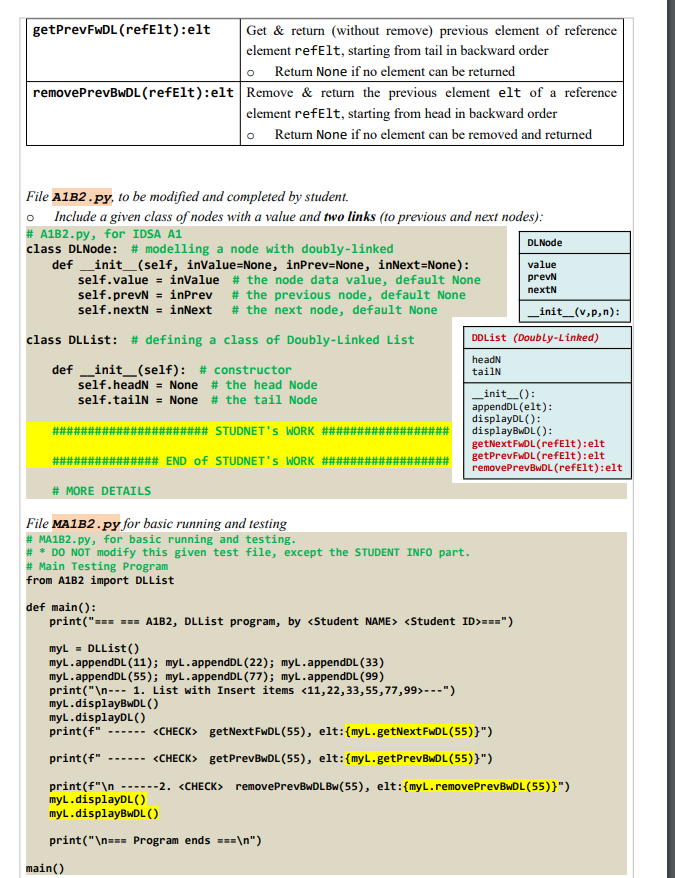
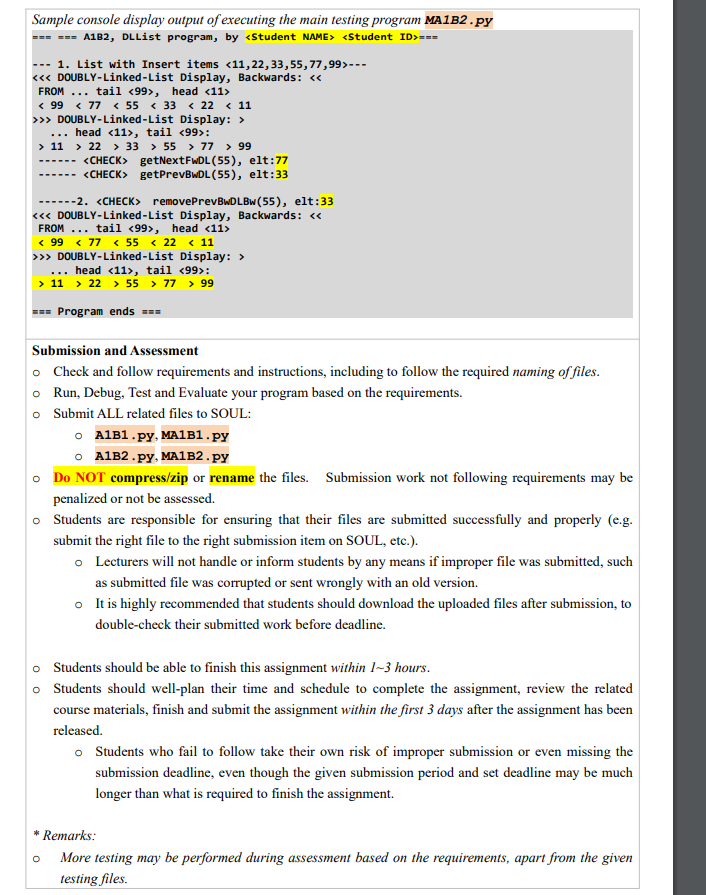
Develop a Doubly-Linked-List, with the given Python file A1B2.py. tailN headN JOA Each node in Doubly-Linked-List has two links: one for the next node as in singly-linked list, the other for the previous node. The head node has no previous link and the tail node has no next link. This is implemented as a Python class DLNode and given in our Python file. prevN value nextN Some operations could be done for efficiently with this Doubly-Linked-List, which require tracing backward (the previous node of the current node). o Given an uncompleted Doubly-Linked-List in A1B2.py (based on the one in our lecture notes, Llist.py), with implemented methods below: Given Operations (Class DDList) Description _init__(): appendDL (elt): displayDL (): displayBwDL(): Create and initiate a new DLL (constructor) Append/Insert element elt as a new tail Traverse & display node values, starting from head in forward order Traverse & display node values, starting from tail in backward order Complete this Doubly-Linked-List with the Extra Operations below (methods of the class): o At least one line of simple comment for each extra operation required Operations (Class DDList) getNextFwDL (refElt): elt Description Get & return (without remove) the next element of a reference element refelt, starting from head in forward order Return None if no element can be returned getPrevFwDL (refElt):elt removePrevBwDL (refElt): elt Remove & return the previous element elt of a reference element refelt, starting from head in backward order Return None if no element can be removed and returned File A1B2.py, to be modified and completed by student. O Include a given class of nodes with a value and two links (to previous and next nodes): # A1B2.py, for IDSA A1 class DLNode: # modelling a node with doubly-linked def _init__(self, inValue=None, inPrev=None, inNext=None): self.value = inValue # the node data value, default None self.prevN inPrev # the previous node, default None self.nextN = inNext # the next node, default None class DLList: # defining a class of Doubly-Linked List _init__(self): # constructor self.headN= None # the head Node self.tailN = None # the tail Node def #### Get & return (without remove) previous element of reference element refelt, starting from tail in backward order O Return None if no element can be returned ##########_STUDNET'S WORK #####: # MORE DETAILS ########### END of STUDNET'S WORK #### File MA1B2.py for basic running and testing # MA1B2.py, for basic running and testing. # * DO NOT modify this given test file, except the STUDENT INFO part. # Main Testing Program from A1B2 import DLList main() DLNode value prevN nextN def main(): print("=== === A1B2, DLList program, by ===") _init__(v,p,n): DDList (Doubly-Linked) headN tailN _init__(): appendDL (elt): displayDL(): displayBwDL(): getNextFwDL(refElt): elt getPrevFwDL (refElt): elt removePrevBwDL (refElt): elt myL= DLList() myL.appendDL (11); myL.appendDL (22); myL.appendDL (33) myL.appendDL (55); myL.appendDL (77); myL.appendDL (99) print(" --- 1. List with Insert items ---") myl.displayBwDL () myl.displayDL() print (f" ------ getNextFwDL (55), elt:{myL.getNextFwDL (55)}") print (f" ------ get PrevBwDL (55), elt:{myL.getPrevBwDL (55)}") print (f" ------2. remove PrevBwDLBw (55), elt:{myL.remove PrevBwDL (55)}") myl.displayDL() myl.displayBwDL () print(" === Program ends === ") Sample console display output of executing the main testing program MA1B2.py === === A1B2, DLList program, by === --- 1. List with Insert items --- < < < DOUBLY-Linked-List Display, Backwards: < < FROM ... tail , head < 99 < 77 < 55 < 33 < 22 < 11 >>> DOUBLY-Linked-List Display: > head , tail : ... > 11 > 22 > 33 > 55 > 77 > 99 --- ------ --- getNextFwDL (55), elt:77 getPrevBwDL (55), elt:33 ------2. removePrevBwDLBw (55), elt:33 < < < DOUBLY-Linked-List Display, Backwards: < < FROM ... tail , head < 99 < 77 55 < 22 < 11 >>> DOUBLY-Linked-List Display: > ... head , tail : > 11 > 22 > 55 > 77 > 99 === Program ends === Submission and Assessment o Check and follow requirements and instructions, including to follow the required naming of files. o Run, Debug, Test and Evaluate your program based on the requirements. o Submit ALL related files to SOUL: o A1B1.py, MA1B1.py o A1B2.py, MA1B2.py o Do NOT compress/zip or rename the files. Submission work not following requirements may be penalized or not be assessed. o Students are responsible for ensuring that their files are submitted successfully and properly (e.g. submit the right file to the right submission item on SOUL, etc.). o Lecturers will not handle or inform students by any means if improper file was submitted, such as submitted file was corrupted or sent wrongly with an old version. o It is highly recommended that students should download the uploaded files after submission, to double-check their submitted work before deadline. o Students should be able to finish this assignment within 1-3 hours. o Students should well-plan their time and schedule to complete the assignment, review the related course materials, finish and submit the assignment within the first 3 days after the assignment has been released. o Students who fail to follow take their own risk of improper submission or even missing the submission deadline, even though the given submission period and set deadline may be much longer than what is required to finish the assignment. * Remarks: More testing may be performed during assessment based on the requirements, apart from the given testing files. O
Step by Step Solution
There are 3 Steps involved in it
You are tasked with completing a doublylinked list implementation in Python The given code snippets provide the basic structure for the DLNode and DLL... View full answer

Get step-by-step solutions from verified subject matter experts
 Study Help