







Question: Develop a MATLAB function to find the root of a user - specified function using a user - specified computational method. Implement all of the
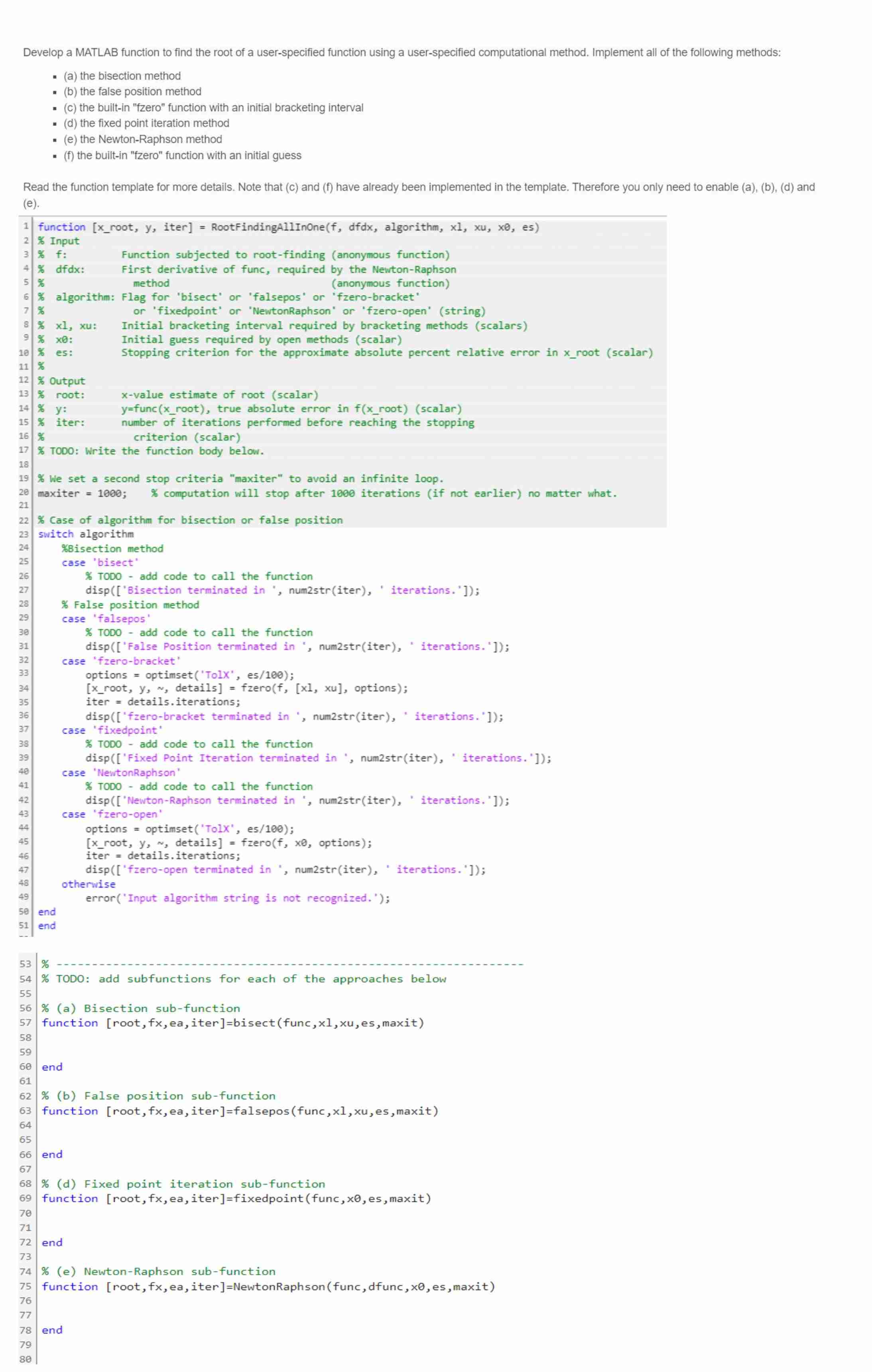
Develop a MATLAB function to find the root of a userspecified function using a userspecified computational method. Implement all of the following methods:
a the bisection method
b the false position method
c the builtin "fzero" function with an initial bracketing interval
d the fixed point iteration method
e the NewtonRaphson method
f the builtin "fzero" function with an initial guess
Read the function template for more details. Note that c and f have already been implemented in the template. Therefore you only need to enable abd and e
Hint: You may reuse functions and subfunctions developed in the past. Code to call function: f @xxxx;
Note: we set dfdx x they will not be used anyways
xyit RootFindingAllInOnef'bisect',
Step by Step Solution
There are 3 Steps involved in it
1 Expert Approved Answer
Step: 1 Unlock

Question Has Been Solved by an Expert!
Get step-by-step solutions from verified subject matter experts
Step: 2 Unlock
Step: 3 Unlock
 Study Help