Question: Develop a program, called AESinPNG, that performs AES encryption and stores the encrypted data in a PNG image file. All image-related functions are provided in
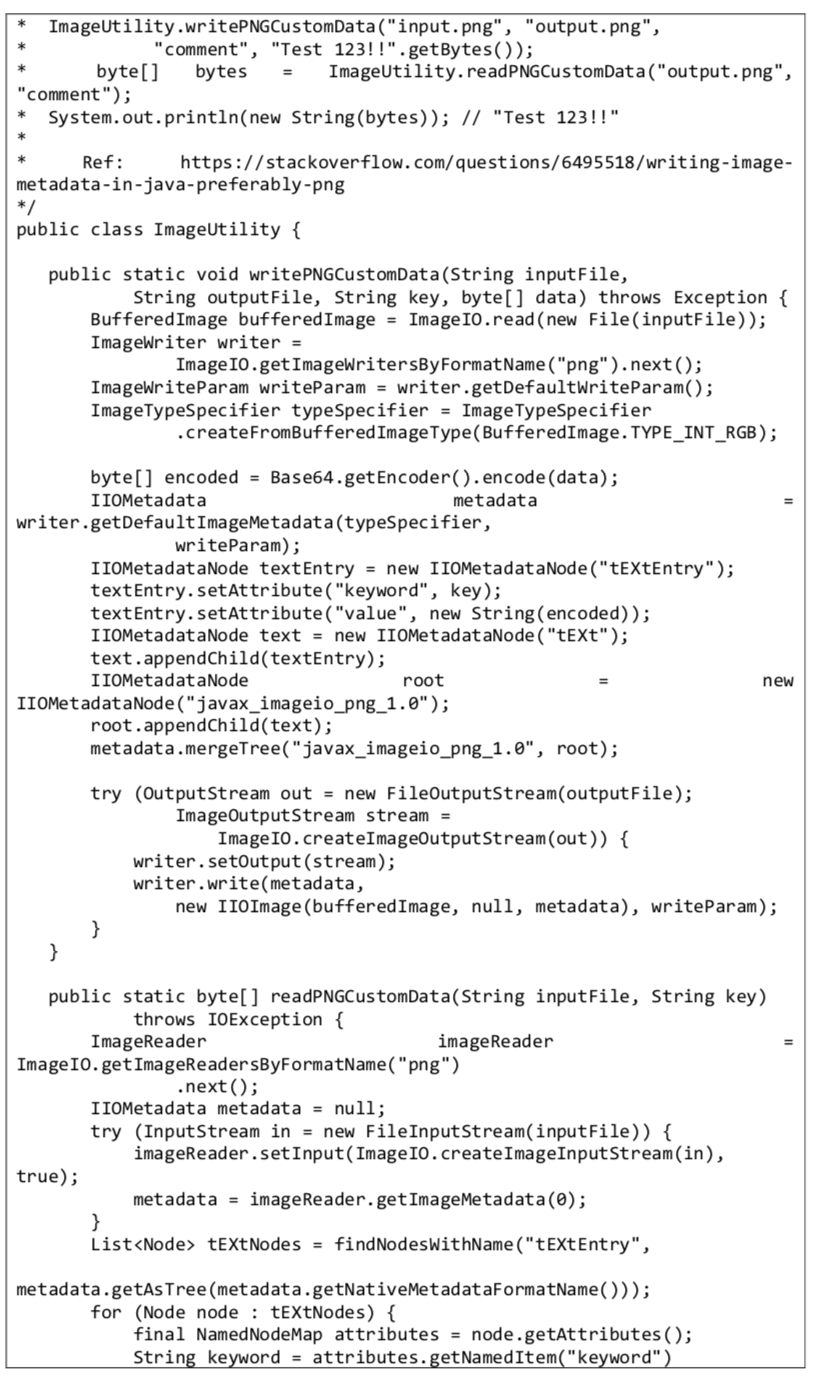
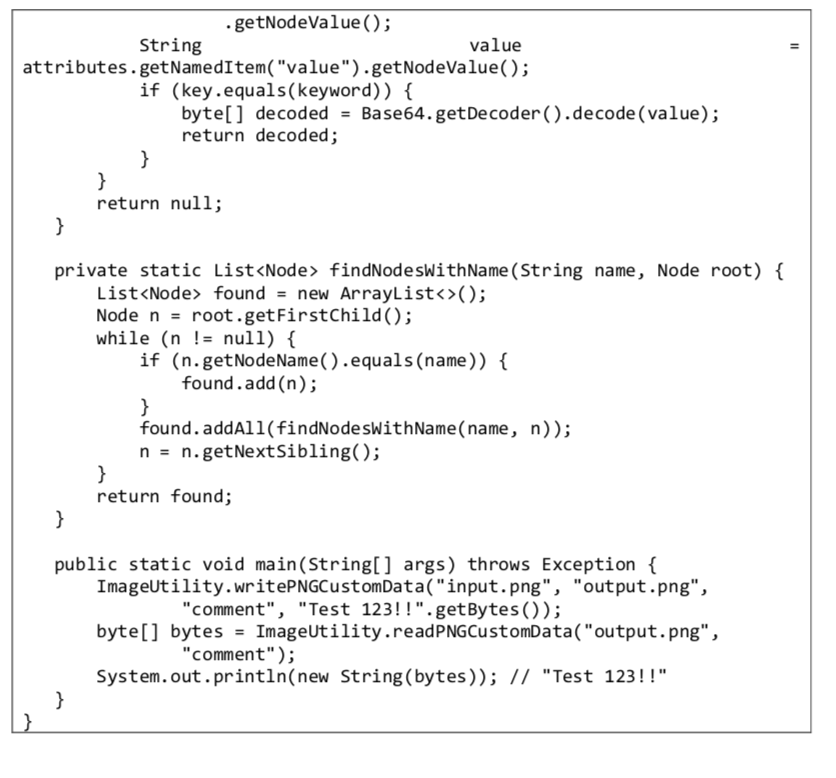
Develop a program, called AESinPNG, that performs AES encryption and stores the encrypted data in a PNG image file. All image-related functions are provided in the ImageUtility class shown at the end of this question
The program performs two operations encryption and decryption depending on the first command-line argument.
-
If the first argument is -encrypt, the second to fifth arguments are the encryption key, the data to be encrypted, the input PNG file, and the output PNG file. The program encrypts the data using AES, reads the input PNG file, puts the encrypted data as metadata of the PNG image, and saves the result to the output PNG file.
-
If the first argument is -decrypt, the second and third arguments are the encryption key, and the PNG file which contains encrypted data in its metadata. The program reads the encrypted data from the PNG file, decrypts the encrypted data using AES, and displays the decrypted data.
For both encryption and decryption, the program computes the MD5 message digest of the encryption key (i.e. the second command-line argument) and uses the digest as the key for AES operations. This is required because the key argument is arbitrary in length, but an AES key must be 128, 192, or 256 bits in length; the MD5 digest of the key argument is 128 bits in length and can be used as an AES key. (Hint: Create a SecretKeySpec object of the AES algorithm as the AES key.)
These are sample outputs of running the program.
ImageUtility.writePNGCustomData("input.png", "output.png", "comment", "Test 123!!".getBytes()); byte[] bytes ImageUtility.readPNGCustomData("output.png", "comment"); System.out.println(new String(bytes)); // "Test 123!!" Ref: https://stackoverflow.com/questions/6495518/writing-image- metadata-in-java-preferably-png */ public class ImageUtility { public static void writePNGCustomData(String input File, String output File, String key, byte[] data) throws Exception { Buffered Image buffered Image = ImageIO.read(new File(inputFile)); ImageWriter writer = ImageIO.getImageWritersByFormatName("png").next(); ImageWriteParam writeParam = writer.getDefaultWriteParam(); ImageTypeSpecifier type Specifier = ImageTypeSpecifier .createFromBuffered Image Type(Buffered Image. TYPE_INT_RGB); byte[] encoded = Base64.getEncoder().encode(data); IIOMetadata metadata writer.getDefaultImageMetadata(typeSpecifier, writeParam); IIOMetadataNode textEntry = new IIOMetadataNode("textEntry"); textEntry.setAttribute("keyword", key); textEntry.setAttribute("value", new String(encoded)); IIOMetadataNode text = new IIOMetadataNode ("text"); text.appendChild(textEntry); IIOMetadataNode root IIOMetadataNode("javax_imageio_png_1.0"); root.appendChild(text); metadata.mergeTree("javax_imageio_png_1.0", root); new try (OutputStream out = new FileOutputStream(output File); ImageOutputStream stream = ImageIO.createImageOutputStream(out)) { writer.setOutput(stream); writer.write(metadata, new IIOImage(buffered Image, null, metadata), writeParam); } } public static byte[] readPNGCustomData(String inputFile, String key) throws IOException { ImageReader imageReader ImageIO.getImageReadersByFormatName("png") .next(); I IOMetadata metadata = null; try (InputStream in = new FileInputStream(input File)) { imageReader.setInput(ImageIO.createImageInputStream(in), true); metadata = imageReader.getImageMetadata(); } List tExtNodes = findNodesWithName("tExtEntry", metadata.getAsTree (metadata.getNativeMetadataFormatName())); for (Node node : tExtNodes) { final NamedNodeMap attributes = node.getAttributes(); String keyword = attributes.getNamed Item("keyword") ImageUtility.writePNGCustomData("input.png", "output.png", "comment", "Test 123!!".getBytes()); byte[] bytes ImageUtility.readPNGCustomData("output.png", "comment"); System.out.println(new String(bytes)); // "Test 123!!" Ref: https://stackoverflow.com/questions/6495518/writing-image- metadata-in-java-preferably-png */ public class ImageUtility { public static void writePNGCustomData(String input File, String output File, String key, byte[] data) throws Exception { Buffered Image buffered Image = ImageIO.read(new File(inputFile)); ImageWriter writer = ImageIO.getImageWritersByFormatName("png").next(); ImageWriteParam writeParam = writer.getDefaultWriteParam(); ImageTypeSpecifier type Specifier = ImageTypeSpecifier .createFromBuffered Image Type(Buffered Image. TYPE_INT_RGB); byte[] encoded = Base64.getEncoder().encode(data); IIOMetadata metadata writer.getDefaultImageMetadata(typeSpecifier, writeParam); IIOMetadataNode textEntry = new IIOMetadataNode("textEntry"); textEntry.setAttribute("keyword", key); textEntry.setAttribute("value", new String(encoded)); IIOMetadataNode text = new IIOMetadataNode ("text"); text.appendChild(textEntry); IIOMetadataNode root IIOMetadataNode("javax_imageio_png_1.0"); root.appendChild(text); metadata.mergeTree("javax_imageio_png_1.0", root); new try (OutputStream out = new FileOutputStream(output File); ImageOutputStream stream = ImageIO.createImageOutputStream(out)) { writer.setOutput(stream); writer.write(metadata, new IIOImage(buffered Image, null, metadata), writeParam); } } public static byte[] readPNGCustomData(String inputFile, String key) throws IOException { ImageReader imageReader ImageIO.getImageReadersByFormatName("png") .next(); I IOMetadata metadata = null; try (InputStream in = new FileInputStream(input File)) { imageReader.setInput(ImageIO.createImageInputStream(in), true); metadata = imageReader.getImageMetadata(); } List tExtNodes = findNodesWithName("tExtEntry", metadata.getAsTree (metadata.getNativeMetadataFormatName())); for (Node node : tExtNodes) { final NamedNodeMap attributes = node.getAttributes(); String keyword = attributes.getNamed Item("keyword") II .getNodeValue(); String value attributes.getNamedItem("value").getNodeValue(); if (key.equals(keyword)) { byte[] decoded - Base64.getDecoder().decode(value); return decoded; } } return null; } private static List findNodesWithName(String name, Node root) { List found = new ArrayList(); Node n = root.getFirstChild(); while (n != null) { if (n.getNodeName().equals(name)) { found.add(n); } found. addAll(findNodesWithName(name, n)); n = n.getNextSibling(); } return found; } public static void main(String[] args) throws Exception { ImageUtility.writePNGCustomData("input.png", "output.png", "comment", "Test 123!!".getBytes()); byte[] bytes = ImageUtility.readPNGCustomData("output.png", "comment"); System.out.println(new String(bytes)); // "Test 123!!" } } ImageUtility.writePNGCustomData("input.png", "output.png", "comment", "Test 123!!".getBytes()); byte[] bytes ImageUtility.readPNGCustomData("output.png", "comment"); System.out.println(new String(bytes)); // "Test 123!!" Ref: https://stackoverflow.com/questions/6495518/writing-image- metadata-in-java-preferably-png */ public class ImageUtility { public static void writePNGCustomData(String input File, String output File, String key, byte[] data) throws Exception { Buffered Image buffered Image = ImageIO.read(new File(inputFile)); ImageWriter writer = ImageIO.getImageWritersByFormatName("png").next(); ImageWriteParam writeParam = writer.getDefaultWriteParam(); ImageTypeSpecifier type Specifier = ImageTypeSpecifier .createFromBuffered Image Type(Buffered Image. TYPE_INT_RGB); byte[] encoded = Base64.getEncoder().encode(data); IIOMetadata metadata writer.getDefaultImageMetadata(typeSpecifier, writeParam); IIOMetadataNode textEntry = new IIOMetadataNode("textEntry"); textEntry.setAttribute("keyword", key); textEntry.setAttribute("value", new String(encoded)); IIOMetadataNode text = new IIOMetadataNode ("text"); text.appendChild(textEntry); IIOMetadataNode root IIOMetadataNode("javax_imageio_png_1.0"); root.appendChild(text); metadata.mergeTree("javax_imageio_png_1.0", root); new try (OutputStream out = new FileOutputStream(output File); ImageOutputStream stream = ImageIO.createImageOutputStream(out)) { writer.setOutput(stream); writer.write(metadata, new IIOImage(buffered Image, null, metadata), writeParam); } } public static byte[] readPNGCustomData(String inputFile, String key) throws IOException { ImageReader imageReader ImageIO.getImageReadersByFormatName("png") .next(); I IOMetadata metadata = null; try (InputStream in = new FileInputStream(input File)) { imageReader.setInput(ImageIO.createImageInputStream(in), true); metadata = imageReader.getImageMetadata(); } List tExtNodes = findNodesWithName("tExtEntry", metadata.getAsTree (metadata.getNativeMetadataFormatName())); for (Node node : tExtNodes) { final NamedNodeMap attributes = node.getAttributes(); String keyword = attributes.getNamed Item("keyword") ImageUtility.writePNGCustomData("input.png", "output.png", "comment", "Test 123!!".getBytes()); byte[] bytes ImageUtility.readPNGCustomData("output.png", "comment"); System.out.println(new String(bytes)); // "Test 123!!" Ref: https://stackoverflow.com/questions/6495518/writing-image- metadata-in-java-preferably-png */ public class ImageUtility { public static void writePNGCustomData(String input File, String output File, String key, byte[] data) throws Exception { Buffered Image buffered Image = ImageIO.read(new File(inputFile)); ImageWriter writer = ImageIO.getImageWritersByFormatName("png").next(); ImageWriteParam writeParam = writer.getDefaultWriteParam(); ImageTypeSpecifier type Specifier = ImageTypeSpecifier .createFromBuffered Image Type(Buffered Image. TYPE_INT_RGB); byte[] encoded = Base64.getEncoder().encode(data); IIOMetadata metadata writer.getDefaultImageMetadata(typeSpecifier, writeParam); IIOMetadataNode textEntry = new IIOMetadataNode("textEntry"); textEntry.setAttribute("keyword", key); textEntry.setAttribute("value", new String(encoded)); IIOMetadataNode text = new IIOMetadataNode ("text"); text.appendChild(textEntry); IIOMetadataNode root IIOMetadataNode("javax_imageio_png_1.0"); root.appendChild(text); metadata.mergeTree("javax_imageio_png_1.0", root); new try (OutputStream out = new FileOutputStream(output File); ImageOutputStream stream = ImageIO.createImageOutputStream(out)) { writer.setOutput(stream); writer.write(metadata, new IIOImage(buffered Image, null, metadata), writeParam); } } public static byte[] readPNGCustomData(String inputFile, String key) throws IOException { ImageReader imageReader ImageIO.getImageReadersByFormatName("png") .next(); I IOMetadata metadata = null; try (InputStream in = new FileInputStream(input File)) { imageReader.setInput(ImageIO.createImageInputStream(in), true); metadata = imageReader.getImageMetadata(); } List tExtNodes = findNodesWithName("tExtEntry", metadata.getAsTree (metadata.getNativeMetadataFormatName())); for (Node node : tExtNodes) { final NamedNodeMap attributes = node.getAttributes(); String keyword = attributes.getNamed Item("keyword") II .getNodeValue(); String value attributes.getNamedItem("value").getNodeValue(); if (key.equals(keyword)) { byte[] decoded - Base64.getDecoder().decode(value); return decoded; } } return null; } private static List findNodesWithName(String name, Node root) { List found = new ArrayList(); Node n = root.getFirstChild(); while (n != null) { if (n.getNodeName().equals(name)) { found.add(n); } found. addAll(findNodesWithName(name, n)); n = n.getNextSibling(); } return found; } public static void main(String[] args) throws Exception { ImageUtility.writePNGCustomData("input.png", "output.png", "comment", "Test 123!!".getBytes()); byte[] bytes = ImageUtility.readPNGCustomData("output.png", "comment"); System.out.println(new String(bytes)); // "Test 123!!" } }









 Study Help