







Question: Develop an application that allows a user to log in, save the users data in a cookie, navigate to a new page, and log out.
Develop an application that allows a user to log in, save the users data in a cookie, navigate to a new page, and log out. The interface looks like this initially:
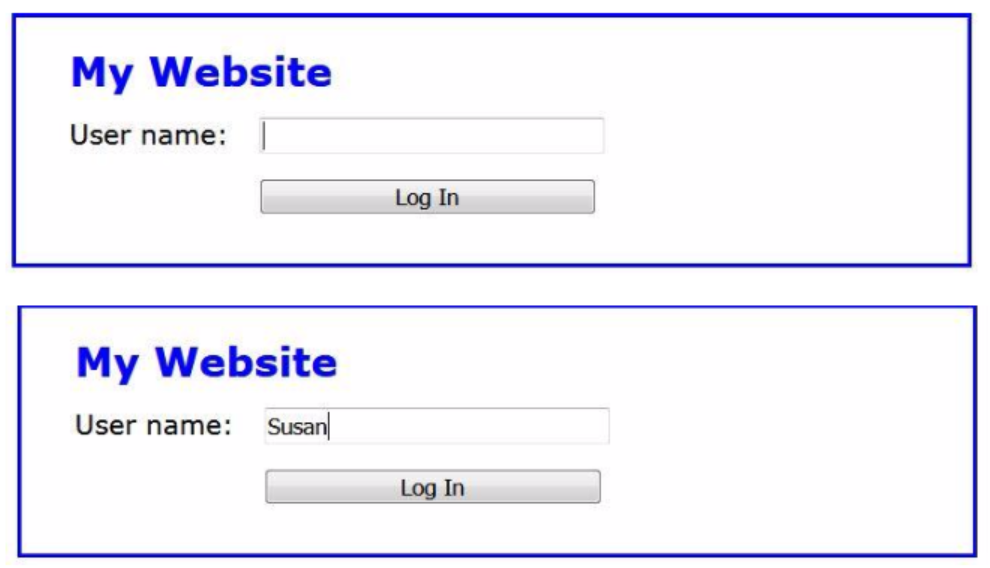
And the interface looks like this after the user has logged in:
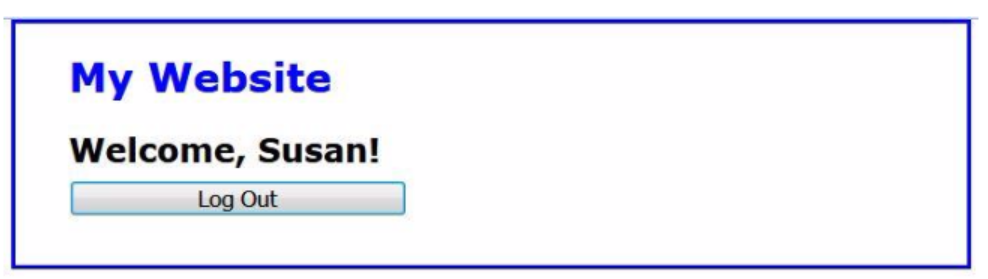
1. Open the HTML and JavaScript files in the login folder (download from Canvas). Then, run the application to see the user interface shown above.
2. Review the code in the cookies.js file. As you can see, it contains starts for three functions, getCookieByName(), setCookie(), and deleteCookie(). The getCookieByName() function returns an empty string, while the other two contain no code.
3. Update each of these functions so they perform the tasks described by their names. Use the examples in figures 15-6 through 15-8 in chapter 15 as a guide.
4. Display the index.html file and notice that its embedded JavaScript code uses the functions that you just updated. Then, find the two places in the code where you need to redirect to the login.html page. Use the location object to do that.
5. Display the login.html file and notice that its embedded JavaScript code uses the functions that you just updated. Then, find the place in the code where you need to redirect back to the index.html page. Use the location object to do that.
6. Run the application, enter a user name, and click Log In. When the login.html page displays, press F12 to open the developer tools and display the Application panel to view the cookies for this application.
7. Click on the Log Out button. When the index.html page is displayed, display the Application panel of the developer tools again and view the cookies for this application.
cookie.js
"use strict"; var getCookieByName = function( name ) { return ""; };
var setCookie = function( name, value, days ) { };
var deleteCookie = function( name ) { };
index.html
"use strict";
$(document).ready(function(){
var user = getCookieByName( "user" );
if (user === "") {
$( "#login" ).click(function() {
var user = $("#user").val();
if ( user === "" ) {
alert( "Please enter a user name." );
$("#user").focus();
} else {
setCookie( "user", user );
// go to login.html page
}
});
$("#user").focus();
} else {
// go to login.html page
}
});
My Website
login.html
"use strict";
$(document).ready(function(){
var user = getCookieByName( "user" );
$("#name").text( user );
$( "#logout" ).click(function() {
deleteCookie( "user" );
// go to initial page
});
$( "#logout" ).focus();
});
My Website
Welcome, !
login.css
body { font-family: Verdana, Arial, Helvetica, sans-serif; font-size: 100%; background-color: white; width: 500px; margin: 0 auto; border: 3px solid blue; padding: 0 2em 1em; } h1 { font-size: 150%; color: blue; margin-bottom: .5em; } h2 { font-size: 120%; margin-bottom: .25em; } label { float: left; width: 7em; } input { width: 15em; margin-bottom: 1em; }
My Website User name: I Log In My Website User name: Susan Log In
Step by Step Solution
There are 3 Steps involved in it

Get step-by-step solutions from verified subject matter experts
 Study Help