







Question: Develop the following solution using C# The following is a website that allows CSI418 instructors to upload their students grades and compute their final score.
Develop the following solution using C#
The following is a website that allows CSI418 instructors to upload their students grades and compute their final score. It is composed of 4 web pages.
The MS SQL Server databases name is GradesDB . Before you start, mention the connection string youre going to use assuming that youre saving it in
the Web.config file (show the code youre going to write in the web.config file). There are four tables in the database:
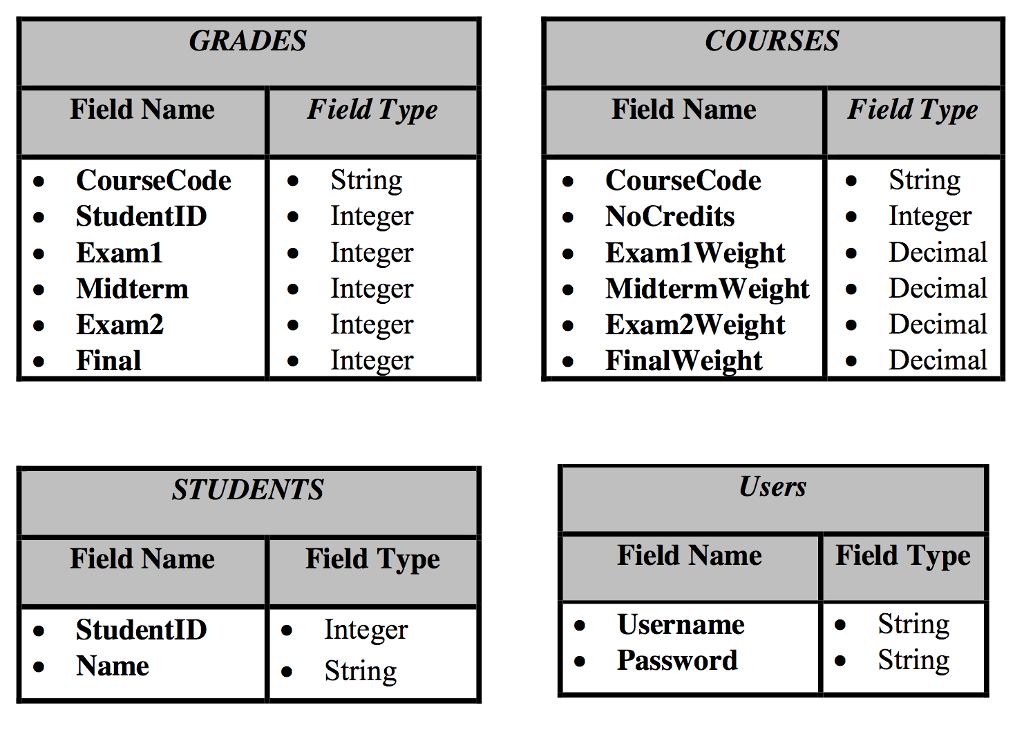 Web Page 1 (frmLogin.aspx)
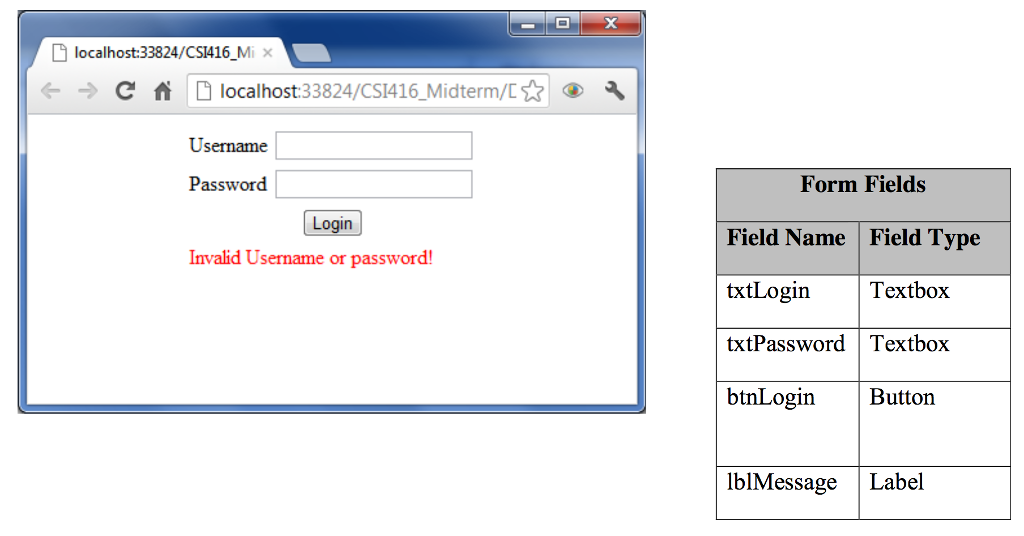
Check the login and password against the above table in the database.
If they are incorrect then display a message in lblMessage reading Invalid Username or Password!. Otherwise, redirect the user to the following page (addStudentGrades.aspx) and make sure to use the appropriate state management technique in order for the subsequent pages to tell that the user has been successfully authenticated.
Important!
In case the user maliciously attempts to open any of the next pages without first logging in then the page should not be opened but rather it should redirect him/her to the login page. Web Page 2 (AddStudentGrades.aspx)
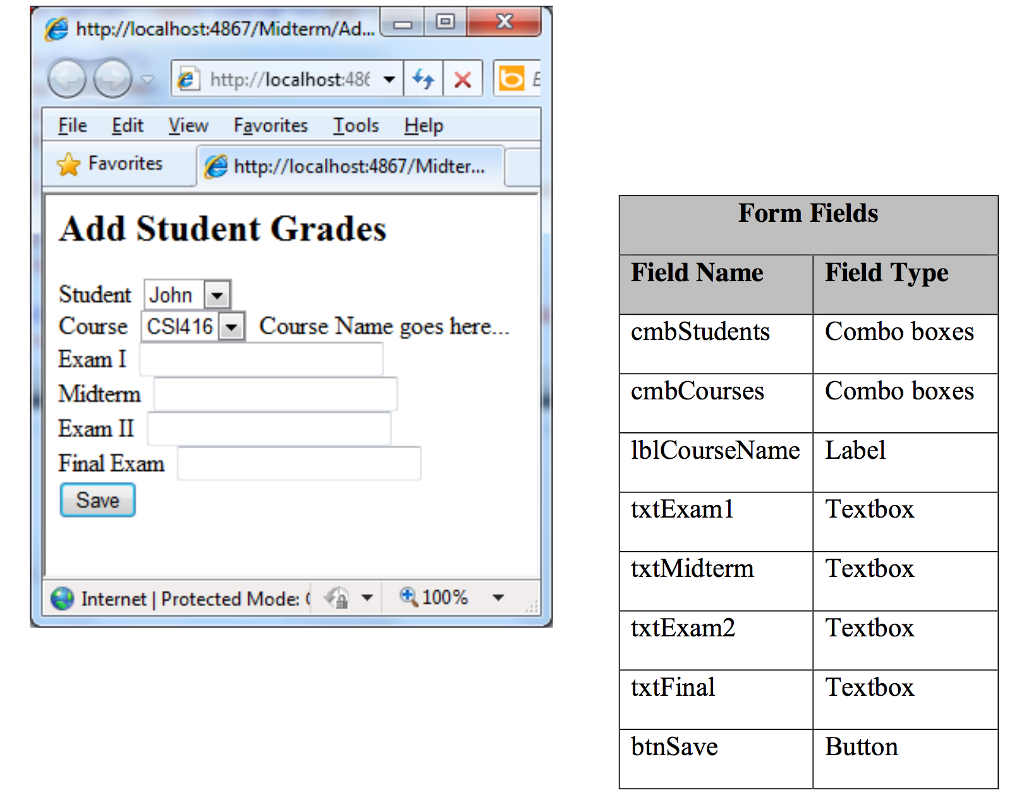
1. When the page loads your code should populate the two combo boxes (cmbStudents and cmbCourses) from the Students and the Courses tables respectively. The Students list should use the student names for the text part and their IDs for the value part. The Courses combo box uses the courses code as text and the course name as a value.
Once the user selects a course from the list, the courses name should be shown in the label next to it.
Upon clicking on the btnSave button, the grades should be stored in the Grades table.
You should reject saving any grades for a student in case any of the fields is empty
(including the combo boxes).
You should also reject adding any new student grades in case the students grades for that
specific course have already been entered. WebPage3 (ModifyGrades.aspx)
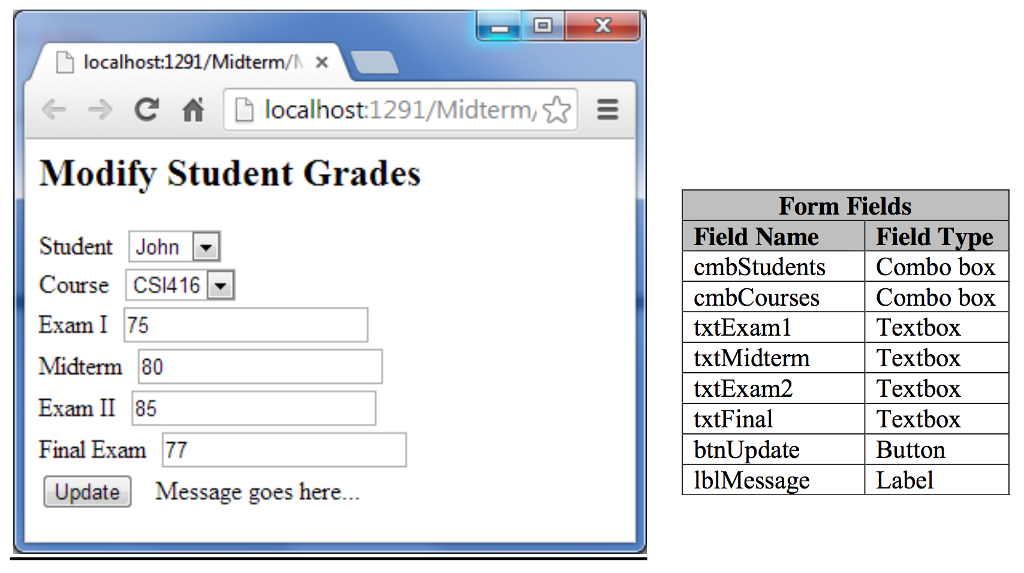
This page allows the user to modify the grades. He/she should select from the Students and Courses combo boxes a student and a course. Assume the above two combo boxes are already filled.
Your page should automatically display the grades of that student and the course selected from the respective combo boxes in the fields shown on the page.
If there are no grades yet entered for that student in that course then your code should redirect the page to addStudentGrades.aspx. Modify addStudentGrades.aspx to accept data from ModifyGrade.aspx such that the 2 combo boxes in addStudentGrades.aspx show automatically the values selected in ModifyGrades.aspx (dont go back to previous question and modify it. Just specify in this question what should be modified or added in that page).
This page should display a message reading Modifications Saved Successfully! in the lblMessage upon successful modification (lblMessage currently reads Message goes here...).
Step by Step Solution
There are 3 Steps involved in it

Get step-by-step solutions from verified subject matter experts
 Study Help