



Question: Developing Business Applications MGIS-350 Homework: Calculator Instructions Create a new python script that will use Tkinter to create a UI similar to the following:
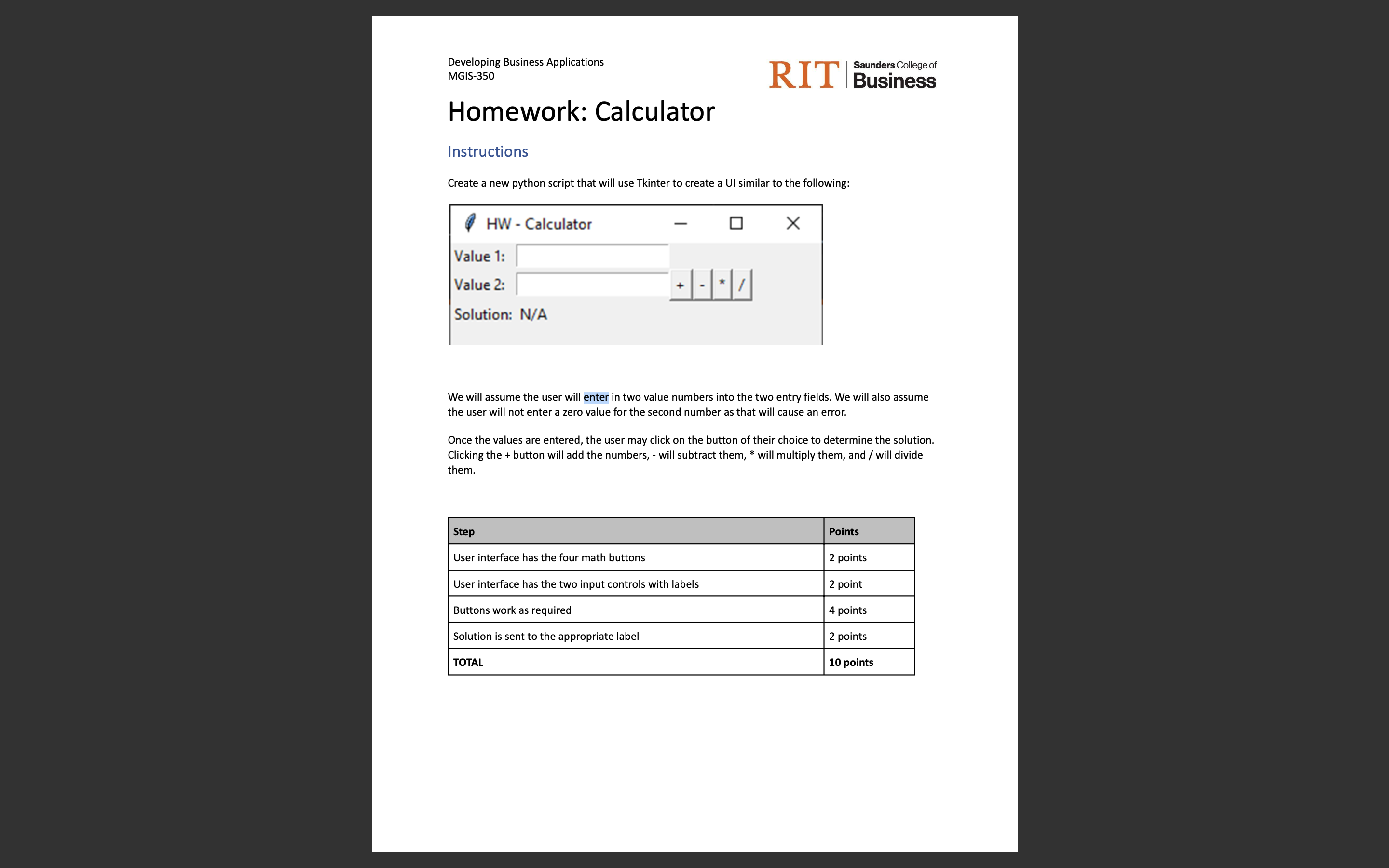
Developing Business Applications MGIS-350 Homework: Calculator Instructions Create a new python script that will use Tkinter to create a UI similar to the following: HW - Calculator Value 1: Value 2: Solution: N/A Saunders College of RIT Business We will assume the user will enter in two value numbers into the two entry fields. We will also assume the user will not enter a zero value for the second number as that will cause an error. Step User interface has the four math buttons User interface has the two input controls with labels Buttons work as required Solution is sent to the appropriate label TOTAL X Once the values are entered, the user may click on the button of their choice to determine the solution. Clicking the + button will add the numbers, - will subtract them, * will multiply them, and / will divide them. Points 2 points 2 point 4 points 2 points 10 points
Step by Step Solution
There are 3 Steps involved in it
Solutions Step 1 Here we create a Python script with Tkinter to build a simple calculator with the given requirements import tkinter as tk def calculate try val1 floatentryvalue1get val2 floatentryval... View full answer

Get step-by-step solutions from verified subject matter experts