







Question: Device Interface IP Address Subnet Mask Default Gateway R1 Fa0/0 172.16.1.1 255.255.255.0 N/A S0/0/0 172.16.3.1 255.255.255.252 N/A S0/0/1 192.168.10.5 255.255.255.252 N/A R2 Fa0/0 S0/0/0
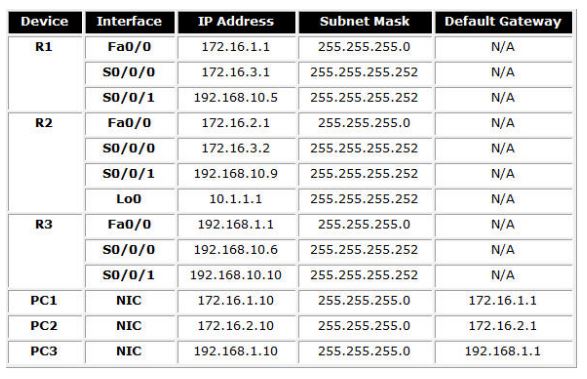
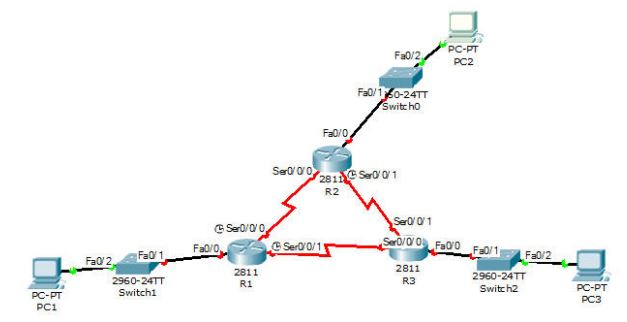
Device Interface IP Address Subnet Mask Default Gateway R1 Fa0/0 172.16.1.1 255.255.255.0 N/A S0/0/0 172.16.3.1 255.255.255.252 N/A S0/0/1 192.168.10.5 255.255.255.252 N/A R2 Fa0/0 S0/0/0 172.16.2.1 172.16.3.2 255.255.255.0 N/A 255.255.255.252 N/A S0/0/1 192.168.10.9 255.255.255.252 N/A Loo 10.1.1.1 255.255.255.252 N/A R3 Fa0/0 192.168.1.1 255.255.255.0 N/A S0/0/0 192.168.10.6 255.255.255.252 N/A S0/0/1 192.168.10.10 255.255.255.252 N/A PC1 NIC 172.16.1.10 255.255.255.0 172.16.1.1 PC2 NIC 172.16.2.10 255.255.255.0 172.16.2.1 PC3 NIC 192.168.1.10 255.255.255.0 192.168.1.1 PC-PT PC1 PC-PT Fa0/2 PC2 Fa0/0 Fa0/160-24TT Switcho Sero/0/0 2811 Ser0/0/1 R2 Ser 0/0/1 Ser0/0/0 Fa0/0 Sero/0/11 Ser 0/0/0 Fa0/0 Fa0/1 Fa0/1, Fa0/2 Fa0/2 2960-24TT 2811 2811 R1 R3 2960-24TT Switch2 Switch1 PC-PT PC3
Step by Step Solution
There are 3 Steps involved in it

Get step-by-step solutions from verified subject matter experts
 Study Help