







Question: Dice Game with Objects Java basics - declaring variables, assigning values to variables, using math functions, using utility classes such as Scanner and Random, reading
Dice Game with Objects
- Java basics - declaring variables, assigning values to variables, using math functions, using utility classes such as Scanner and Random, reading from and writing to console.
- Selections - if, if-else, conditional operators, switch.
- Loops - loop with counters, play again loop.
- Methods - implement class methods and invoke in main method.
- Objects and Classes - implementing object classes, instantiating object class objects, and using the objects to perform functions in a driver class
Exercise Overview
Implement a Java program that simulates the rolling of 2 dice and then evaluates the dice roll to determine points scored based on the game's rules. Total points are the sum of the 2 dice plus bonus points for rolling a pair, a 7, or an 11.
- Player starts the game by entering their name.
- Player enters the number of turns (rolls) they wish to have in the game.
- Player rolls the dice.
- The system shows the points scored based on the roll and the bonus point rules.
- Game repeats for the designated number of turns.
- Player has the option to play again.
Functional Requirements (how the code will work from the user perspective)
- System prompts the player for their name and reads the input via Scanner.
- System displays a welcome message to the user on the console, including the user's name, and prints the rules of the game.
- System prompts the user to begin the game.
- Player is prompted for and enters in the number of turns (rolls) they with to play for their game.
- System rolls the dice and displays the dice values.
- System evaluates the dice values and calculates total score.
- Score components are printed on the console.
- The roll of the dice, evaluation, and score printing is repeated for the number of turns designated.
- Player is prompted as to whether they wish to play again.
- End the game by printing an end-of-game message.
Technical Requirements (how you must code it)
The system should include the following Java components:
- 3 classes - Driver ([your_name]_Project_5), Game, and Session.
- Driver class. Contains the main method and instantiates and uses objects from the other 2 classes.
- Driver class instantiates objects, includes the do-while loop, invokes methods on the objects.
- Instantiate objects from Scanner (input), Game (game), and Session (session).
- Declare variables. There is only the String playAgain variable.
- Invoke pre-game methods, session.getName and session.prtIntro.
- Initiate the do-while loop with variable playAgain.
- Invoke the session.setTurns method to prompt for, read-in, and store the number of turns.
- Initiate a for loop or while loop to manage the number of turns played.
- Use playAgain to prompt for and read-in Y or N to stay in or exit the do-while loop.
- Invoke prtOutro method.
- Driver class instantiates objects, includes the do-while loop, invokes methods on the objects.
- Game class. Includes most of the variables and methods that were used in Project 3, but with some modifications.
- Game class includes the variables and methods associated with the dice game, and has the major sections, Instantiate Objects, Declare Variables, Define Constructors, and Define Methods.
- Instantiate Objects
- The Game class must instantiate a Random (random) object.
- Declare Variables.
- All variables declared in Game class must have a private visibility modifier.
- die1, die2
- sum
- pairBonus
- seven11Bonus
- total
- tempDie
- Define Constructors.
- No explicit constructors need be defined but include a section comment for Define Constructors with no constructors listed.
- Define Methods.
- setDice - assigns the random int values to die1 and die2, and assigns the value to the variable sum.
- sortDice - sequences the dice so that the value of die1 is less than or equal to the value of die2.
- getDie1 - returns the die1 value.
- getDie2 - returns the die2 value.
- getSum - returns the sum value.
- setPairBonus - evaluates the dice for a pair bonus and sets the variable pairBonus to either 0 or 6.
- getPairBonus - returns the value of the var pairBonus.
- setSeven11Bonus - evaluates the dice for 7-11 bonus and sets the variable seven11Bonus to either 0 or 5.
- getSeven11Bonus - returns the value of the variable seven11Bonus.
- setTotal - sets the variable total to the sum of the variables sum, pairBonus, and seven11Bonus.
- getTotal - returns the value of the variable total.
- Instantiate Objects
- Game class includes the variables and methods associated with the dice game, and has the major sections, Instantiate Objects, Declare Variables, Define Constructors, and Define Methods.
- Session class. Includes the administrative variables and methods associated with the player's session.
- Session class includes the variables and methods associated with the management of the player's session and has the major sections, Instantiate Objects, Declare Variables, Define Constructors, and Define Methods.
- Instantiate Objects
- The Session class must instantiate a Scanner(scan) object.
- Declare Variables
- All variables declared in Session class must have a private visibility modifier.
- String name
- int turns
- Define Constructors
- No explicit constructors need be defined but include a section comment for Define Constructors with no constructors listed.
- Define Methods
- setName - prompts for, reads in, and assigns the value to the variable name.
- prtIntro - prints the intro message.
- setTurns - prompts for, reads in, and assigns the value to the variable turns.
- getTurns - returns the value of the variable turns.
- prtOutro - prints the outro message.
- Instantiate Objects
- Session class includes the variables and methods associated with the management of the player's session and has the major sections, Instantiate Objects, Declare Variables, Define Constructors, and Define Methods.
- Name your source code main class (.java file) as YourName _Project5.java
Example output(from the Eclipse console)
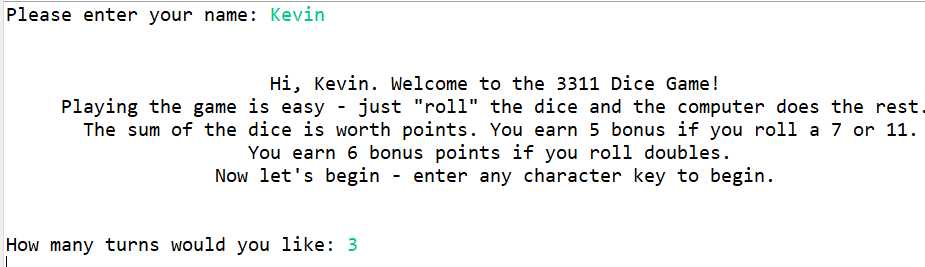
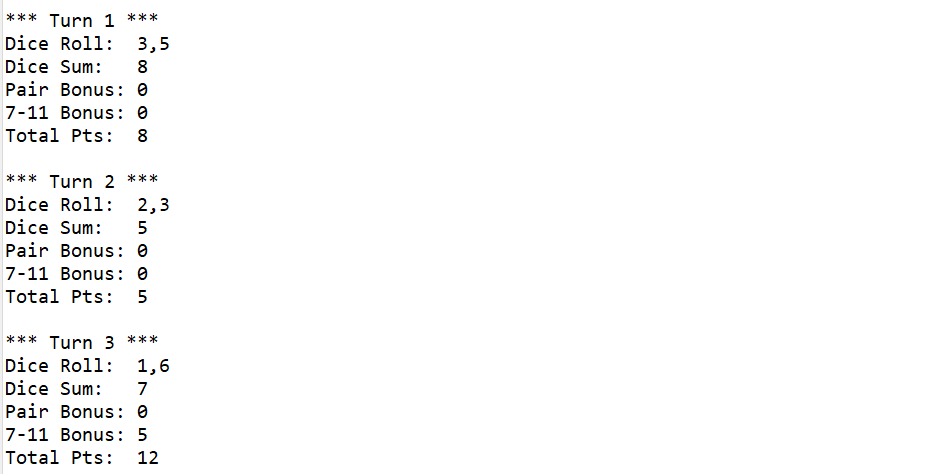
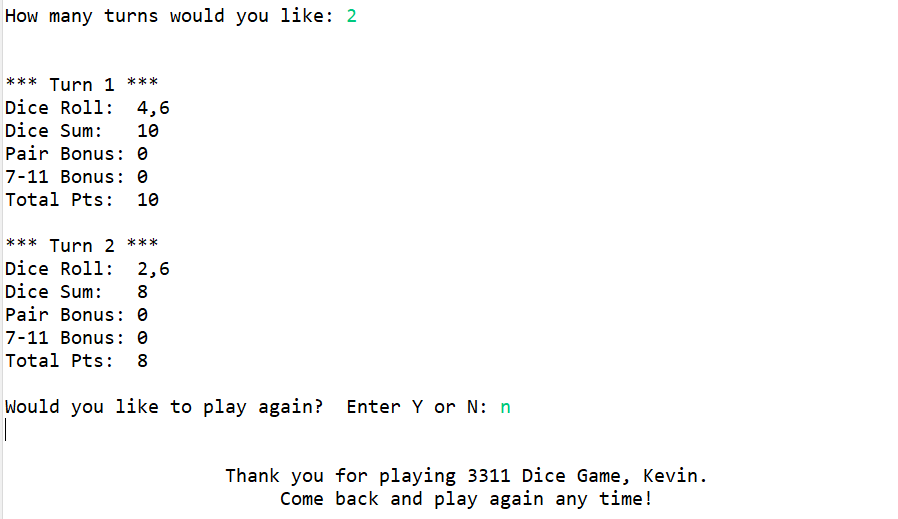
Please enter your name: Kevin Hi, Kevin. Welcome to the 3311 Dice Game! Playing the game is easy - just "roll" the dice and the computer does the rest. The sum of the dice is worth points. You earn 5 bonus if you roll a 7 or 11. You earn 6 bonus points if you roll doubles. Now let's begin - enter any character key to begin. How many turns would you like: 3
Step by Step Solution
There are 3 Steps involved in it
Answer Below are the steps to implement the required Java components Session Class Instantiate a Scanner object Declare private variables name String ... View full answer

Get step-by-step solutions from verified subject matter experts
 Study Help