







Question: Digital clock with stopwatch Clock 3 : 0 5 : 2 2 PM - Stop Watch Start Ster Reset 0 0 : 0 8 :
Digital clock with stopwatch
Clock
: : PM
Stop Watch
Start Ster Reset : :
In the JavaScript file, note the $ displayCurrentTime padSingleDigit and DQMContentLoaded
event handler functions from the Clock application. In addition, note the global variables and starting
code for the tickStopwatch startStopwatch stopStopwatch and resetStopwatch functions.
In the tickStopwatch function, add code that adds milliseconds to the elapsedMilliseconds
variable and then adjusts the elapsedMinutes and elapsedSeconds variables accordingly. Then, add
code that displays the result in the appropriate span tags in the page.
In the startStopwatch function, add code that starts the stopwatch. Be sure to cancel the default
action of the link too.
In the stopStopwatch and resetStopwatch functions, add code that stops the stopwatch. Also, in the
resetStopwatch function, reset the elapsed time and the page display. Be sure to cancel the default
action of the links too.
In the DQMContentLoaded event handler, attach the stopwatch event handlers to the appropriate
links.kDOCTYPE
head
Digital clock with stopwatch
Clock
:
:
span
"ampm" span
stop watch
Start
Stop
Reset
:
:
script src"clock.js : script
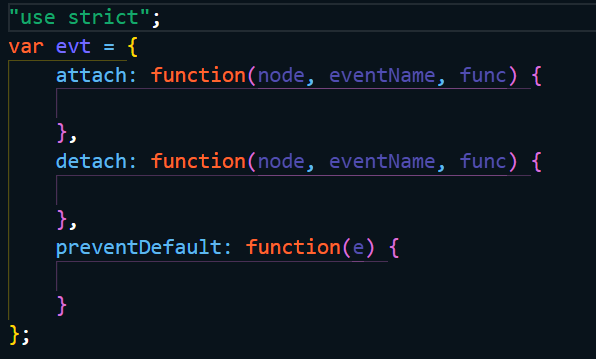
"use strict";
var evt
attach: functionnode eventName, func
detach: functionnode eventName, func
preventDefault: functione
;
"use strict";
const $ selector document.querySelectorselector;
const padSingleDigit num num.toStringpadStart;
const displayCurrentTime
const now new Date;
const hours now.getHours;
let ampm AM; set default value
correct hours and AMPM value for display
if hours convert from military time
hours hours ;
ampm PM;
else adjust noon and midnight
switch hours
case : noon
ampm PM;
break;
case : midnight
hours ;
ampm AM;
$#hours"textContent hours;
$#minutes"textContent padSingleDigitnowgetMinutes;
$#seconds"textContent padSingleDigitnowgetSeconds;
$#ampm"textContent ampm;
;
global stop watch timer variable and elapsed time object
let stopwatchTimer null;
let elapsedMinutes ;
let elapsedSeconds ;
let elapsedMilliseconds ;
const tickStopwatch
increment milliseconds by milliseconds
if milliseconds total increment seconds by one and reset milliseconds to zero
if seconds total increment minutes by one and reset seconds to zero
display new stopwatch time
;
event handler functions
const startStopwatch evt
prevent default action of link
do first tick of stop watch and then set interval timer to tick
stop watch every milliseconds. Store timer object in stopwatchTimer
variable so next two functions can stop timer.
;
const stopStopwatch evt
prevent default action of link
stop timer
;
const resetStopwatch evt
prevent default action of link
stop timer
reset elapsed variables and clear stopwatch display
;
document.addEventListenerDOMContentLoaded
set initial clock display and then set interval timer to display
new time every second. Don't store timer object because it
won't be needed clock will just run.
displayCurrentTime;
setIntervaldisplayCurrentTime;
set up stopwatch event handlers
;
Step by Step Solution
There are 3 Steps involved in it
1 Expert Approved Answer
Step: 1 Unlock

Question Has Been Solved by an Expert!
Get step-by-step solutions from verified subject matter experts
Step: 2 Unlock
Step: 3 Unlock
 Study Help