







Question: Directions: Creating a CalendarView Struct Add a new Swift File to the program named CalendarView Create a new Type in the file named CalendarView that
Directions:
Creating a CalendarView Struct
Add a new Swift File to the program named CalendarView
Create a new Type in the file named CalendarView that implements the tableDataSource protocol.
Add the following instance properties to the CalendarView:
var currentMonth: Month
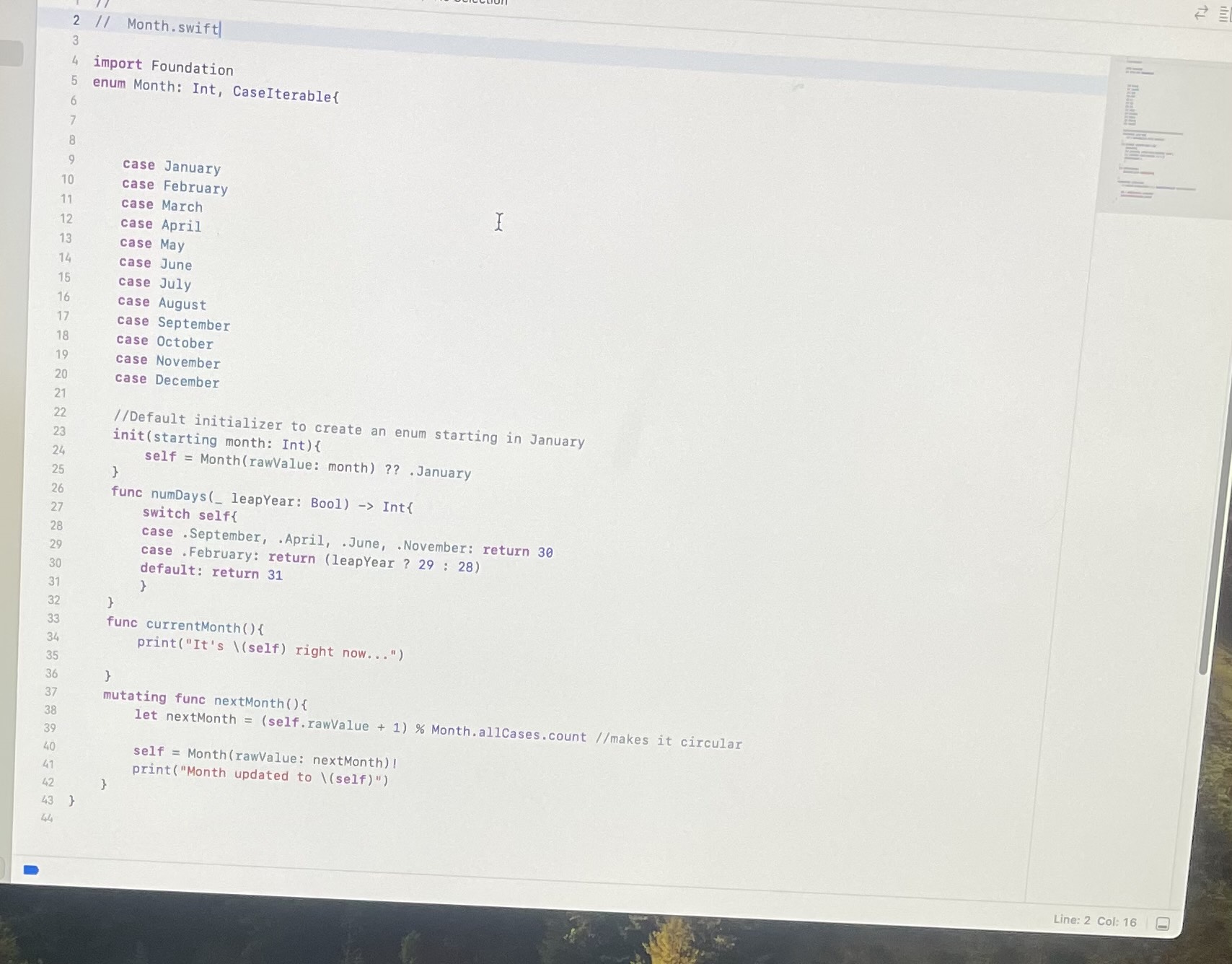
represents the month being used to print the calendar defined in Month.SwiftA Month has methods for returning its number of days and other pertinent data.
var leap: Bool
represents whether or not this is a leap year. Really only relevant when printing february.
var startingDay: Weekday
the starting day for the month. A Weekday is an enum that has a raw Int value. Knowing this is important to drawingthe Calendar correctly.
Add the required properties and methods for the protocol conformance for tableDataSource
numberOfColumns should return
numberOfRows should return we will need this many to accommodate a realistic looking calendar
labelforColumn column: IntString should return a label for each day of the week using the first letters of each day, EGSunor FriSee the following page for an example of output.
func itemForrow: Int, column: IntString should return the numerical date EGor for the given row and column. Note: there is an arithmetic formula that will correctly calculate the date, knowing the starting position in Week which corresponds to a Weekdays raw valueIf the given row and column does not fall within the Months range of dates either before the st or after the last daythis should return XX
Make a few CalendarView objects and check the methods youve defined to ensure they are working correctly. You may want to look at an actual Monthly calendar for this double checking your work
Printing a CalendarView:
Now we want to be able to print the CalendarViews. Add protocol conformance for the CustomStringConvertible protocol:
First list it at the top of the CalendarView Struct, next to the tableDataSource listing, separated by a comma.
Now define a public, computed String variable named description. This variable should return a labeled Calendar drawnin ASCII characters. This should utilize both the label and the itemFor methods youve already defined for tableDataSource Conformance.
I've given the parts of the project that are already in place in the pictures below, use those to help yourself make those files, so that you can make sure the code you give me for CalendarView works in tandem with the rest of the project file.
I also provided an example of what the output should look like if CalendarView is done correctly in alignment with the other parts of the project. Test for yourself and make sure that it creates the desired output, that way you know for sure you've given the right answer.
Don't waste my time and yours by not taking the time to do this correctly and not checking to make sure you've done it correctly.
You will get a thumbs up if you provide the adequate solution, and I thank you if you do it correctly and put the time in to ensure it is correct.
Step by Step Solution
There are 3 Steps involved in it
1 Expert Approved Answer
Step: 1 Unlock

Question Has Been Solved by an Expert!
Get step-by-step solutions from verified subject matter experts
Step: 2 Unlock
Step: 3 Unlock
 Study Help