







Question: Directions Using the following guidelines, create a new python program. 1. Name the program circle.py. 2. Add three comment lines at the top of the
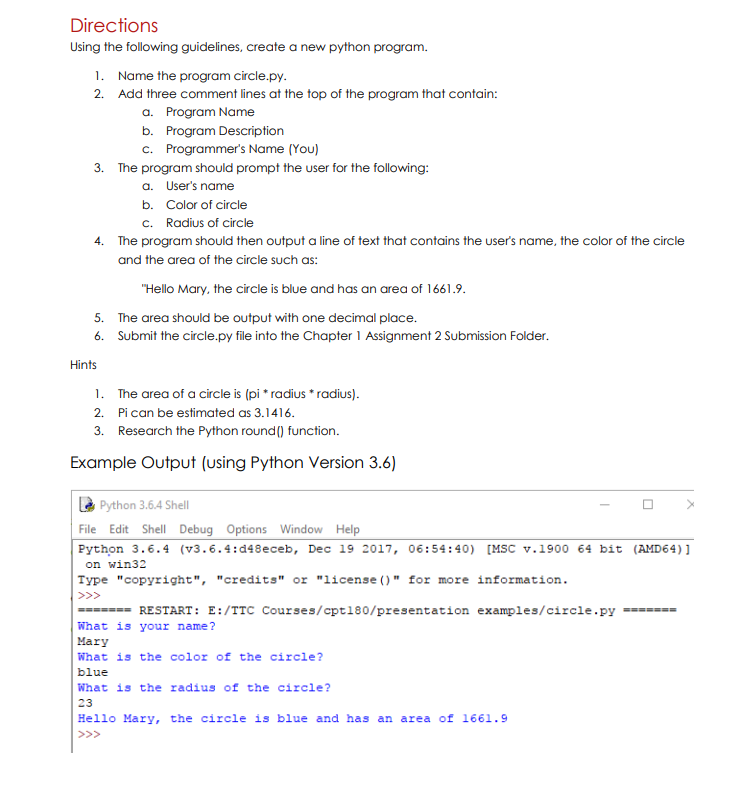
Directions Using the following guidelines, create a new python program. 1. Name the program circle.py. 2. Add three comment lines at the top of the program that contain: a. Program Name b. Program Description c. Programmer's Name (You) 3. The program should prompt the user for the following: a. User's name b. Color of circle c. Radius of circle The program should then output a line of text that contains the user's name, the color of the circle and the area of the circle such as: "Hello Mary, the circle is blue and has an area of 1661.9. 5. The area should be output with one decimal place. 6. Submit the circle.py file into the Chapter 1 Assignment 2 Submission Folder. 4. Hints 1. The area of a circle is (pi* radius * radius). 2. Pican be estimated as 3.1416. 3. Research the Python round() function. Example Output (using Python Version 3.6) >>> Python 3.6.4 Shell File Edit Shell Debug Options Window Help Python 3.6.4 (v3.6.4:d48eceb, Dec 19 2017, 06:54:40) [MSC v.1900 64 bit (AMD64)] on win32 Type "copyright", "credits" or "license ()" for more information. ======= RESTART: E:/TTC Courses/cpt180/presentation examples/circle.py What is your name? Mary What is the color of the circle? What is the radius of the circle? 23 Hello Mary, the circle is blue and has an area of 1661.9 blue
Step by Step Solution
There are 3 Steps involved in it

Get step-by-step solutions from verified subject matter experts
 Study Help