







Question: Directions: Using the information below, complete Table 3, the Smart Gadgets, Inc. Projected Income Statement for the two years ending December 31, Year 1 and
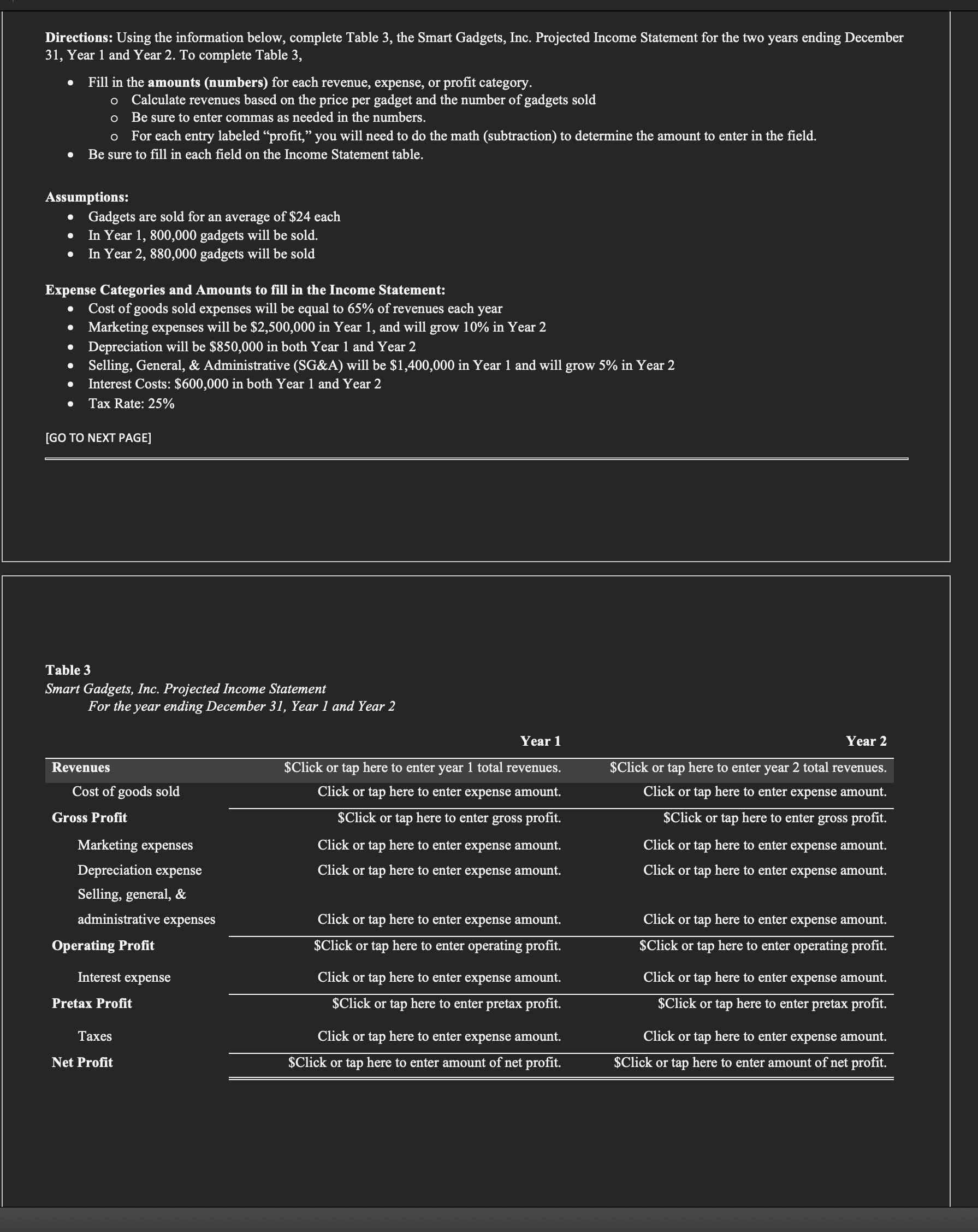
Directions: Using the information below, complete Table 3, the Smart Gadgets, Inc. Projected Income Statement for the two years ending December 31, Year 1 and Year 2. To complete Table 3, e Fill in the amounts (numbers) for each revenue, expense, or profit category. o Calculate revenues based on the price per gadget and the number of gadgets sold o Be sure to enter commas as needed in the numbers. o For each entry labeled \"profit,\" you will need to do the math (subtraction) to determine the amount to enter in the field. e Be sure to fill in each field on the Income Statement table. Assumptions: e Gadgets are sold for an average of $24 each e In Year 1, 800,000 gadgets will be sold. e In Year 2, 880,000 gadgets will be sold Expense Categories and Amounts to fill in the Income Statement: Cost of goods sold expenses will be equal to 65% of revenues each year Marketing expenses will be $2,500,000 in Year 1, and will grow 10% in Year 2 Depreciation will be $850,000 in both Year 1 and Year 2 Selling, General, & Administrative (SG&A) will be $1,400,000 in Year 1 and will grow 5% in Year 2 Interest Costs: $600,000 in both Year 1 and Year 2 Tax Rate: 25% [GO TO NEXT PAGE] Table 3 Smart Gadgets, Inc. Projected Income Statement For the year ending December 31, Year 1 and Year 2 Year 1 VG Revenues $Click or tap here to enter year 1 total revenues. $Click or tap here to enter year 2 total revenues. Cost of goods sold Click or tap here to enter expense amount. Click or tap here to enter expense amount. Gross Profit $Click or tap here to enter gross profit. $Click or tap here to enter gross profit. Marketing expenses Click or tap here to enter expense amount. Click or tap here to enter expense amount. Depreciation expense Click or tap here to enter expense amount. Click or tap here to enter expense amount. KRG eI 4 administrative expenses Click or tap here to enter expense amount. Click or tap here to enter expense amount. Operating Profit $Click or tap here to enter operating profit. $Click or tap here to enter operating profit. Interest expense Click or tap here to enter expense amount. Click or tap here to enter expense amount. Pretax Profit $Click or tap here to enter pretax profit. $Click or tap here to enter pretax profit. e Click or tap here to enter expense amount. Click or tap here to enter expense amount. Net Profit $Click or tap here to enter amount of net profit. $Click or tap here to enter amount of net profit
Step by Step Solution
There are 3 Steps involved in it

Get step-by-step solutions from verified subject matter experts
 Study Help