







Question: Directions Write a GUI application in Java using Swing that has a three buttons and a drawing area. The buttons should be at the top
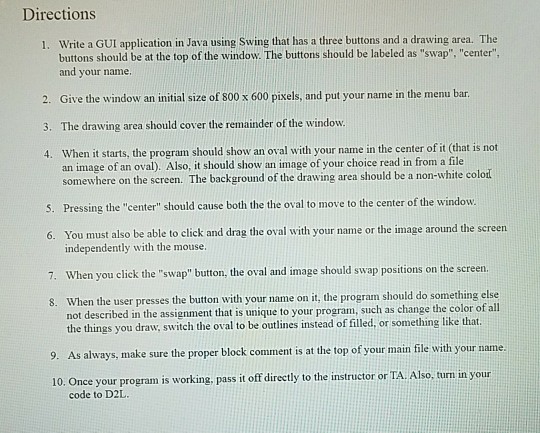
Directions Write a GUI application in Java using Swing that has a three buttons and a drawing area. The buttons should be at the top of the window. The buttons should be labeled as "swap", "center" and your name 1. 2. Give the window an initial size of 800 x 600 pixels, and put your name in the menu bar 3. The draving area should cover tht remaindr of he w 4. When it starts, the program should show an oval with your name in the center of it (that an image of an oval). Also, it should show an image of your choice read in from a file somewhere on the screen. The background of the drawing area should be a non-white colod Pressing the "center" should cause both the the oval to move to the center of the window. 6. You must also be able to click and drag the oval with your name or the image around the screen independently with the mouse. 7. When you click the "swap" button, the oval and image should swap positions on the sereen When the user presses the button with your name on it, the program should do something else not described in the assignment that is unique to your program, such as change the color of all the things you draw, switch the oval to be outlines instead of filled, or something like that 8. 9. As always, make sure the proper block comment is at the top of your main file with your name. 10. Once your program is working, pass it off directly to the instructor or TA Also, turn in your code to D2L
Step by Step Solution
There are 3 Steps involved in it

Get step-by-step solutions from verified subject matter experts
 Study Help