







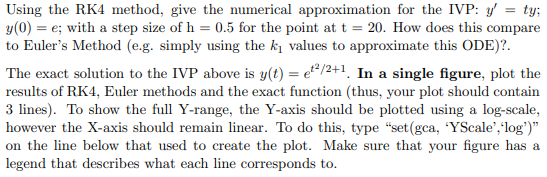
Question: Do in matlab, start with following code. Using the RK4 method, give the numerical approximation for the IVP: y = ty; y(0) = e; with
Do in matlab, start with following code.
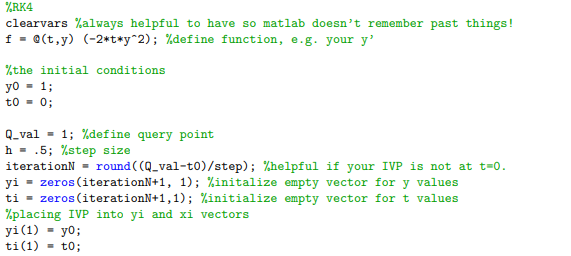
Using the RK4 method, give the numerical approximation for the IVP: y = ty; y(0) = e; with a step size of h = 0.5 for the point at t = 20. How does this compare to Euler's Method (e.g. simply using the k values to approximate this ODE)?. The exact solution to the IVP above is y(t) = et/2+1 In a single figure, plot the results of RK4, Euler methods and the exact function (thus, your plot should contain 3 lines). To show the full Y-range, the Y-axis should be plotted using a log-scale, however the X-axis should remain linear. To do this, type "set(gca, 'YScale', 'log")" on the line below that used to create the plot. Make sure that your figure has a legend that describes what each line corresponds to. %RK4 clearvars %always helpful to have so matlab doesn't remember past things! f = @(t,y) (-2*t*y*2); %define function, e.g. your y' %the initial conditions yo = 1; to = 0; Q_val - 1; %define query point h =.5; %step size iterationn = round(CQ_val-t0)/step); Whelpful if your IVP is not at t=0. yi = zeros(iterationN+1, 1); %initalize empty vector for y values ti = zeros(iterationN+1,1); %initialize empty vector for t values %placing IVP into yi and xi vectors yi(1) = y0; ti(1) - to
Step by Step Solution
There are 3 Steps involved in it

Get step-by-step solutions from verified subject matter experts
 Study Help