







Question: ################################################################# # # # # # # # DO NOT MODIFY any code above the STUDENT_CODE label. # # # # # ################################################################# .data .align
################################################################# # # # # # # # DO NOT MODIFY any code above the STUDENT_CODE label. # # # # # ################################################################# .data .align 0 # Define strings used in each of the printf statements msg1: .asciiz "Welcome to Prime Tester " msg2: .asciiz "Enter a number between 0 and 100: " msg3: .asciiz "Error: Invalid input for Prime Tester " msg4: .asciiz "The entered number is prime " msg5: .asciiz "The entered number is not prime " ec_msg: .asciiz " is prime " # Reserved for use in extra credit .align 2 .text .globl main # The following macros are provided to simplify the program code # A macro can be thought of as a cross between a function and a constant # The assembler will copy the macro's code to each use in the program code # Display the %integer to the user # Reserved for extra credit .macro display_integer (%integer) li $v0, 1 # Prepare the system for output add $a0, $zero, %integer # Set the integer to display syscall # System displays the specified integer .end_macro # Display the %string to the user .macro display_string (%string) li $v0, 4 # Prepare the system for output la $a0, %string # Set the string to display syscall # System displays the specified string .end_macro # Compute the square root of the %value # Result stored in the floating-point register $f2 .macro calc_sqrt (%value) mtc1.d %value, $f2 # Copy integer %value to floating-point processor cvt.d.w $f2, $f2 # Convert integer %value to double sqrt.d $f2, $f2 # Calculate the square root of the %value .end_macro # Determine if the %value is less-than or equal-to the current square root value in register $f2 # Result stored in the register $v1 .macro slt_sqrt (%value) mtc1.d %value, $f4 # Copy integer %value to floating-point processor cvt.d.w $f4, $f4 # Convert integer %value to double c.lt.d $f4, $f2 # Test if %value is less-than square root bc1t less_than_or_equal # If less-than, go to less_than_or_equal label c.eq.d $f4, $f2 # Test if %value is equal-to square root bc1t less_than_or_equal # If equal-to, go to less_than_or_equal label li $v1, 0 # Store a 0 in register $v1 to indicate greater-than condition j end_macro # Go to the end_macro label less_than_or_equal: li $v1, 1 # Store a 1 in register $v1 to indicate less-than or equal-to condition end_macro: .end_macro main: # This series of instructions # 1. Displays the welcome message # 2. Displays the input prompt # 3. Reads input from the user display_string msg1 # Display welcome message display_string msg2 # Display input prompt li $v0, 5 # Prepare the system for keyboard input syscall # System reads user input from keyboard move $a1, $v0 # Store the user input in register $a0 j student_code # Go to the student_code label error: display_string msg3 # Display error message j exit isprime: display_string msg4 # Display is prime message j exit notprime: display_string msg5 # Display not prime message exit: li $v0, 10 # Prepare to terminate the program syscall # Terminate the program ################################################################# # # # DO NOT MODIFY any code above the STUDENT_CODE label. # # # # . # ################################################################# # Place all code below the student_code label student_code:
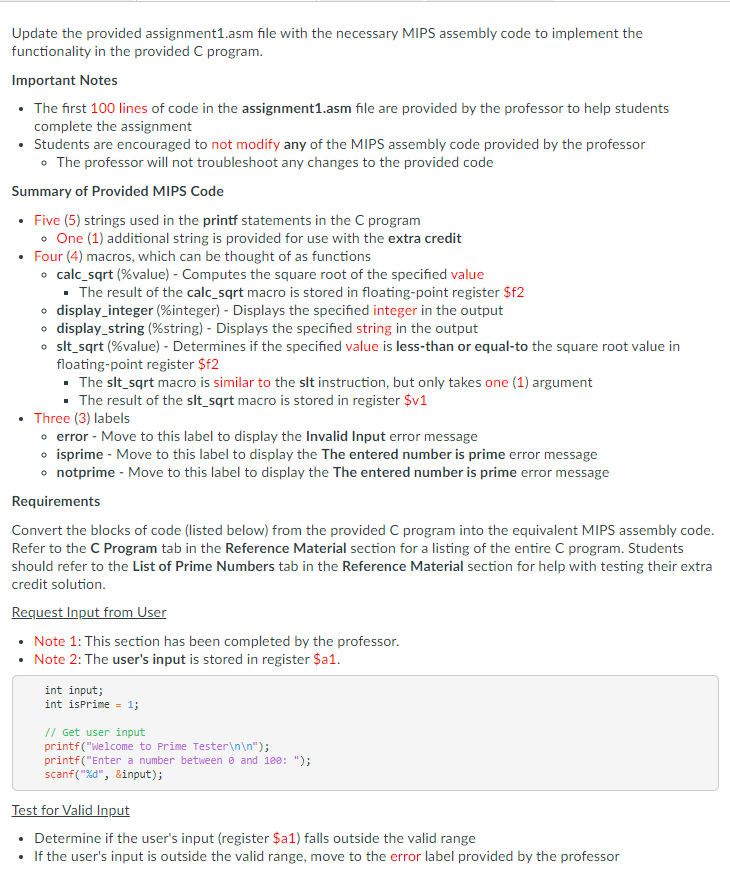
. o Update the provided assignment1.asm file with the necessary MIPS assembly code to implement the functionality in the provided C program. Important Notes The first 100 lines of code in the assignment1.asm file are provided by the professor to help students complete the assignment Students are encouraged to not modify any of the MIPS assembly code provided by the professor . The professor will not troubleshoot any changes to the provided code Summary of Provided MIPS Code Five (5) strings used in the printf statements in the C program One (1) additional string is provided for use with the extra credit Four (4) macros, which can be thought of as functions calc_sqrt (%value) - Computes the square root of the specified value The result of the calc_sqrt macro is stored in floating-point register $82 display_integer (%integer) - Displays the specified integer in the output display_string (%string) - Displays the specified string in the output slt_sqrt (%value) - Determines if the specified value is less than or equal to the square root value in floating-point register $f2 The slt_sqrt macro is similar to the slt instruction, but only takes one (1) argument . The result of the slt_sqrt macro is stored in register $v1 Three (3) labels o error - Move to this label to display the Invalid Input error message isprime - Move to this label to display the The entered number is prime error message notprime - Move to this label to display the The entered number is prime error message Requirements Convert the blocks of code (listed below) from the provided C program into the equivalent MIPS assembly code. Refer to the C Program tab in the Reference Material section for a listing of the entire C program. Students should refer to the List of Prime Numbers tab in the Reference Material section for help with testing their extra credit solution. Request Input from User Note 1: This section has been completed by the professor. Note 2: The user's input is stored in register $a1. . o int input; int isprime = 1; // Get user input printf("Welcome to Prime Tester "); printf("Enter a number between @ and 100: "); scanf("%d", &input); Test for Valid Input Determine if the user's input (register $a1) falls outside the valid range If the user's input is outside the valid range, move to the error label provided by the professor Request Input from User Note 1: This section has been completed by the professor. Note 2: The user's input is stored in register $a1. int input; int isPrime = 1; // Get user input printf("Welcome to Prime Tester "); printf("Enter a number between and 100: "); scanf("%d", &input); Test for Valid Input Determine if the user's input (register $a1) falls outside the valid range If the user's input is outside the valid range, move to the error label provided by the professor if(input 100) { printf("Error: Invalid input for Prime Tester "); exit(); } Perform Prime Test Determine if the user's input represents a prime number To compute the square root of the user's input, call the calc_sqrt macro provided by the professor The result of the calc_sqrt macro is stored in floating-point register $f2 for later use by the slt_sqrt macro Example: calc_sqrt $rs To test if a value is less than or equal to the square root value computed by the calc_sqrt macro, call the slt_sqrt macro provided by the professor The result of the slt_sqrt macro is stored in register $v1 Example: slt_sqrt $rs To display the prime or not prime messages, move to the isprime or notprime labels provided by the professor if(input
Step by Step Solution
There are 3 Steps involved in it

Get step-by-step solutions from verified subject matter experts
 Study Help