







Question: in MIPS please use commenting # The following code is provided by the professor. # # DO NOT MODIFY any code above the STUDENT_CODE label.
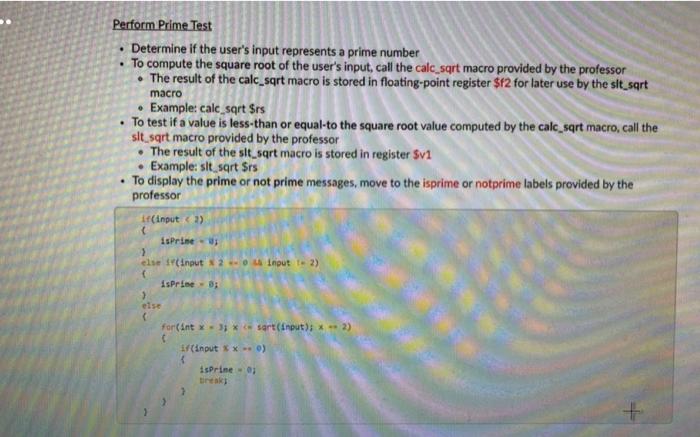
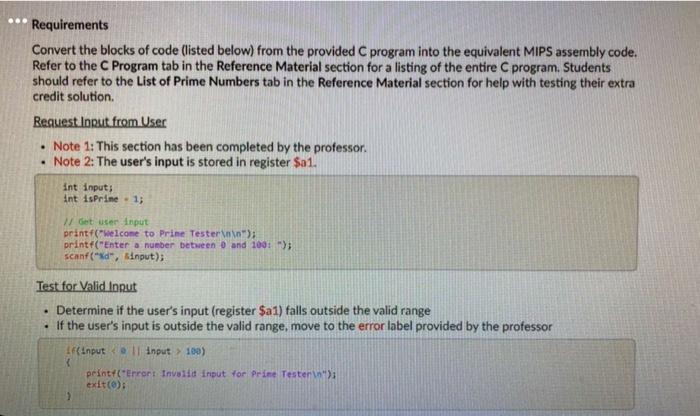
macro Perform Prime Test Determine if the user's input represents a prime number To compute the square root of the user's input, call the calc,sqrt macro provided by the professor The result of the calc_sqrt macro is stored in floating-point register $f2 for later use by the sit_sart Example: calc sqrt $rs To test if a value is less than or equal to the square root value computed by the calc_sqrt macro, call the sit sqrt macro provided by the professor The result of the sit_sqrt macro is stored in register Sv1 Example: sit sort Srs To display the prime or not prime messages, move to the isprime or notprime labels provided by the professor if(input) isprint > else (input Input t. 2) IsPrime - 0 for(ant. *** sart(input); * -- >> if(input xx-0) isprineo bintas Requirements Convert the blocks of code (listed below) from the provided C program into the equivalent MIPS assembly code. Refer to the C Program tab in the Reference Material section for a listing of the entire C program. Students should refer to the List of Prime Numbers tab in the Reference Material section for help with testing their extra credit solution. Request Input from User Note 1: This section has been completed by the professor. Note 2: The user's input is stored in register $a1. int inputs int is Prine - 1; Get user input printf(welcome to Prime Tester"); printf("Enter a number between 0 and 100); scanf("%d", $input); Test for Valid Input Determine if the user's input (register $a1) falls outside the valid range If the user's input is outside the valid range, move to the error label provided by the professor IF(input input > 100) print("Error : Invalid Input for Prime Testerin) exit(0); macro Perform Prime Test Determine if the user's input represents a prime number To compute the square root of the user's input, call the calc,sqrt macro provided by the professor The result of the calc_sqrt macro is stored in floating-point register $f2 for later use by the sit_sart Example: calc sqrt $rs To test if a value is less than or equal to the square root value computed by the calc_sqrt macro, call the sit sqrt macro provided by the professor The result of the sit_sqrt macro is stored in register Sv1 Example: sit sort Srs To display the prime or not prime messages, move to the isprime or notprime labels provided by the professor if(input) isprint > else (input Input t. 2) IsPrime - 0 for(ant. *** sart(input); * -- >> if(input xx-0) isprineo bintas Requirements Convert the blocks of code (listed below) from the provided C program into the equivalent MIPS assembly code. Refer to the C Program tab in the Reference Material section for a listing of the entire C program. Students should refer to the List of Prime Numbers tab in the Reference Material section for help with testing their extra credit solution. Request Input from User Note 1: This section has been completed by the professor. Note 2: The user's input is stored in register $a1. int inputs int is Prine - 1; Get user input printf(welcome to Prime Tester"); printf("Enter a number between 0 and 100); scanf("%d", $input); Test for Valid Input Determine if the user's input (register $a1) falls outside the valid range If the user's input is outside the valid range, move to the error label provided by the professor IF(input input > 100) print("Error : Invalid Input for Prime Testerin) exit(0)
Step by Step Solution
There are 3 Steps involved in it

Get step-by-step solutions from verified subject matter experts
 Study Help