







Question: do not change the def main 1. Complete the draw_E, draw_L, and draw_O functions to draw a message in a turtle window. Do not change
do not change the def main
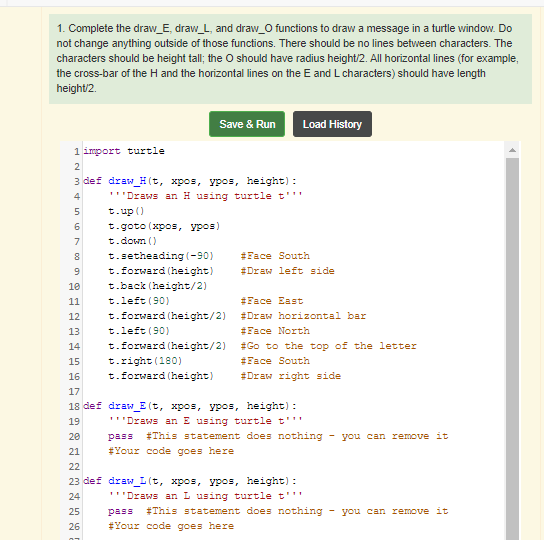
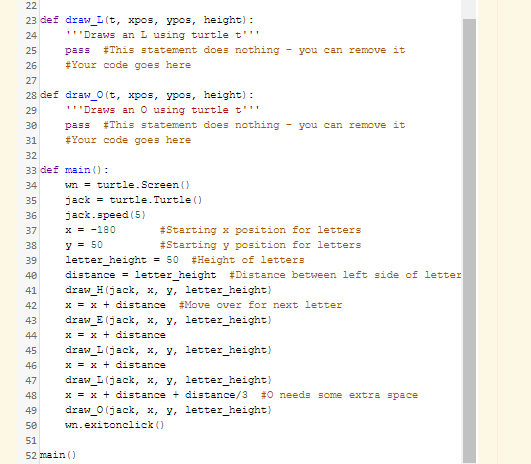
1. Complete the draw_E, draw_L, and draw_O functions to draw a message in a turtle window. Do not change anything outside of those functions. There should be no lines between characters. The characters should be height tall; the O should have radius height/2. All horizontal lines (for example, the cross-bar of the H and the horizontal lines on the E and L characters) should have length height/2. Save & Run Load History 1 report turtle 2 3 def draw_H(t, xpos, ypos, height): 4 ''Draws an H using turtle t'' 5 t.up0) 6 t.goto (xpos, ypos) 7 t.down() 8 t.setheading(-90) #Face South 9 t. forward (height) #Draw left side 10 t.back (height/2) 11 t.left (90) #Face East 12 t. forward (height/2) #Draw horizontal bar 13 t.left (90) #Face North 14 t. forward (height/2) #Go to the top of the letter 15 t.right (180) #Face South 16 t. forward (height) #Draw right side 17 18 def draw_E (t, xpos, ypos, height): 19 ''Draws an E using turtle t'' 20 pass #This statement does nothing - can remove it 21 #Your code goes here 22 23 def draw_L (t, xpos, ypos, height): 24 "Draws an I using turtle t'' 25 pass #This statement does nothing - you can remove it 26 #Your code goes here 22 23 def draw_(t, xpos, ypos, height): 24 "Draws an I using turtle t''' 25 pass #This statement does nothing - you can remove it 26 #Your code goes here 27 28 def draw_o(t, xpos, ypos, height): 29 "Draws an O using turtle t'' 30 pass #This statement does nothing - you can remove it 31 #Your code goes here 32 33 def main(): 34 w = turtle. Screen() 35 jack = turtle. Turtle() 36 jack speed (5) 37 X = -180 #Starting x position for letters 38 y = 50 #Starting y position for letters 39 letter_height = 50 Height of letters 40 distance = letter_height #Distance between left side of letter 41 draw_H(jack, x, y, letter_height) 42 x = x + distance #Move over for next letter 43 draw_E (jack, x, y, letter_height) 44 x = x + distance 45 draw_L (jack, x, y, letter_height) 46 x = x + distance 47 draw_L (jack, x, y, letter_height) 48 x = x + distance + distance/3 #0 needs some extra space 49 draw_0(jack, x, y, letter_height) 50 w.exitonclick) 51 52 main()
Step by Step Solution
There are 3 Steps involved in it

Get step-by-step solutions from verified subject matter experts
 Study Help