







Question: Do this in Android Studio (Java code) Activity No. 7: STUDENT PERFORMANCE ASSESSMENT FORM Create a moble application that will enact as the form below.
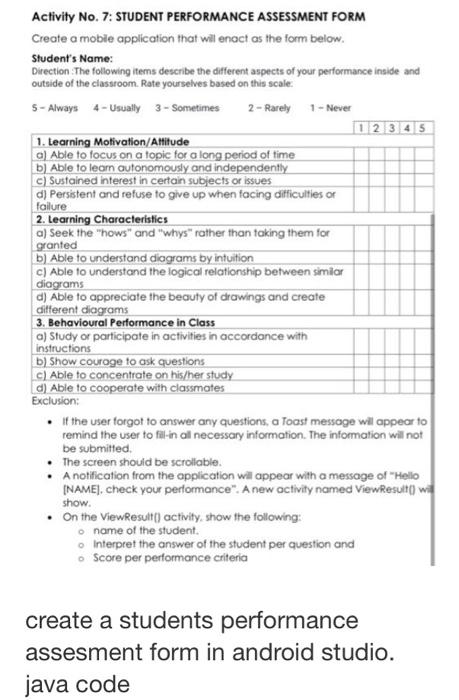
Activity No. 7: STUDENT PERFORMANCE ASSESSMENT FORM Create a moble application that will enact as the form below. Student's Name: Direction . The following items describe the different aspects of your performance inside and outside of the classroom. Rate yourselves based on this scale: 5-Always4-Usually3-Sometimes2-Rarely1-Never - If the user forgot to answer any questions, a Toast message will appear to remind the user to fill-in all necessary information. The information will not be submitted. - The screen should be scrollable. - A notification from the application will appear with a message of "Hello [NAME], check your pertormance". A new octivity named ViewResult[] wi. show. - On the View Result[) activity, show the following: name of the student. Interpret the answer of the student per question and Score per pertormance criteria create a students performance assesment form in android studio. java code
Step by Step Solution
There are 3 Steps involved in it

Get step-by-step solutions from verified subject matter experts
 Study Help