



Question: dog: IT'S BETTER THAN Cat (100 PTS) PURPOSE This assignment is meant to give students practice working on projects that contain multiple source code files.
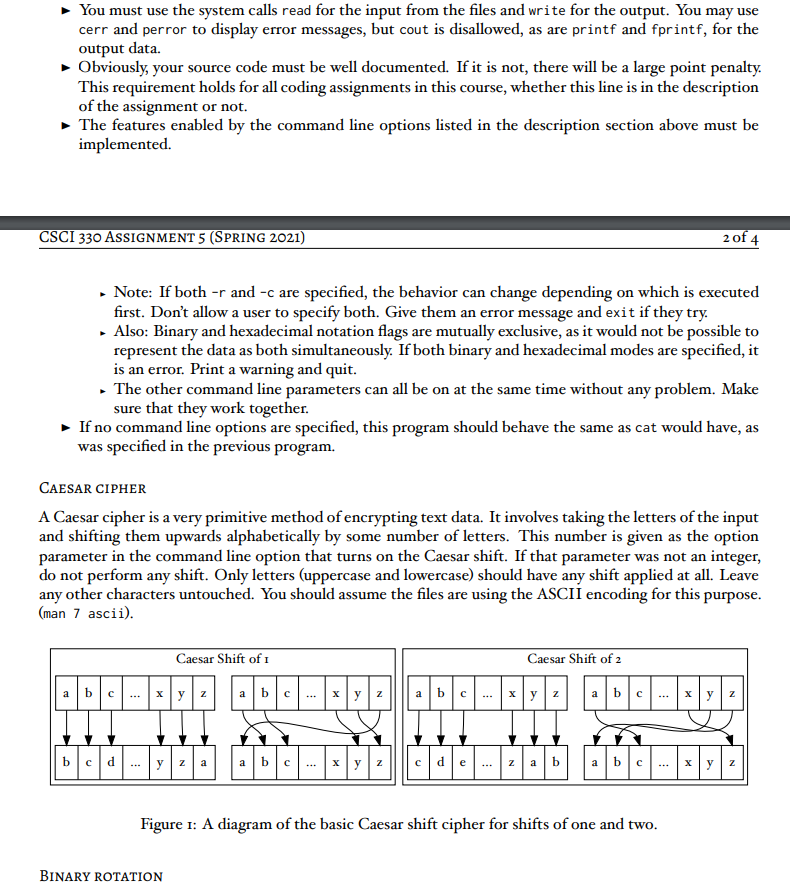
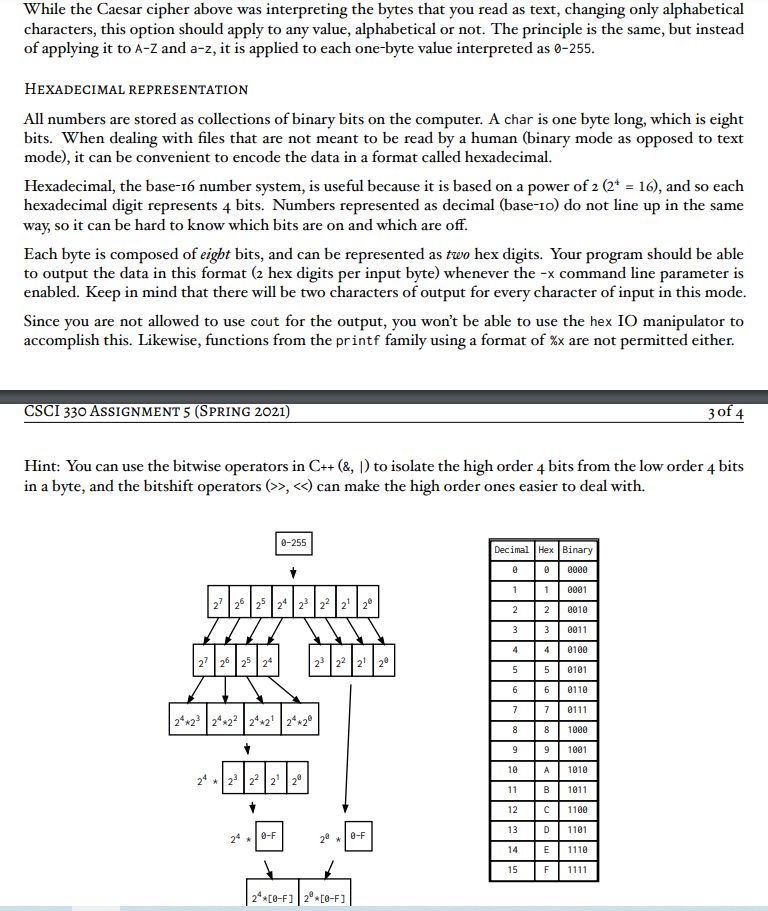
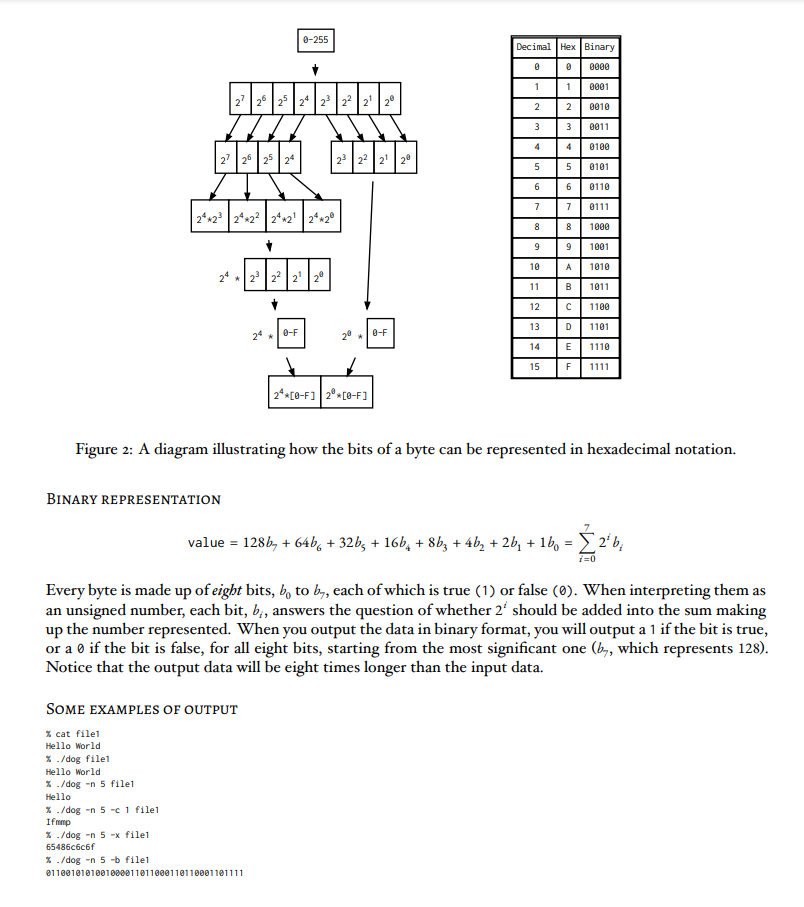
dog: IT'S BETTER THAN Cat (100 PTS) PURPOSE This assignment is meant to give students practice working on projects that contain multiple source code files. It will require the students to construct a Makefile and appropriate header files. It will also require the use of getopt to handle command line options, and manipulation of data read in from a file. You must use read (2) for all input and write (2) for all output (excluding error messages, for which you may use perror and/or the cerr stream object). The use of getopt (3) is not required but is strongly recom- mended. DESCRIPTION For this assignment, you will take the cat program you wrote for the last assignment and upgrade it to add more features. We will call it dog instead of cat, because dogs are kind of like cats, but way better. These new features will include: The ability to change the size of the buffer used for calls to read and write to N bytes when passed the command line option (-s N). The ability to change the number of bytes read from each file before finishing to N when supplied with the command line option (-n N). This is instead of reading the whole file as we would have without this option. The ability to apply a Caesar cipher with a shift of k letters to alphabetical characters in the data read in before writing the results when it receives the command line option (-c k). The ability to apply a general rotation (Caesar shift for all characters, not just letters) with a shift of k to the input data before writing it back out when supplied with the command line option (-r k). The ability to output the data from the file in hexadecimal format when supplied the command line option (-x). The ability to output the data from the file in binary notation, most significant bit first, when supplied the command line option (-b) REQUIREMENTS The main loop should be in your main function in one source code file. The functions that process the data (Caesar cipher/binary/hex/rotation) should be found in another file. Their declarations will need to be in a header file, so that they can be called from main even though they will be implemented in that other file. You must make a Makefile that has rules sufficient to compile your program when a user types make in the same directory as your source code. Only files that have changed or that have had their dependen- cies change should be recompiled. You must use the system calls read for the input from the files and write for the output. You may use cerr and perror to display error messages, but cout is disallowed, as are printf and fprintf, for the output data. You must use the system calls read for the input from the files and write for the output. You may use cerr and perror to display error messages, but cout is disallowed, as are printf and fprintf, for the output data. Obviously, your source code must be well documented. If it is not, there will be a large point penalty. This requirement holds for all coding assignments in this course, whether this line is in the description of the assignment or not. The features enabled by the command line options listed in the description section above must be implemented. CSCI 330 ASSIGNMENT 5 (SPRING 2021) 2 of 14 Note: If both -r and -c are specified, the behavior can change depending on which is executed first. Don't allow a user to specify both. Give them an error message and exit if they try. Also: Binary and hexadecimal notation flags are mutually exclusive, as it would not be possible to represent the data as both simultaneously. If both binary and hexadecimal modes are specified, it is an error. Print a warning and quit. - The other command line parameters can all be on at the same time without any problem. Make sure that they work together. If no command line options are specified, this program should behave the same as cat would have, as was specified in the previous program. CAESAR CIPHER A Caesar cipher is a very primitive method of encrypting text data. It involves taking the letters of the input and shifting them upwards alphabetically by some number of letters. This number is given as the option parameter in the command line option that turns on the Caesar shift. If that parameter was not an integer, do not perform any shift. Only letters (uppercase and lowercase) should have any shift applied at all. Leave any other characters untouched. You should assume the files are using the ASCII encoding for this purpose. (man 7 ascii). Caesar Shift of 1 Caesar Shift of 2 X y Z N | | Z b c d yz a | Xyz cale z a b | Figure 1: A diagram of the basic Caesar shift cipher for shifts of one and two. BINARY ROTATION While the Caesar cipher above was interpreting the bytes that you read as text, changing only alphabetical characters, this option should apply to any value, alphabetical or not. The principle is the same, but instead of applying it to A-Z and a-z, it is applied to each one-byte value interpreted as 0-255. HEXADECIMAL REPRESENTATION All numbers are stored as collections of binary bits on the computer. A char is one byte long, which is eight bits. When dealing with files that are not meant to be read by a human (binary mode as opposed to text mode), it can be convenient to encode the data in a format called hexadecimal. Hexadecimal, the base-16 number system, is useful because it is based on a power of 2 (2* = 16), and so each hexadecimal digit represents 4 bits. Numbers represented as decimal (base-10) do not line up in the same way, so it can be hard to know which bits are on and which are off. Each byte is composed of eight bits, and can be represented as two hex digits. Your program should be able to output the data in this format (2 hex digits per input byte) whenever the -x command line parameter is enabled. Keep in mind that there will be two characters of output for every character of input in this mode. Since you are not allowed to use cout for the output, you won't be able to use the hex 10 manipulator to accomplish this. Likewise, functions from the printf family using a format of %x are not permitted either. CSCI 330 ASSIGNMENT 5 (SPRING 2021) 3 of 4 Hint: You can use the bitwise operators in C++ (8, 1) to isolate the high order 4 bits from the low order 4 bits in a byte, and the bitshift operators (>>, >,
Step by Step Solution
There are 3 Steps involved in it

Get step-by-step solutions from verified subject matter experts