







Question: Done in Java. Any help is greatly appreciated. I'm confused about this program. Here is the code I have so far: // ShapeDriver class import
Done in Java. Any help is greatly appreciated. I'm confused about this program.
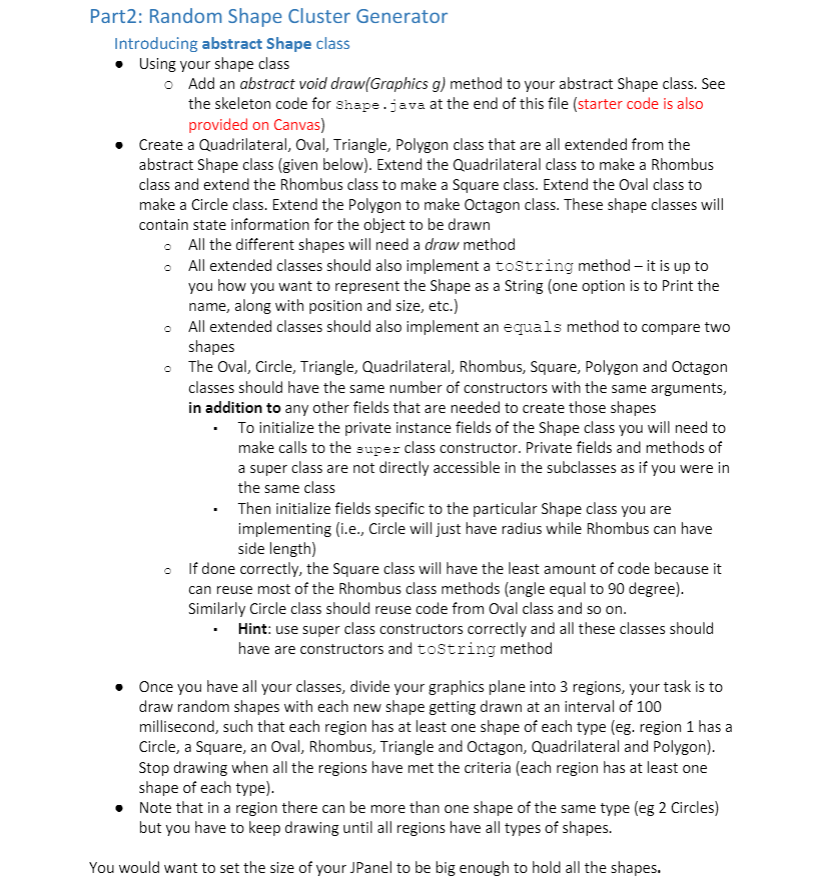
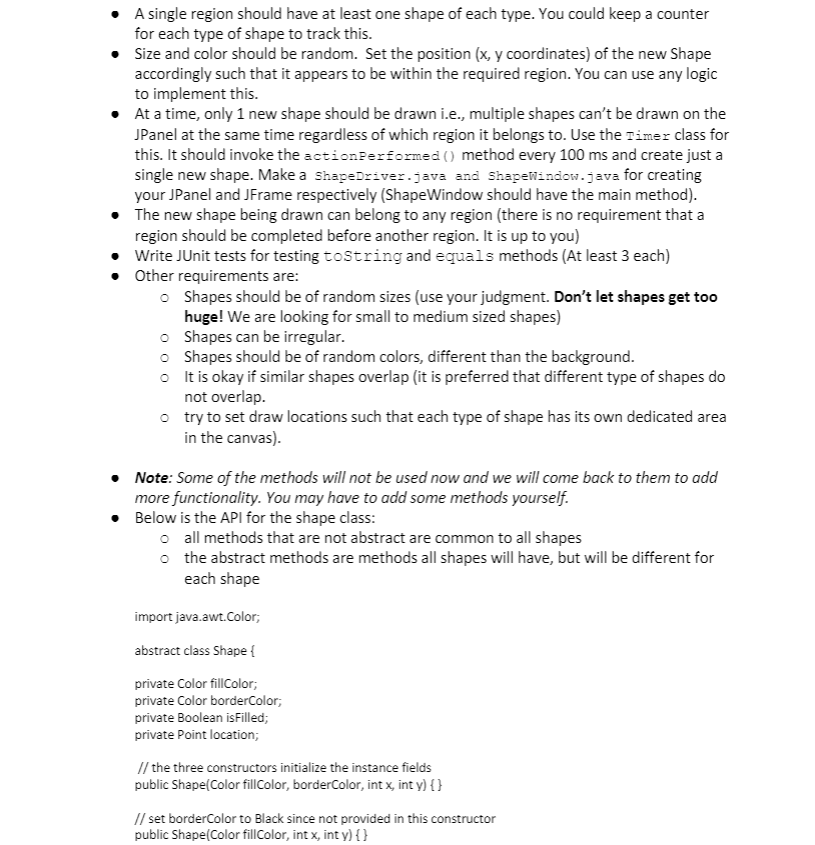
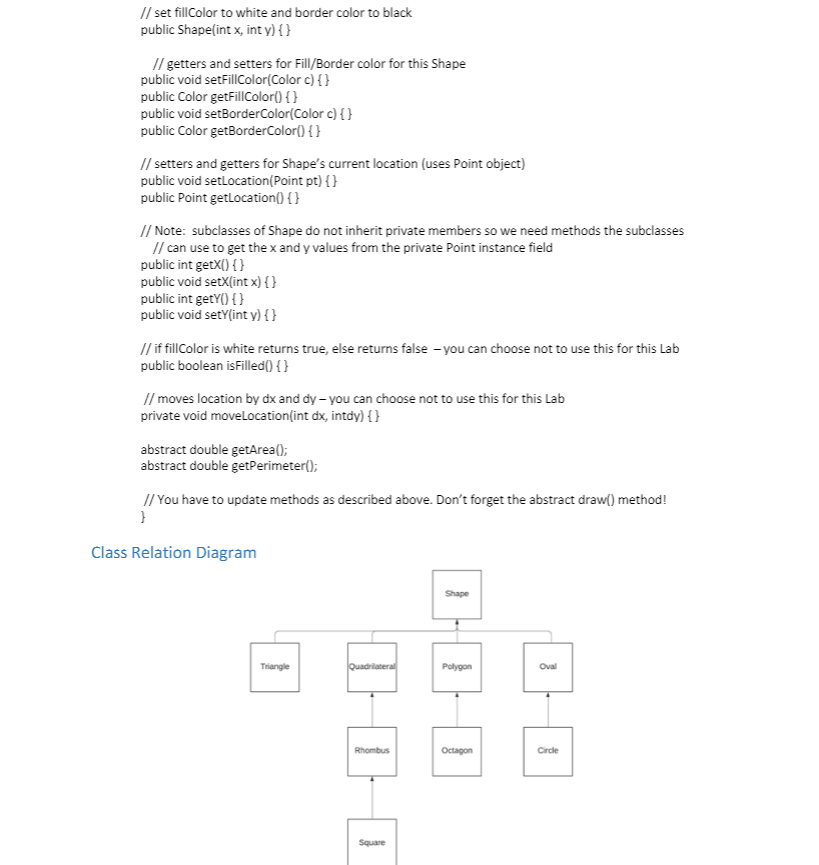
Here is the code I have so far:
// ShapeDriver class
import java.util.List; import java.util.ArrayList; import java.util.Random;
import javax.swing.JPanel;
import java.awt.Color; import java.awt.Graphics; import java.awt.Dimension;
/* * Driver program for random shape generator app * NOTE: You are encouraged to experiment and try out various approaches * The comments given here are just guidelines to get you started * Possibly, this problem can be finished in many ways. */ public class ShapeDriver extends JPanel {
// Panel constants. Change this accordingly public final int FRAME_WIDTH = 1000; public final int FRAME_HEIGHT = 1000;
private Random random; // Need some data structure here to store all Shapes to be drawn // via the paintComponent (an ArrayList
/* TO-DO: * - set up this JPanel * - initialize any other fields you've declared * - You could also setBackground here */ }
@Override public void paintComponent(Graphics g) { // calling super class paintComponent method // background will not be colored otherwise super.paintComponent(g);
/* Invoke the .draw() of the different Shapes here. It should take the Graphics g object as a parameter. Iterate over your data structure holding all the various Shape objects and call their draw() method. */ } @Override public void actionPerformed(ActionEvent e){ /* This method gets invoked automatically whenever Timer runs out. Purpose of this method should be to do all the randomization such as picking random colors, sizes and also deciding which type of shape to draw. Don't make the size too large! Small to medium shapes is the aim Once you have a Shape object (can be a Triangle, Polygon, Square etc), add this new object to your data structure that holds all shapes. Calling this.repaint() at the end, so that paintComponent() is invoked and new Shape is picked up from the data structure and drawn. Remember, a specific type of shape (Square, Oval etc) can be repeated only 10 times max. */ this.repaint(); } // test client public static void main(String[] args) { // you could choose to leave this empty and let ShapeWindow do // all the running. } }
// ShapeWindow class
import javax.swing.JFrame; import javax.swing.JPanel;
import java.awt.BorderLayout;
/* * Main application for random shape generator app * NOTE: You are encouraged to experiment and try out various approaches * The comments given here are just guidelines to get you started * Possibly, this problem can be completed in many ways. */ public class ShapeWindow extends JFrame {
JPanel shapeDriver;
public ShapeWindow() { super(); // TO-DO: set up the frame /* Create a ShapeDriver object here (which is a JPanel) and add it to ShapeWindow (which is a JFrame). Don't forget to setSize, setVisible and any other required attributes (you might want to add the ShapeDriver object to the ContentPane (using this.getContentPane()) instead of directly adding to ShapeWindow. Make sure the canvas is large enough to hold all clusters. You can initialize a Timer here (with appropriate milliseconds and your ShapeDriver obj created above as params). Use the timer.start() method to start Timer. It is okay if you do not stop your timer. However, your program should stop drawing new shapes once all shape types have reached a count of 10 */ }
public static void main(String[] args) { // Create a JFrame and invoke the constructor JFrame shapeWindow = new ShapeWindow(); } }
Step by Step Solution
There are 3 Steps involved in it

Get step-by-step solutions from verified subject matter experts
 Study Help