







Question: Don't worry about exercise5.php just make sure the code does what the question is asking. It should work correctly when I link it myself. Thank
Don't worry about exercise5.php just make sure the code does what the question is asking. It should work correctly when I link it myself. Thank You
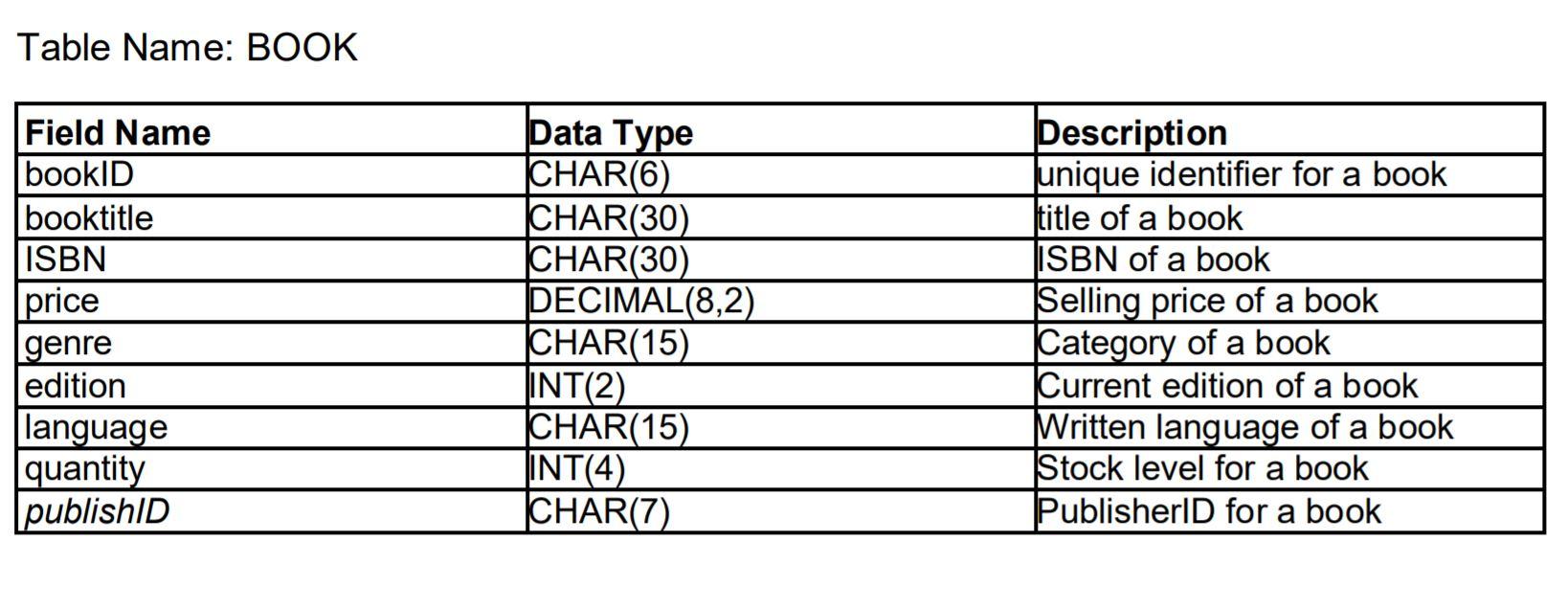
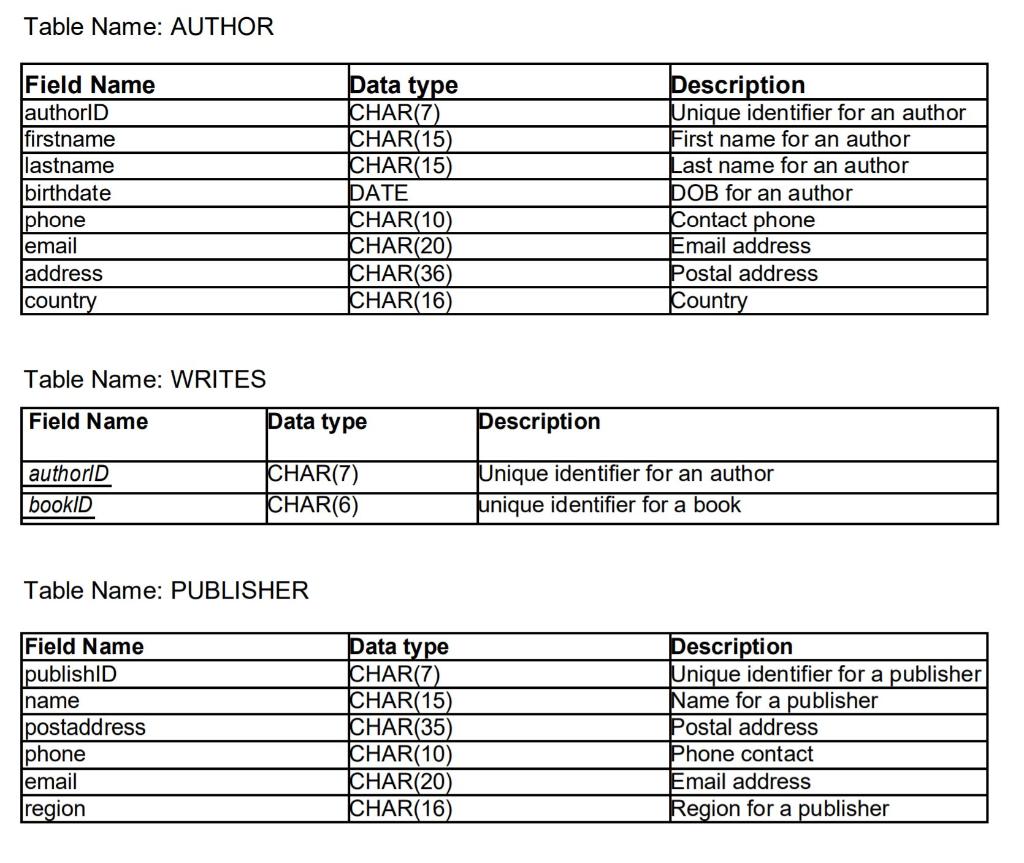
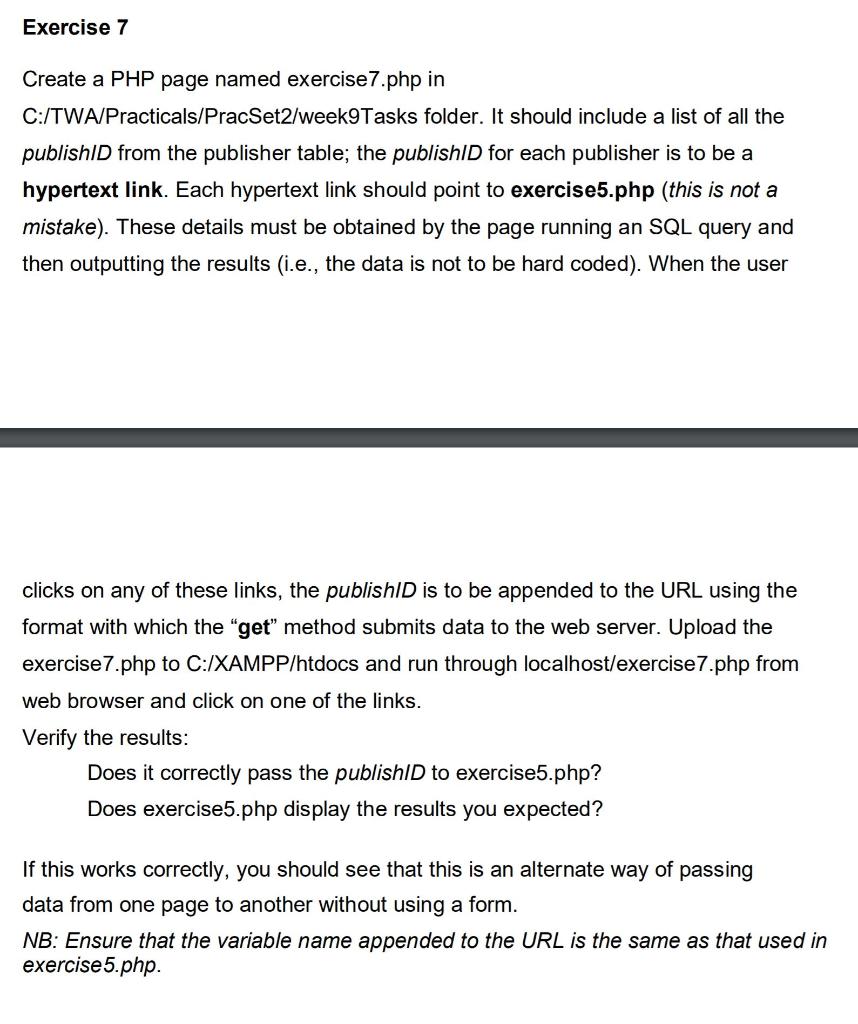
Table Name: BOOK Field Name bookID booktitle ISBN price genre edition language quantity publishID Data Type CHAR(6) CHAR(30) CHAR(30) DECIMAL(8,2) CHAR(15) INT(2) CHAR(15) INT(4) CHAR(7) Description unique identifier for a book title of a book ISBN of a book Selling price of a book Category of a book Current edition of a book Written language of a book Stock level for a book PublisherID for a book a Table Name: AUTHOR Field Name authorID firstname lastname birthdate Iphone email address country Data type CHAR(7) CHAR(15) CHAR(15) DATE CHAR(10) CHAR(20) CHAR(36) CHAR(16) Description Unique identifier for an author First name for an author Last name for an author DOB for an author Contact phone Email address Postal address Country Table Name: WRITES Field Name Data type Description authorld bookID CHAR(7) CHAR(6) Unique identifier for an author unique identifier for a book Table Name: PUBLISHER Field Name lpublishID name Ipostaddress Iphone email region Data type CHAR(7) CHAR(15) CHAR(35) CHAR(10) CHAR(20) CHAR(16) Description Unique identifier for a publisher Name for a publisher Postal address Phone contact Email address Region for a publisher Exercise 7 Create a PHP page named exercise7.php in C:/TWA/Practicals/PracSet2/week9Tasks folder. It should include a list of all the publishID from the publisher table; the publishID for each publisher is to be a hypertext link. Each hypertext link should point to exercise5.php (this is not a mistake). These details must be obtained by the page running an SQL query and then outputting the results (i.e., the data is not to be hard coded). When the user clicks on any of these links, the publishD is to be appended to the URL using the format with which the "get" method submits data to the web server. Upload the exercise7.php to C:/XAMPP/htdocs and run through localhost/exercise 7.php from web browser and click on one of the links. Verify the results: Does it correctly pass the publishID to exercise5.php? Does exercise5.php display the results you expected? If this works correctly, you should see that this is an alternate way of passing data from one page to another without using a form. NB: Ensure that the variable name appended to the URL is the same as that used in exercise5.php
Step by Step Solution
There are 3 Steps involved in it

Get step-by-step solutions from verified subject matter experts
 Study Help