







Question: Download the four files CableCar.java, MountainScene.java, SnowMan.java and Tree.java and include them in an Eclipse project (as we did in class). Run the program by
Download the four files CableCar.java, MountainScene.java, SnowMan.java and Tree.java and include them in an Eclipse project (as we did in class). Run the program by clicking the Run button with the class MountainScene selected. You should get a window with a triangle and a rectangle in the lower left area (this is the beginning of the drawing of a tree with ornaments). Read through the code of MountainScene and Tree. You will see that when MountainScene is instantiated, a graphics window is created. Then a Tree object is created. As it is, the draw method of the Tree class puts a rectangle and a triangle in the graphics window. Make sure that you understand how this is happening within the code. [JAVA USING ECLIPSE]
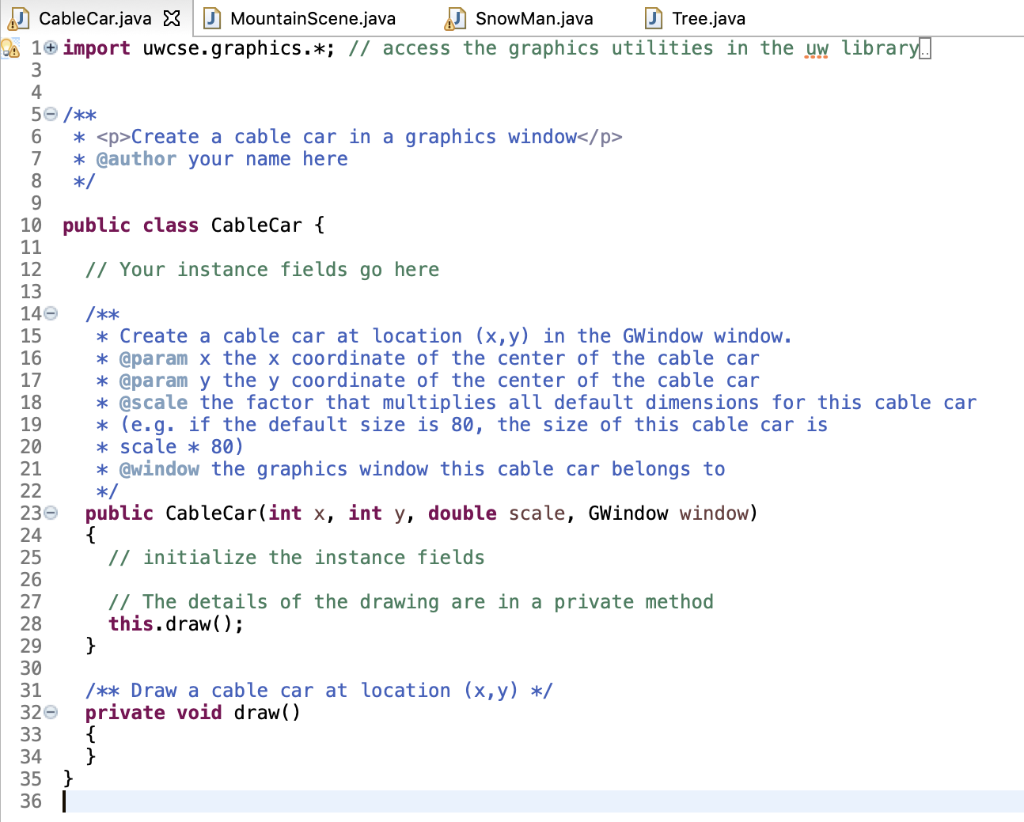
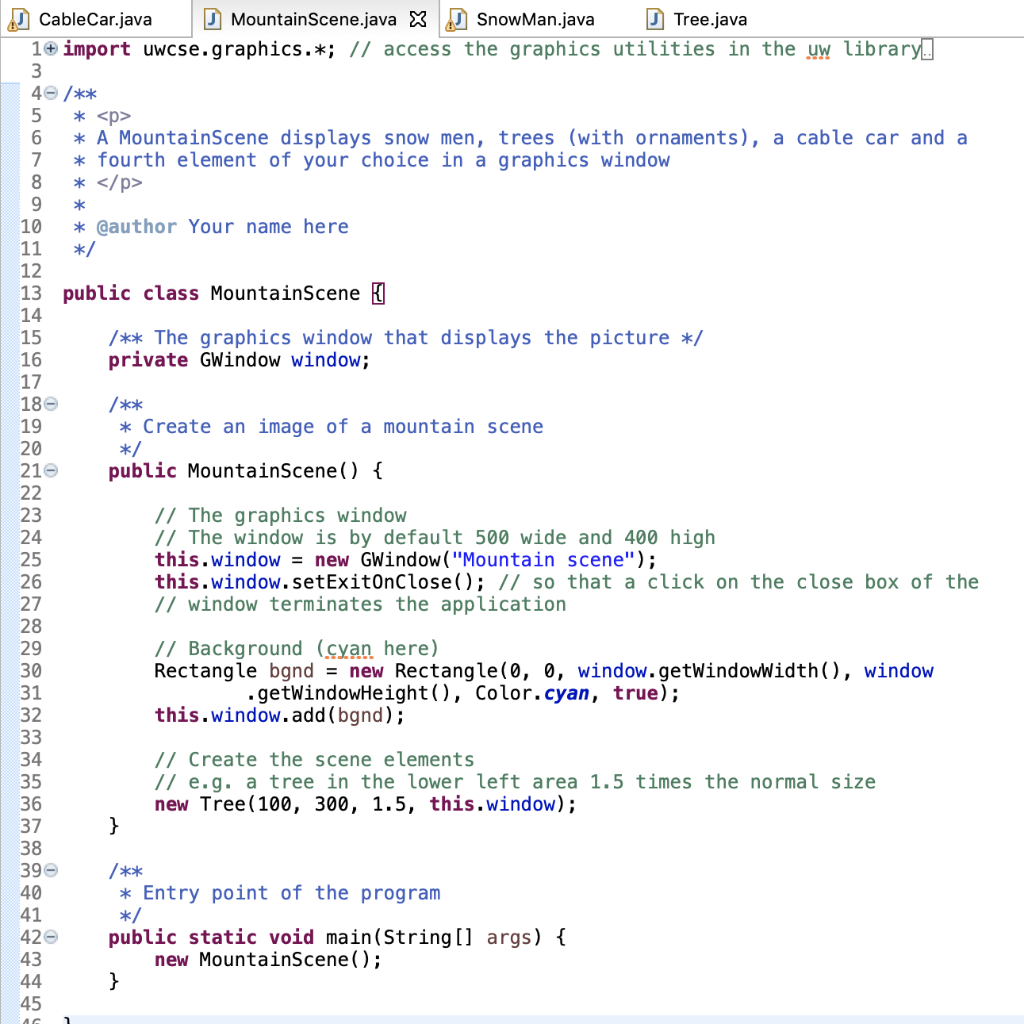
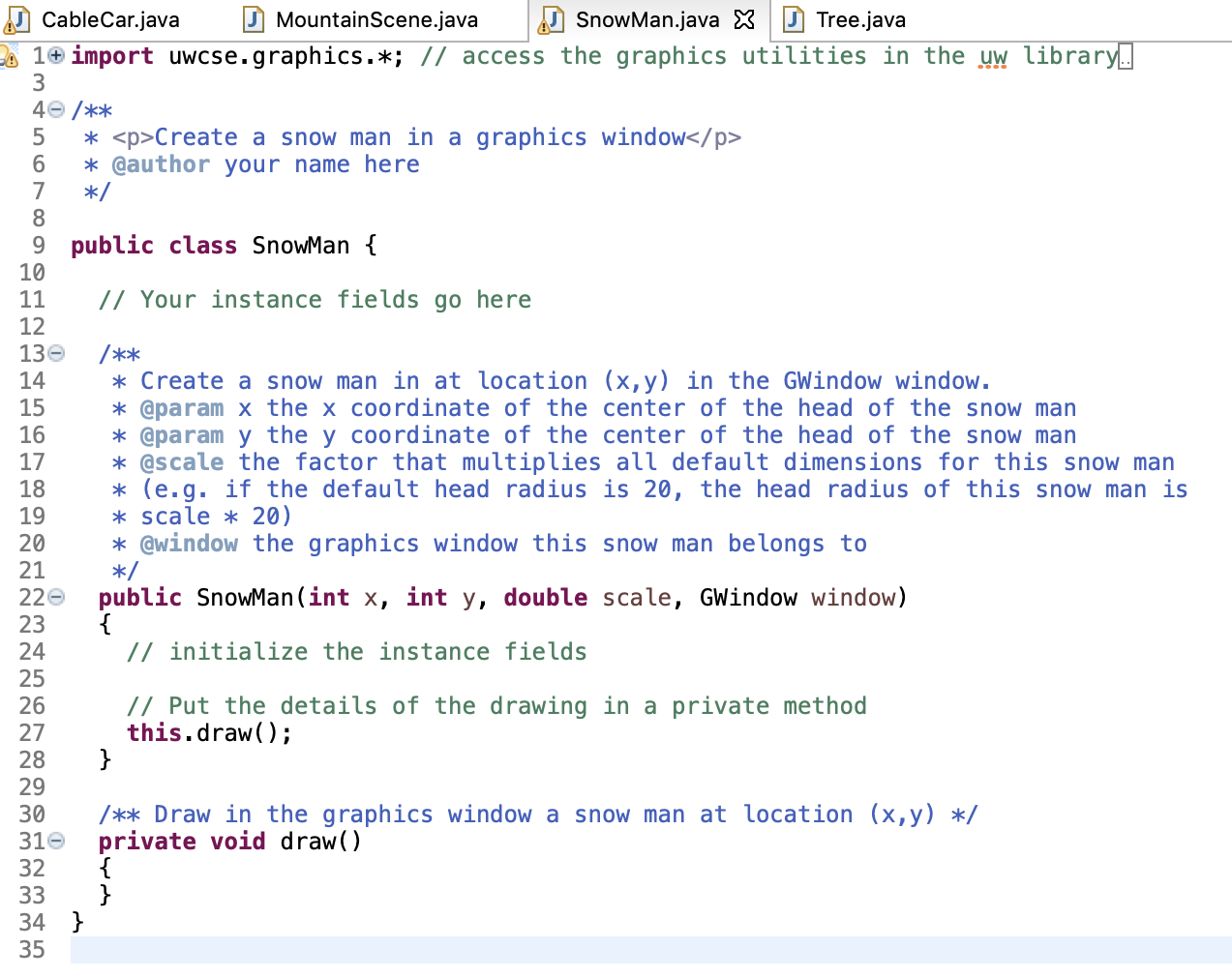
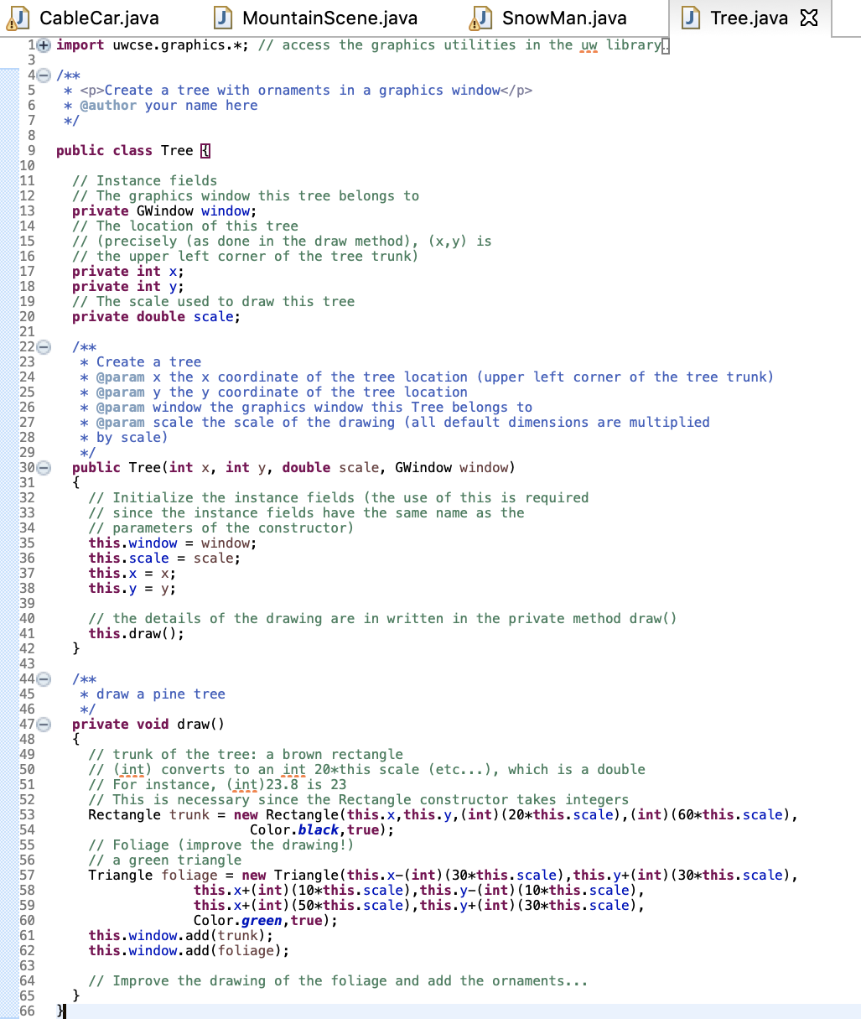
None of the classes given to you are complete. Your assignment is to complete the four classes and create a fith class so that an instance of MountainScene appears as a picture containing four different moutain elements. Here is a list of the requirements of the assignment :
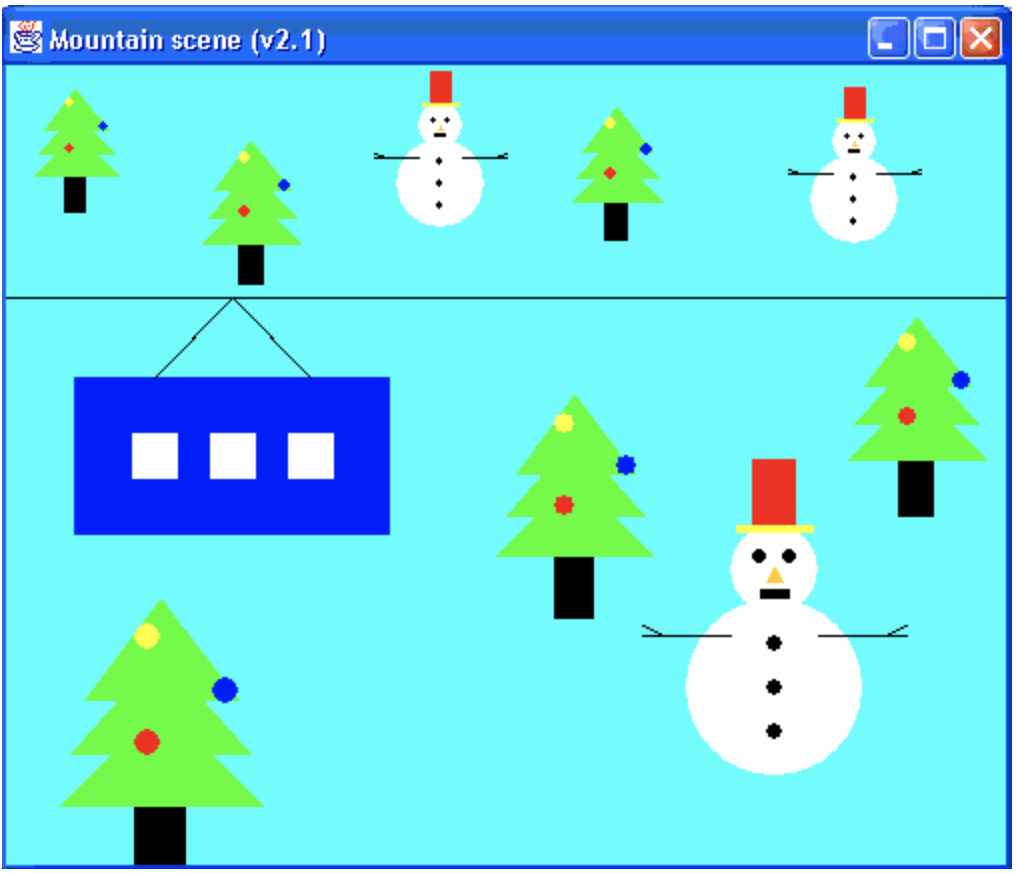
- Your picture should have 4 types of elements. 3 of them must be a cable car on a cable running across the picture, a snow man with a hat and arms, and a tree with ornaments. The fourth one is up to you.
- Create a class for each type of element. The class should at least contain a constructor and a private draw method. Don't change the signature of the constructor. Keep it as public ClassName(int x, int y, double scale, GWindow window) to mean create an object of type ClassName at location (x,y) in the GWindow window with size given by the default size times scale (e.g. you can set the radius of the snow man head by default to 20. Then a scale of 1.5 would draw a snow man with a head of radius 20*1.5 = 30). Don't do the drawing within the constructor. Instead call the private method draw. We will see the advantage of using a draw method in our next homework assignment. Read through the Tree class. It contains code to give you a better idea of what to do.
- Complete the class MountainScene to create a picture with all of the elements in a graphics window. In the picture, each type of element should appear several times at different locations with different sizes (except for the cable car that you can only draw once).
- The graphics elements should show some complexity. A single oval is not a good drawing for a snow man.
- The program should be correctly documented (use the same format as in the sample (javadoc comments /** and */)).
To create the graphics elements, draw them first on a piece of graph paper. It will make it easy for you to locate each point of your drawing with respect to some reference point (x,y).
If you want to create your own colors, use the Color constructor. It reads Color(r,g,b) where r,g and b are integers between 0 and 255. The color is a mixture of red, green and blue as specified by r, g and b. For example
Color myColor = new Color(100,150,210); // a blueish color
Here is a possible picture (shown with only three types of elements. You have to put in a fourth one as well).
Thank you for your help!!
CableCar.java X Mountain Scene.java Snowman.java Tree.java De 10 import uwcse.graphics.*; // access the graphics utilities in the uw library. 3 4 50 /** 6 *
Create a cable car in a graphics window
7 * @author your name here 8 */ 9 10 public class CableCar { 11 12 // Your instance fields go here 13 140 /** 15 * Create a cable car at location (x,y) in the GWindow window. 16 * @param x the x coordinate of the center of the cable car 17 * @param y the y coordinate of the center of the cable car 18 * @scale the factor that multiplies all default dimensions for this cable car 19 * (e.g. if the default size is 80, the size of this cable car is 20 * scale * 80) 21 * @window the graphics window this cable car belongs to 22 */ 230 public CableCar(int x, int y, double scale, GWindow window) 24 { 25 // initialize the instance fields 26 27 // The details of the drawing are in a private method 28 this.draw(); 29 } 30 31 /** Draw a cable car at location (x,y) */ 32 private void draw() 33 { 34 } 35 } 361 * CableCar.java Mountain Scene.java X Snow Man.java Tree.java 1 import uwcse.graphics.*; // access the graphics utilities in the uw library. 3 40 /** 5 *
6 * A MountainScene displays snow men, trees (with ornaments), a cable car and a 7 * fourth element of your choice in a graphics window 8 *
9 10 * @author Your name here 11 */ 12 13 public class MountainScene [ 14 15 /** The graphics window that displays the picture */ 16 private GWindow window; 17 18 /** 19 * Create an image of a mountain scene 20 */ 210 public MountainScene() { 22 23 // The graphics window 24 // The window is by default 500 wide and 400 high 25 this.window = new GWindow("Mountain scene"); 26 this.window.setExitOnClose(); // so that a click on the close box of the 27 // window terminates the application 28 29 // Background (cyan here) 30 Rectangle bgnd = new Rectangle(0, 0, window.getWindowWidth(), window 31 .getWindowHeight(), Color. cyan, true); 32 this.window.add(bgnd); 33 34 // Create the scene elements 35 // e.g. a tree in the lower left area 1.5 times the normal size 36 new Tree (100, 300, 1.5, this.window); 37 } 38 39 /** 40 * Entry point of the program 41 */ public static void main(String[] args) { 43 new MountainScene(); 44 } 45 420 AG CableCar.java Mountain Scene.java SnowMan.java X Tree.java 1+ import uwcse.graphics.*; // access the graphics utilities in the uw library. 3 40 /** 5 *
Create a snow man in a graphics window
6 * @author your name here 7 */ 8 9 public class SnowMan { 10 11 // Your instance fields go here 12 130 /** 14 * Create a snow man in at location (x,y) in the GWindow window. 15 * @param x the x coordinate of the center of the head of the snow man 16 * @param y the y coordinate of the center of the head of the snow man 17 * @scale the factor that multiplies all default dimensions for this snow man 18 * (e.g. if the default head radius is 20, the head radius of this snow man is 19 * scale * 20) 20 * @window the graphics window this snow man belongs to 21 */ 220 public SnowMan(int x, int y, double scale, GWindow window) 23 { 24 // initialize the instance fields 25 26 // Put the details of the drawing in a private method 27 this.draw(); 28 } 29 30 /** Draw in the graphics window a snow man at location (x,y) */ 310 private void draw() 32 { 33 } 34 } 35 CableCar.java Mountain Scene.java Snow Man.java Tree.java X 1+ import uwcse.graphics.*; // access the graphics utilities in the uw library! 40 /** 5 *
Create a tree with ornaments in a graphics window
6 * @author your name here 7 */ 8 9 public class Tree / 10 11 // Instance fields 12 // The graphics window this tree belongs to 13 private GWindow window; 14 / The location of this tree 15 11 (precisely (as done in the draw method), (x,y) is 16 // the upper left corner of the tree trunk) 17 private int x; 18 private int y; 19 // The scale used to draw this tree 20 private double scale; 21 220 23 * Create a tree 24 * @param x the x coordinate of the tree location (upper left corner of the tree trunk) 25 * @param y the y coordinate of the tree location 26 * @param window the graphics window this Tree belongs to 27 * @param scale the scale of the drawing (all default dimensions are multiplied 28 * by scale) 300 public Tree(int x, int y, double scale, GWindow window) 32 // Initialize the instance fields (the use of this is required 33 // since the instance fields have the same name as the 34 // parameters of the constructor) 35 this.window = window; 36 this.scale = scale; 37 this.x = x; 38 this.y = y; 39 40 // the details of the drawing are in written in the private method draw() 41 this.draw(); 42 } 43 440 /** 45 * draw a pine tree 46 */ 476 private void draw() 48 49 // trunk of the tree: a brown rectangle 50 11 (int) converts to an int 20*this scale (etc...), which is a double 51 // For instance, (int) 23.8 is 23 52 // This is necessary since the Rectangle constructor takes integers 53 Rectangle trunk = new Rectangle(this.x, this.y, (int) (20*this.scale), (int) (60*this.scale), 54 Color.black, true); 55 // Foliage (improve the drawing!) 56 // a green triangle Triangle foliage = new Triangle(this.x-(int) (30*this.scale), this.y+(int) (30*this.scale), 58 this.x+(int) (10*this.scale), this.y-(int) (10*this.scale), 59 this.x+(int) (50*this.scale), this.y+(int) (30*this.scale), 60 Color.green, true); 61 this.window.add(trunk); 62 this.window.add(foliage); 63 64 // Improve the drawing of the foliage and add the ornaments... 65 66 } Mountain scene (V2.1) X "11 :1... CableCar.java X Mountain Scene.java Snowman.java Tree.java De 10 import uwcse.graphics.*; // access the graphics utilities in the uw library. 3 4 50 /** 6 *
Create a cable car in a graphics window
7 * @author your name here 8 */ 9 10 public class CableCar { 11 12 // Your instance fields go here 13 140 /** 15 * Create a cable car at location (x,y) in the GWindow window. 16 * @param x the x coordinate of the center of the cable car 17 * @param y the y coordinate of the center of the cable car 18 * @scale the factor that multiplies all default dimensions for this cable car 19 * (e.g. if the default size is 80, the size of this cable car is 20 * scale * 80) 21 * @window the graphics window this cable car belongs to 22 */ 230 public CableCar(int x, int y, double scale, GWindow window) 24 { 25 // initialize the instance fields 26 27 // The details of the drawing are in a private method 28 this.draw(); 29 } 30 31 /** Draw a cable car at location (x,y) */ 32 private void draw() 33 { 34 } 35 } 361 * CableCar.java Mountain Scene.java X Snow Man.java Tree.java 1 import uwcse.graphics.*; // access the graphics utilities in the uw library. 3 40 /** 5 *
6 * A MountainScene displays snow men, trees (with ornaments), a cable car and a 7 * fourth element of your choice in a graphics window 8 *
9 10 * @author Your name here 11 */ 12 13 public class MountainScene [ 14 15 /** The graphics window that displays the picture */ 16 private GWindow window; 17 18 /** 19 * Create an image of a mountain scene 20 */ 210 public MountainScene() { 22 23 // The graphics window 24 // The window is by default 500 wide and 400 high 25 this.window = new GWindow("Mountain scene"); 26 this.window.setExitOnClose(); // so that a click on the close box of the 27 // window terminates the application 28 29 // Background (cyan here) 30 Rectangle bgnd = new Rectangle(0, 0, window.getWindowWidth(), window 31 .getWindowHeight(), Color. cyan, true); 32 this.window.add(bgnd); 33 34 // Create the scene elements 35 // e.g. a tree in the lower left area 1.5 times the normal size 36 new Tree (100, 300, 1.5, this.window); 37 } 38 39 /** 40 * Entry point of the program 41 */ public static void main(String[] args) { 43 new MountainScene(); 44 } 45 420 AG CableCar.java Mountain Scene.java SnowMan.java X Tree.java 1+ import uwcse.graphics.*; // access the graphics utilities in the uw library. 3 40 /** 5 *
Create a snow man in a graphics window
6 * @author your name here 7 */ 8 9 public class SnowMan { 10 11 // Your instance fields go here 12 130 /** 14 * Create a snow man in at location (x,y) in the GWindow window. 15 * @param x the x coordinate of the center of the head of the snow man 16 * @param y the y coordinate of the center of the head of the snow man 17 * @scale the factor that multiplies all default dimensions for this snow man 18 * (e.g. if the default head radius is 20, the head radius of this snow man is 19 * scale * 20) 20 * @window the graphics window this snow man belongs to 21 */ 220 public SnowMan(int x, int y, double scale, GWindow window) 23 { 24 // initialize the instance fields 25 26 // Put the details of the drawing in a private method 27 this.draw(); 28 } 29 30 /** Draw in the graphics window a snow man at location (x,y) */ 310 private void draw() 32 { 33 } 34 } 35 CableCar.java Mountain Scene.java Snow Man.java Tree.java X 1+ import uwcse.graphics.*; // access the graphics utilities in the uw library! 40 /** 5 *
Create a tree with ornaments in a graphics window
6 * @author your name here 7 */ 8 9 public class Tree / 10 11 // Instance fields 12 // The graphics window this tree belongs to 13 private GWindow window; 14 / The location of this tree 15 11 (precisely (as done in the draw method), (x,y) is 16 // the upper left corner of the tree trunk) 17 private int x; 18 private int y; 19 // The scale used to draw this tree 20 private double scale; 21 220 23 * Create a tree 24 * @param x the x coordinate of the tree location (upper left corner of the tree trunk) 25 * @param y the y coordinate of the tree location 26 * @param window the graphics window this Tree belongs to 27 * @param scale the scale of the drawing (all default dimensions are multiplied 28 * by scale) 300 public Tree(int x, int y, double scale, GWindow window) 32 // Initialize the instance fields (the use of this is required 33 // since the instance fields have the same name as the 34 // parameters of the constructor) 35 this.window = window; 36 this.scale = scale; 37 this.x = x; 38 this.y = y; 39 40 // the details of the drawing are in written in the private method draw() 41 this.draw(); 42 } 43 440 /** 45 * draw a pine tree 46 */ 476 private void draw() 48 49 // trunk of the tree: a brown rectangle 50 11 (int) converts to an int 20*this scale (etc...), which is a double 51 // For instance, (int) 23.8 is 23 52 // This is necessary since the Rectangle constructor takes integers 53 Rectangle trunk = new Rectangle(this.x, this.y, (int) (20*this.scale), (int) (60*this.scale), 54 Color.black, true); 55 // Foliage (improve the drawing!) 56 // a green triangle Triangle foliage = new Triangle(this.x-(int) (30*this.scale), this.y+(int) (30*this.scale), 58 this.x+(int) (10*this.scale), this.y-(int) (10*this.scale), 59 this.x+(int) (50*this.scale), this.y+(int) (30*this.scale), 60 Color.green, true); 61 this.window.add(trunk); 62 this.window.add(foliage); 63 64 // Improve the drawing of the foliage and add the ornaments... 65 66 } Mountain scene (V2.1) X "11 :1
Step by Step Solution
There are 3 Steps involved in it

Get step-by-step solutions from verified subject matter experts
 Study Help