







Question: Download the Macro-enabled Excel file, which is uploaded on the E-learning portal, and then write a VB program that calculates the total mark and letter
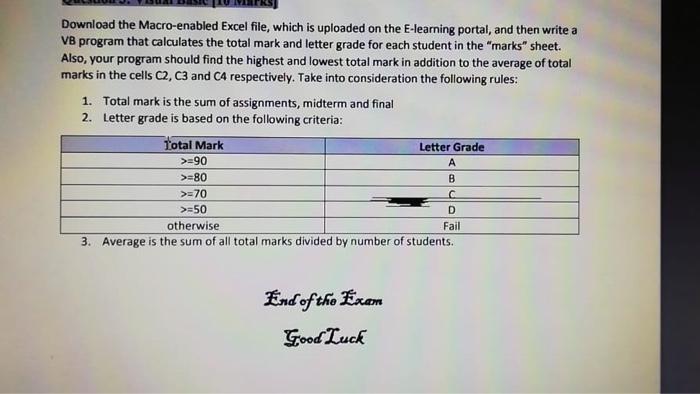
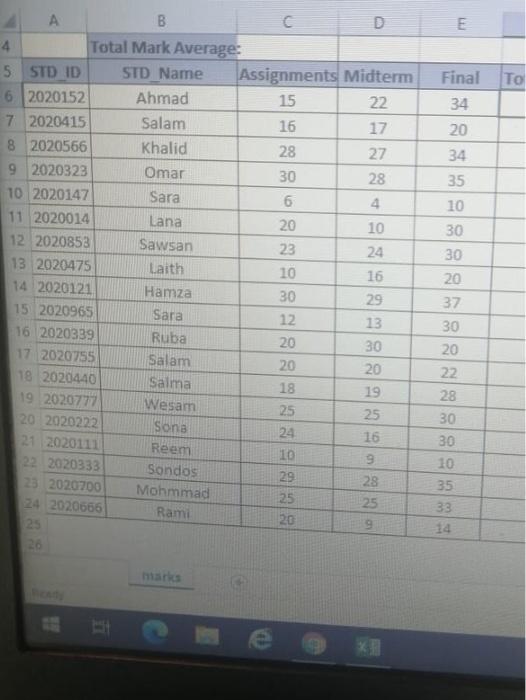
Download the Macro-enabled Excel file, which is uploaded on the E-learning portal, and then write a VB program that calculates the total mark and letter grade for each student in the "marks" sheet. Also, your program should find the highest and lowest total mark in addition to the average of total marks in the cells C2, C3 and CA respectively. Take into consideration the following rules: 1. Total mark is the sum of assignments, midterm and final 2. Letter grade is based on the following criteria: Total Mark Letter Grade >=90 A >=80 B >=70 >=50 otherwise Fail 3. Average is the sum of all total marks divided by number of students. D End of the Exam Good Luck E To Final 34 20 17 34 35 10 30 A B C 4 Total Mark Average: 5 STD ID STD Name Assignments Midterm 6 2020152 Ahmad 15 22 7 2020415 Salam 16 8 2020566 Khalid 28 27 9 2020323 Omar 30 28 10 2020147 Sara 6. 4 11 2020014 Lana 20 10 12 2020853 Sawsan 23 24 13 2020475 Laith 10 16 14 2020121 Hamza 30 29 15 2020965 Sara 12 13 16 2020339 Ruba 20 30 17 2020755 Salam 20 20 18 2020440 Salma 18 19 19 2020777 Wesam 25 25 20 2020222 Sona 24 16 21 2020111 Reem 10 9 22 2020333 Sondos 29 28 23 2020700 Mohmmad 25 25 24 2020666 Rami 20 25 37 30 20 22 28 30 30 10 35 33 14 BR
Step by Step Solution
There are 3 Steps involved in it

Get step-by-step solutions from verified subject matter experts
 Study Help