







Question: Download the Macro-enabled Excel file, which is uploaded on the E-learning portal, and then write a VB program that calculates the total mark and letter
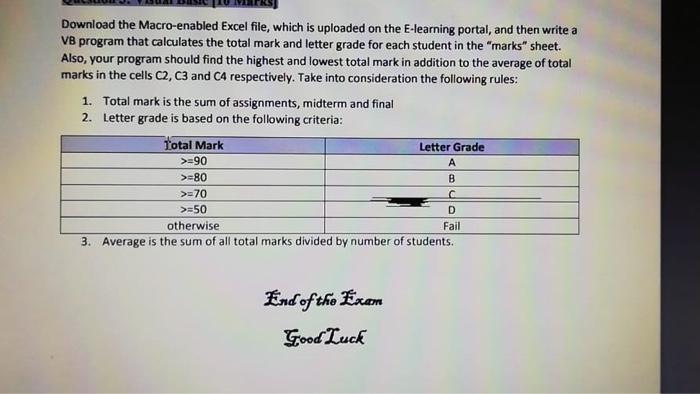
Download the Macro-enabled Excel file, which is uploaded on the E-learning portal, and then write a VB program that calculates the total mark and letter grade for each student in the "marks" sheet. Also, your program should find the highest and lowest total mark in addition to the average of total marks in the cells C2, C3 and CA respectively. Take into consideration the following rules: 1. Total mark is the sum of assignments, midterm and final 2. Letter grade is based on the following criteria: Total Mark Letter Grade >=90 >=80 B >=70 >=50 otherwise 3. Average is the sum of all total marks divided by number of students. D Fail End of the Exam Good Luck Download the Macro-enabled Excel file, which is uploaded on the E-learning portal, and then write a VB program that calculates the total mark and letter grade for each student in the "marks" sheet. Also, your program should find the highest and lowest total mark in addition to the average of total marks in the cells C2, C3 and CA respectively. Take into consideration the following rules: 1. Total mark is the sum of assignments, midterm and final 2. Letter grade is based on the following criteria: Total Mark Letter Grade >=90 >=80 B >=70 >=50 otherwise 3. Average is the sum of all total marks divided by number of students. D Fail End of the Exam Good Luck
Step by Step Solution
There are 3 Steps involved in it

Get step-by-step solutions from verified subject matter experts
 Study Help