



Question: Download this document to your desktop as a Word document. Then, answer the below questions and submit the document using Canvas 1) Part A: (6
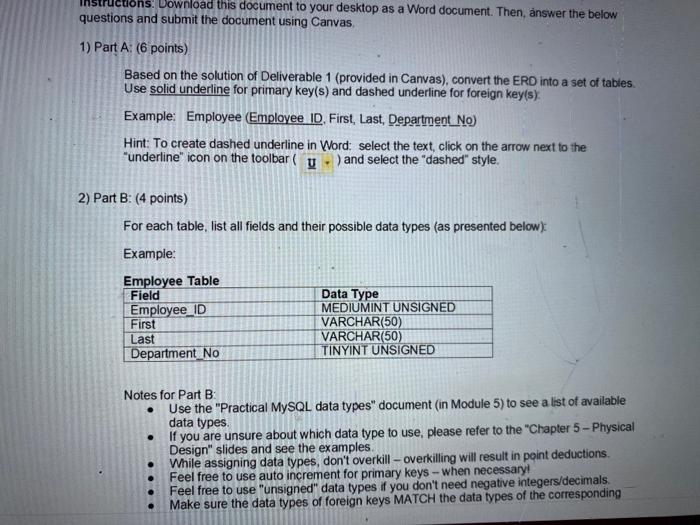
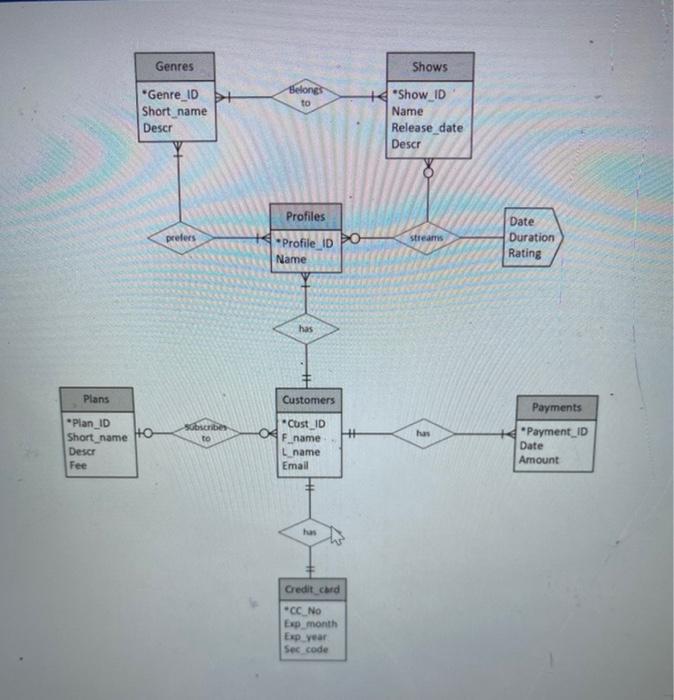
Download this document to your desktop as a Word document. Then, answer the below questions and submit the document using Canvas 1) Part A: (6 points) Based on the solution of Deliverable 1 (provided in Canvas), convert the ERD into a set of tables Use solid underline for primary key(s) and dashed underline for foreign key(s). Example: Employee Employee ID. First, Last, Department No) Hint: To create dashed underline in Word: select the text click on the arrow next to the "underline" icon on the toolbar u - ) and select the "dashed" style. 2) Part B: (4 points) For each table, list all fields and their possible data types (as presented below) Example: Employee Table Field Data Type Employee ID MEDIUMINT UNSIGNED First VARCHAR(50) Last VARCHAR(50) Department No TINYINT UNSIGNED Notes for Part B Use the "Practical MySQL data types" document (in Module 5) to see a list of available data types If you are unsure about which data type to use, please refer to the "Chapter 5 - Physical Design" slides and see the examples While assigning data types, don't overkill-overkilling will result in point deductions Feel free to use auto increment for primary keys - when necessary! Feel free to use "unsigned" datatypes if you don't need negative integers/decimals Make sure the data types of foreign keys MATCH the data types of the corresponding Genres Shows Belongs to "Genre_ID + Short_name Descr + Show_ID Name Release date Descr Profiles prefers streams Profile ID Name Date Duration Rating has Plans Customers Payments Subscribe *CustID OF name has "Plan_ID Short name Ho Descr Fee L name Email Payment ID Date Amount Credit card "CC No Exp_month Exp year Sec code
Step by Step Solution
There are 3 Steps involved in it

Get step-by-step solutions from verified subject matter experts