







Question: Draw an activity diagram based on the scenario/question below: Table 2.3 Use Case Specification for UC010 View User begin{tabular}{|l|l|} hline Use Case ID & UC010
Draw an activity diagram based on the scenario/question below:
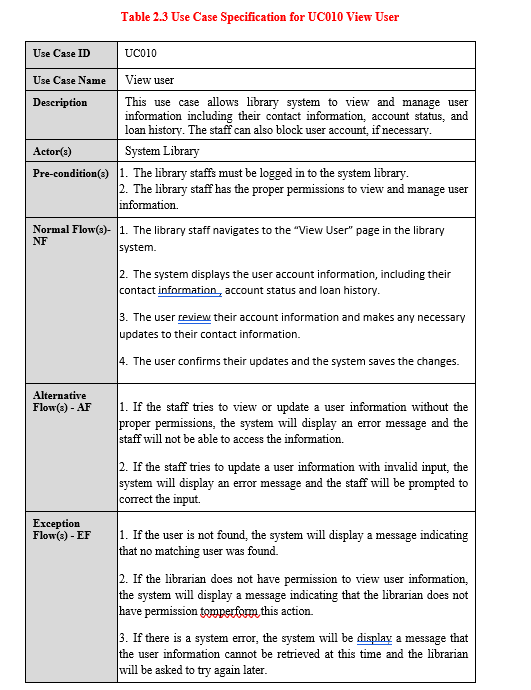

Table 2.3 Use Case Specification for UC010 View User \begin{tabular}{|l|l|} \hline Use Case ID & UC010 \\ \hline Use Case Name & View user \\ \hline Description & This use case allows library system to view and manage user information including their contact information, account status, and loan history. The staff can also block user account, if necessary. \\ \hline Actor(s) & System Library \\ \hline Pre-condition(s) & 1. The library staffs must be logged in to the system library. 2. The library staff has the proper permissions to view and manage user information. \\ \hline Normal Flow(s)-NF & 1. The library staff navigates to the "View User" page in the library system. 2. The system displays the user account information, including their contact information, account status and loan history. 3. The user review their account information and makes any necessary the user information cannot be retrieved at this time and the librarian will be asked to try again later. \\ \hline \end{tabular} \begin{tabular}{|l|l|} \hline Postcondition(s) & 1. The user account information is up-to-date and accurate. 2. Any updates to the user account are saved in the library database. \\ \hline \end{tabular}
Step by Step Solution
There are 3 Steps involved in it

Get step-by-step solutions from verified subject matter experts
 Study Help