







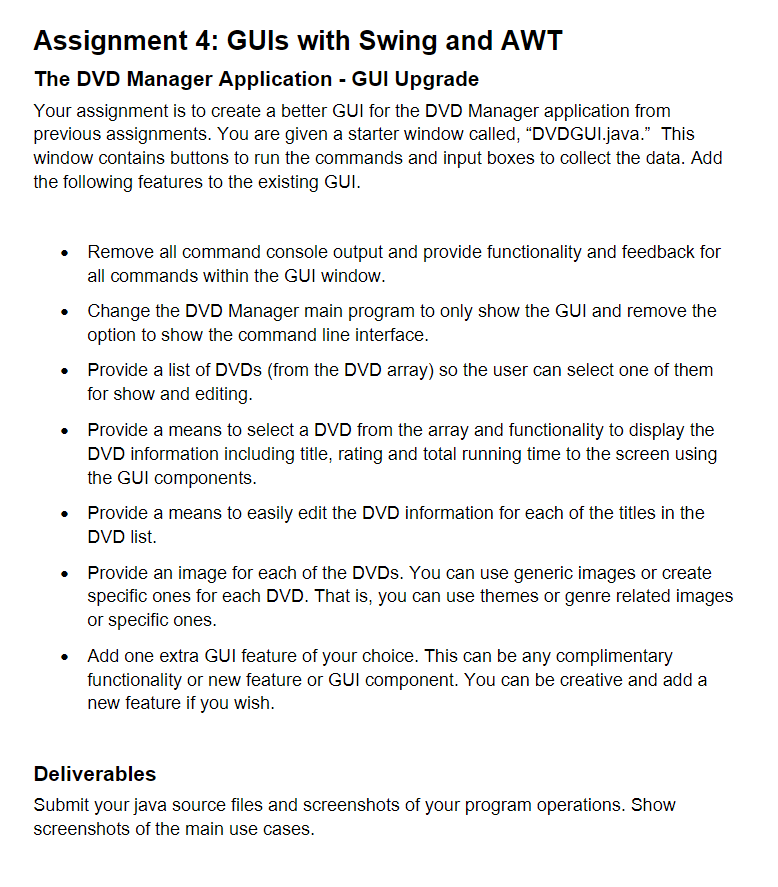
Question: DVD . java and DVDCollection.java screenshots are attached here: DVDConsoleUI.java: import java.util. * ; / * * * This class is an implementation of DVDUserInterface
DVDjava and DVDCollection.java screenshots are attached here:
DVDConsoleUI.java:
import java.util.;
This class is an implementation of DVDUserInterface
that uses the console to display the menu of command choices
public class DVDConsoleUI implements DVDUserInterface
private DVDCollection dvdlist;
private Scanner scan;
public DVDConsoleUIDVDCollection dl
dvdlist dl;
scan new ScannerSystemin;
public void processCommands
String commands AddModify DVD
"Remove DVD
"Get DVDs By Rating",
"Get Total Running Time",
"Save and Exit";
int choice;
do
for int i ; i commands.length; i
System.out.printlnSelect i : commandsi;
try
choice scan.nextInt;
scan.nextLine;
switch choice
case : doAddOrModifyDVD; break;
case : doRemoveDVD; break;
case : doGetDVDsByRating; break;
case : doGetTotalRunningTime; break;
case : doSave; break;
default: System.out.printlnINVALID CHOICE TRY AGAIN";
catch InputMismatchException e
System.out.printlnINVALID CHOICE TRY AGAIN";
scan.nextLine;
choice ;
while choice commands.length;
private void doAddOrModifyDVD
Request the title
System.out.printlnEnter title";
String title scan.nextLine;
if titleequals
return; input was cancelled
title title.toUpperCase;
Request the rating
System.out.printlnEnter rating";
String rating scan.nextLine;
if ratingequals
return; input was cancelled
rating rating.toUpperCase;
Request the running time
System.out.printlnEnter running time";
String time scan.nextLine; NOTE: time read in as a String!
if timeequals
return; input was cancelled
Add or modify the DVD assuming the rating and time are valid
dvdlist.addOrModifyDVDtitle rating, time;
Display current collection to the console for debugging
System.out.printlnAddingModifying: title rating time;
System.out.printlndvdlist;
private void doRemoveDVD
Request the title
System.out.printlnEnter title";
String title scan.nextLine;
if titleequals
return; dialog was cancelled
title title.toUpperCase;
Remove the matching DVD if found
dvdlist.removeDVDtitle;
Display current collection to the console for debugging
System.out.printlnRemoving: title;
System.out.printlndvdlist;
private void doGetDVDsByRating
Request the rating
System.out.printlnEnter rating";
String rating scan.nextLine;
if ratingequals
return; dialog was cancelled
rating rating.toUpperCase;
String results dvdlist.getDVDsByRatingrating;
System.out.printlnDVDs with rating rating;
System.out.printlnresults;
private void doGetTotalRunningTime
int total dvdlist.getTotalRunningTime;
System.out.printlnTotal Running Time of DVDs: ;
System.out.printlntotal;
private void doSave
dvdlist.save;
DVDManager.java:
import java.util.;
Program to display and modify a simple DVD collection
public class DVDManager
public static void mainString args
DVDUserInterface dlInterface;
DVDCollection dl new DVDCollection;
Scanner scan new ScannerSystemin;
System.out.printlnEnter name of data file to load:";
String filename scan.nextLine;
dlloadDatafilename;
System.out.printlnInput interface type: CConsole, GGUI";
String interfaceType scan.nextLine;
if interfaceTypeequalsC
dlInterface new DVDConsoleUIdl;
dlInterface.processCommands;
else if interfaceTypeequalsG
dlInterface new DVDGUIdl;
dlInterface.processCommands;
else
System.out.printlnUnrecognized interface type. Program exiting.";
System.exit;
DVDUserInterface.java:
public interface DVDUserInterface
void processCommands;
Step by Step Solution
There are 3 Steps involved in it
1 Expert Approved Answer
Step: 1 Unlock

Question Has Been Solved by an Expert!
Get step-by-step solutions from verified subject matter experts
Step: 2 Unlock
Step: 3 Unlock
 Study Help