







Question: e) Display routing information b) What is the command to display the router's routing table? f) Display the running configuration 1) What is the command
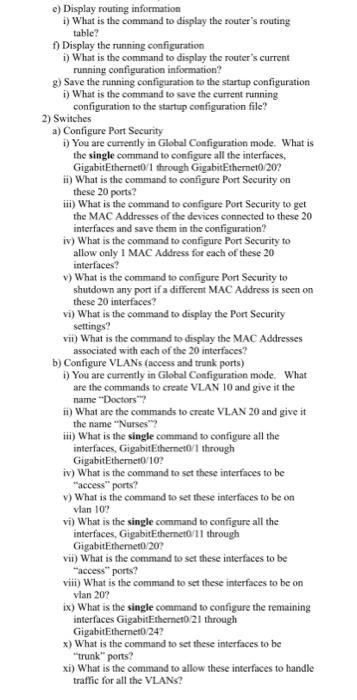
e) Display routing information b) What is the command to display the router's routing table? f) Display the running configuration 1) What is the command to display the router's current running configuration information? 3) Save the running configuration to the startup configuration 1) What is the command to save the current running configuration to the startup configuration file? 2) Switches a) Configure Port Security 1) You are currently in Global Configuration mode. What is the single command to configure all the interfaces, Gigabit Ethernet0/1 through GigabitEthernet0/20? i) What is the command to configure Port Security on these 20 ports? iii) What is the command to configure Port Security to get the MAC Addresses of the devices connected to these 20 interfaces and save them in the configuration? iv) What is the command to configure Port Security to allow only 1 MAC Address for each of these 20 interfaces? ) What is the command to configure Port Security to shutdown any port if a different MAC Address is seen on these 20 interfaces? vi) What is the command to display the Port Security settings? vii) What is the command to display the MAC Adresses associated with each of the 20 interfaces? b) Configure VLANs (access and trunk ports) b) You are currently in Global Configuration mode. What are the commands to create VLAN 10 and give it the name "Doctors? ) What are the commands to create VLAN 20 and give it the name "Nurses"? iii) What is the single command to configure all the interfaces, Gigabit Ethernet0/1 through Gigabit Ethernet0/10? iv) What is the command to set these interfaces to be "access" ports? v) What is the command to set these interfaces to be on vlan 10? vi) What is the single command to configure all the interfaces, Gigabit Ethernet0/11 through Gigabit Ethernet/207 vii) What is the command to set these interfaces to be "access" ports? viii) What is the command to set these interfaces to be on vlan 20? ix) What is the single command to configure the remaining interfaces Gigabit Ethernet0/21 through Gigabit Ethernet0/24 x) What is the command to set these interfaces to be trunk" ports? xi) What is the command to allow these interfaces to handle traffic for all the VLANS
Step by Step Solution
There are 3 Steps involved in it

Get step-by-step solutions from verified subject matter experts
 Study Help