







Question: e. Save and close the workbook, submit the workbook to your instructor, then exit Excel. ndependent Challenge 1 ou are the manager for Smith &
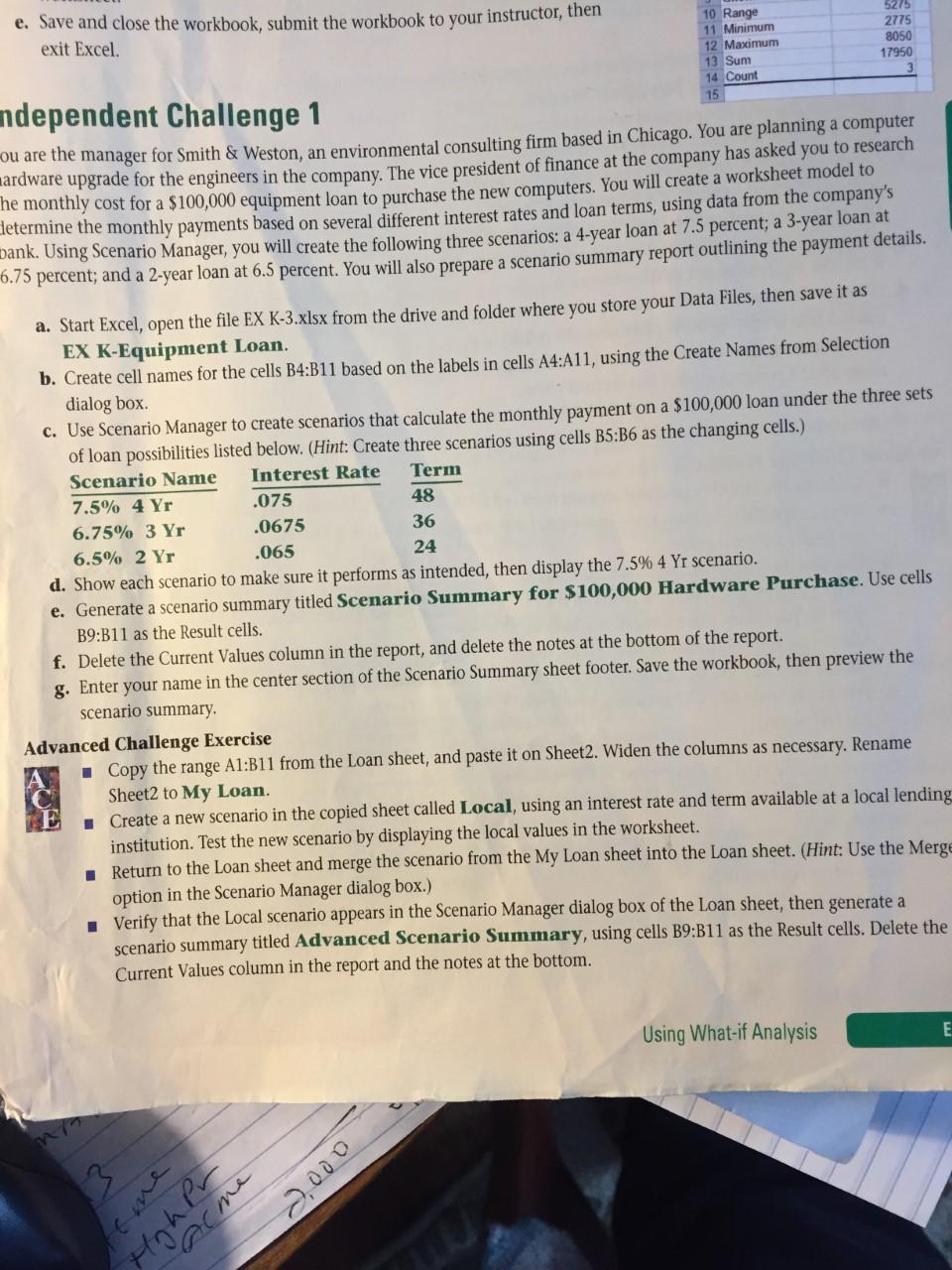
e. Save and close the workbook, submit the workbook to your instructor, then exit Excel. ndependent Challenge 1 ou are the manager for Smith \& Weston, an environmental consulting firm based in Chicago. You are planning a computer lardware upgrade for the engineers in the company. The vice president of finance at the company has asked you to research he monthly cost for a $100,000 equipment loan to purchase the new computers. You will create a worksheet model to letermine the monthly payments based on several different interest rates and loan terms, using data from the company's bank. Using Scenario Manager, you will create the following three scenarios: a 4-year loan at 7.5 percent; a 3-year loan at 6.75 percent; and a 2 -year loan at 6.5 percent. You will also prepare a scenario summary report outlining the payment details. a. Start Excel, open the file EX K-3.xlsx from the drive and folder where you store your Data Files, then save it as EX K-Equipment Loan. b. Create cell names for the cells B4:B11 based on the labels in cells A4:A11, using the Create Names from Selection dialog box. c. Use Scenario Manager to create scenarios that calculate the monthly payment on a $100,000 loan under the three sets of loan possibilities listed below. (Hint: Create three scenarios using cells B5:B6 as the changing cells.) d. Show each scenario to make sure it pertorms as munucu, then display the 7.5%4 Yr scenario. e. Generate a scenario summary titled Scenario Summary for $100,000 Hardware Purchase. Use cells B9:B11 as the Result cells. f. Delete the Current Values column in the report, and delete the notes at the bottom of the report. g. Enter your name in the center section of the Scenario Summary sheet footer. Save the workbook, then preview the scenario summary. Advanced Challenge Exercise - Copy the range A1:B11 from the Loan sheet, and paste it on Sheet2. Widen the columns as necessary. Rename Sheet2 to My Loan. - Create a new scenario in the copied sheet called Local, using an interest rate and term available at a local lending institution. Test the new scenario by displaying the local values in the worksheet. - Return to the Loan sheet and merge the scenario from the My Loan sheet into the Loan sheet. (Hint: Use the Merge option in the Scenario Manager dialog box.) - Verify that the Local scenario appears in the Scenario Manager dialog box of the Loan sheet, then generate a scenario summary titled Advanced Scenario Summary, using cells B9:B11 as the Result cells. Delete the Current Values column in the report and the notes at the bottom. e. Save and close the workbook, submit the workbook to your instructor, then exit Excel. ndependent Challenge 1 ou are the manager for Smith \& Weston, an environmental consulting firm based in Chicago. You are planning a computer lardware upgrade for the engineers in the company. The vice president of finance at the company has asked you to research he monthly cost for a $100,000 equipment loan to purchase the new computers. You will create a worksheet model to letermine the monthly payments based on several different interest rates and loan terms, using data from the company's bank. Using Scenario Manager, you will create the following three scenarios: a 4-year loan at 7.5 percent; a 3-year loan at 6.75 percent; and a 2 -year loan at 6.5 percent. You will also prepare a scenario summary report outlining the payment details. a. Start Excel, open the file EX K-3.xlsx from the drive and folder where you store your Data Files, then save it as EX K-Equipment Loan. b. Create cell names for the cells B4:B11 based on the labels in cells A4:A11, using the Create Names from Selection dialog box. c. Use Scenario Manager to create scenarios that calculate the monthly payment on a $100,000 loan under the three sets of loan possibilities listed below. (Hint: Create three scenarios using cells B5:B6 as the changing cells.) d. Show each scenario to make sure it pertorms as munucu, then display the 7.5%4 Yr scenario. e. Generate a scenario summary titled Scenario Summary for $100,000 Hardware Purchase. Use cells B9:B11 as the Result cells. f. Delete the Current Values column in the report, and delete the notes at the bottom of the report. g. Enter your name in the center section of the Scenario Summary sheet footer. Save the workbook, then preview the scenario summary. Advanced Challenge Exercise - Copy the range A1:B11 from the Loan sheet, and paste it on Sheet2. Widen the columns as necessary. Rename Sheet2 to My Loan. - Create a new scenario in the copied sheet called Local, using an interest rate and term available at a local lending institution. Test the new scenario by displaying the local values in the worksheet. - Return to the Loan sheet and merge the scenario from the My Loan sheet into the Loan sheet. (Hint: Use the Merge option in the Scenario Manager dialog box.) - Verify that the Local scenario appears in the Scenario Manager dialog box of the Loan sheet, then generate a scenario summary titled Advanced Scenario Summary, using cells B9:B11 as the Result cells. Delete the Current Values column in the report and the notes at the bottom
Step by Step Solution
There are 3 Steps involved in it

Get step-by-step solutions from verified subject matter experts
 Study Help