







Question: Easy PYTHON question GUI Programming Using the following code in the picture below, Add a Label so you get the following output in the window(check
Easy PYTHON question
GUI Programming
Using the following code in the picture below,
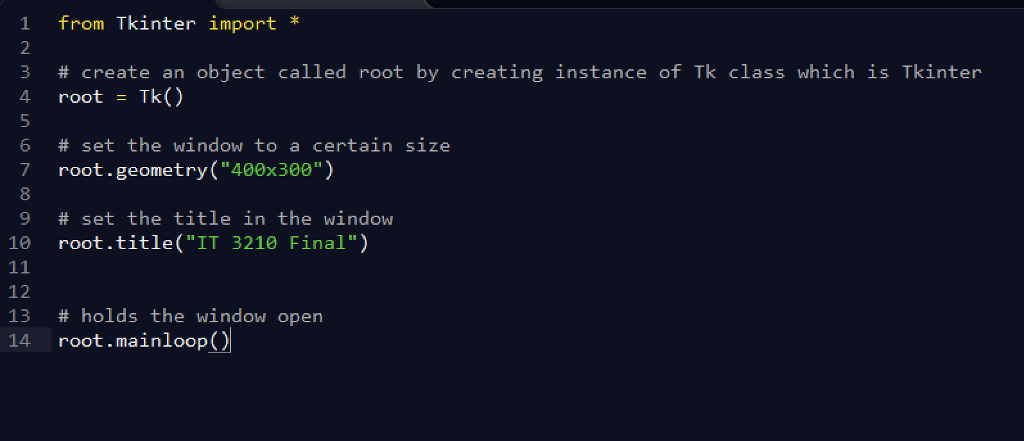
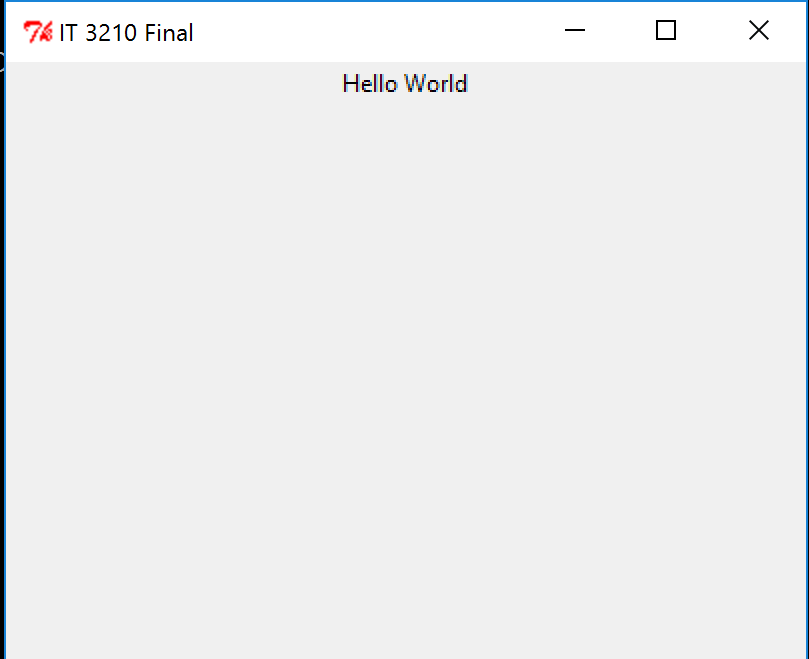
Add a Label so you get the following output in the window(check below picture)
1 from Tkinter import * 2 # create an object called root by creating instance of Tk class which is Tkinter 4 root-Tk() 6 # set the window to a certain size 7 root.geometry("400x300") 8 9 # set the title in the window 10 root.title("IT 3210 Final") 12 13 # holds the window open root.mainloop
Step by Step Solution
There are 3 Steps involved in it
1 Expert Approved Answer
Step: 1 Unlock

Question Has Been Solved by an Expert!
Get step-by-step solutions from verified subject matter experts
Step: 2 Unlock
Step: 3 Unlock
 Study Help