





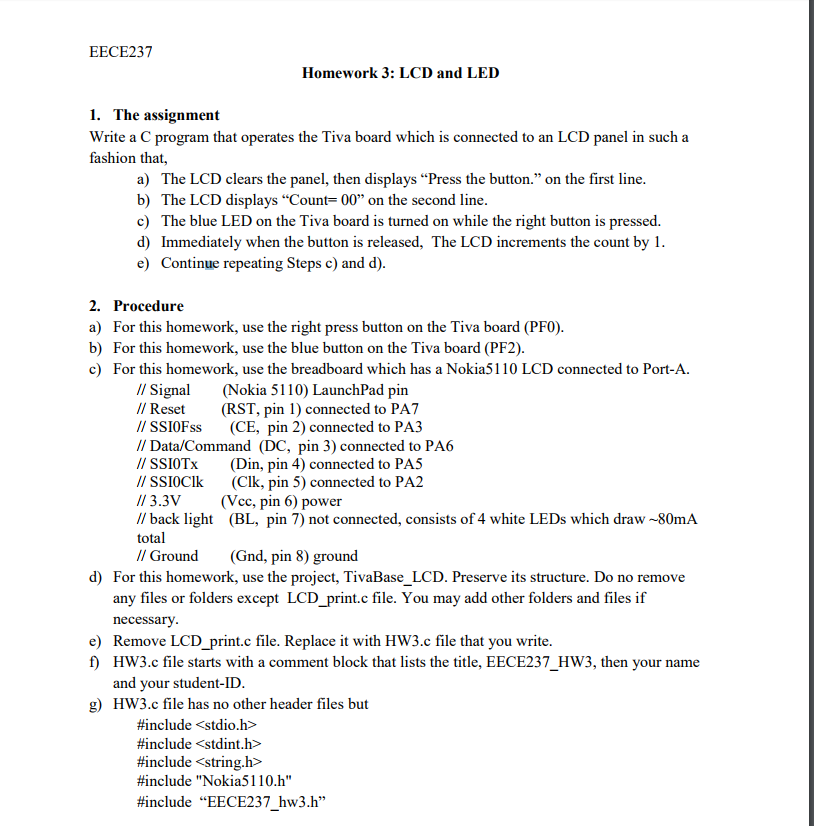
Question: EECE237 Homework 3: LCD and LED 1. The assignment Write a C program that operates the Tiva board which is connected to an LCD panel
 EECE237 Homework 3: LCD and LED 1. The assignment Write a

EECE237 Homework 3: LCD and LED 1. The assignment Write a C program that operates the Tiva board which is connected to an LCD panel in sucha fashion that, a) The LCD clears the panel, then displays "Press the button." on the first line b) The LCD displays "Count-00" on the second line c) The blue LED on the Tiva board is turned on while the right button is pressed. d) Immediately when the button is released, The LCD increments the count by 1 e) Continue repeating Steps c) and d) 2. a) b) c) Procedure For this homework, use the right press button on the Tiva board (PF0) For this homework, use the blue button on the Tiva board (PF2) For this homework, use the breadboard which has a Nokia5110 LCD connected to Port-A. // Signal (Nokia 5110) LaunchPad pirn I/ Reset (RST, pin 1) connected to PA7 // SSIOFss (CE, pin 2) connected to PA3 I/ Data/Command (DC, pin 3) connected to PA6 IOTx (Din, pin 4) connected to PA5 // SSIOClk (Clk, pin 5) connected to PA2 //3.3V(Vcc, pin 6) power // back light (BL, pin 7) not connected, consists of 4 white LEDs which draw -80mA total I/ Ground (Gnd, pin 8) ground d) For this homework, use the project, TivaBase_LCD. Preserve its structure. Do no remove any files or folders except LCD print.c file. You may add other folders and files if necessary e) Remove LCD print.c file. Replace it with HW3.c file that you write f) HW3.c file starts with a comment block that lists the title, EECE237_HW3, then your name and your student-ID g) HW3.c file has no other header files but #include #include include #include "Nokia51 10.h" #include "EECE237 hw3.h" EECE237 Homework 3: LCD and LED 1. The assignment Write a C program that operates the Tiva board which is connected to an LCD panel in sucha fashion that, a) The LCD clears the panel, then displays "Press the button." on the first line b) The LCD displays "Count-00" on the second line c) The blue LED on the Tiva board is turned on while the right button is pressed. d) Immediately when the button is released, The LCD increments the count by 1 e) Continue repeating Steps c) and d) 2. a) b) c) Procedure For this homework, use the right press button on the Tiva board (PF0) For this homework, use the blue button on the Tiva board (PF2) For this homework, use the breadboard which has a Nokia5110 LCD connected to Port-A. // Signal (Nokia 5110) LaunchPad pirn I/ Reset (RST, pin 1) connected to PA7 // SSIOFss (CE, pin 2) connected to PA3 I/ Data/Command (DC, pin 3) connected to PA6 IOTx (Din, pin 4) connected to PA5 // SSIOClk (Clk, pin 5) connected to PA2 //3.3V(Vcc, pin 6) power // back light (BL, pin 7) not connected, consists of 4 white LEDs which draw -80mA total I/ Ground (Gnd, pin 8) ground d) For this homework, use the project, TivaBase_LCD. Preserve its structure. Do no remove any files or folders except LCD print.c file. You may add other folders and files if necessary e) Remove LCD print.c file. Replace it with HW3.c file that you write f) HW3.c file starts with a comment block that lists the title, EECE237_HW3, then your name and your student-ID g) HW3.c file has no other header files but #include #include include #include "Nokia51 10.h" #include "EECE237 hw3.h

Step by Step Solution

There are 3 Steps involved in it

1 Expert Approved Answer
Step: 1 Unlock blur-text-image
Question Has Been Solved by an Expert!

Get step-by-step solutions from verified subject matter experts

Step: 2 Unlock
Step: 3 Unlock

Students Have Also Explored These Related Databases Questions!