







Question: 'egrep' runs grep in a different mode. Same as grep -E. Special characters don't have to be marked with So + is written+..is written (...),
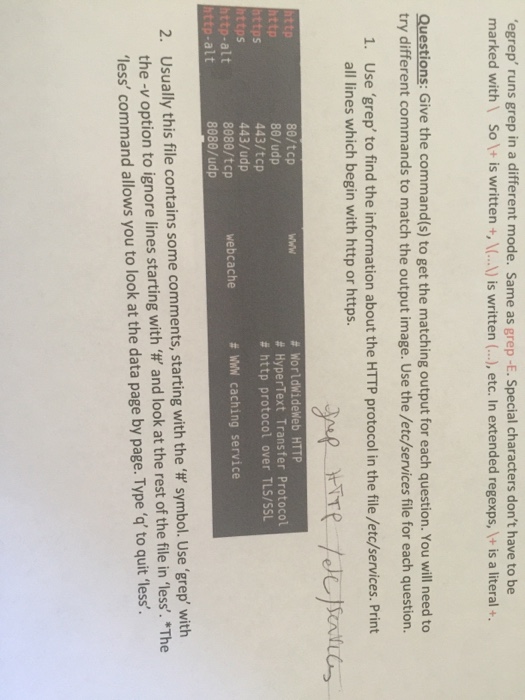
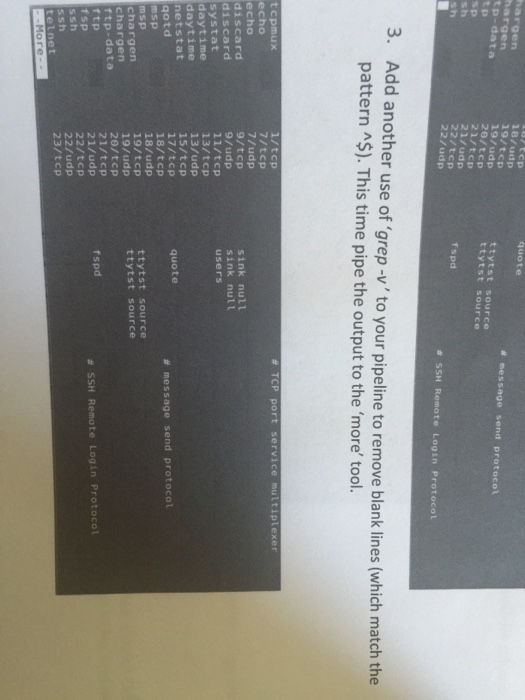
'egrep' runs grep in a different mode. Same as grep -E. Special characters don't have to be marked with So + is written+..is written (...), etc. In extended regexps, + is a literal + Questions: Give the command(s) to get the matching output for each question. You will need to try different commands to match the output image. Use the /etc/services file for each question. 1. Use 'grep' to find the information about the HTTP protocol in the file /etc/services. Print all lines which begin with http or https. 80/tcp 80/udp 443/tcp 443/udp 8080/tcp 888/udp # WorldWideWeb HTTP # HyperText Transfer Protocol # http protocol over TLS/SSL WWw ttps ps http-alt ttp-alt webcache # WIN caching service Usually this file contains some comments, starting with the the-v option to ignore lines starting with and look at the rest of the file in less. "The less' command allows you to look at the data page by page. Typeto quit 'less' 2. symbol. Use 'grep, with
Step by Step Solution
There are 3 Steps involved in it

Get step-by-step solutions from verified subject matter experts
 Study Help