







Question: Please code in Linux. AWS is just the Amazon cloud computing services. do not worry about that part. if need be just put the syntax
Please code in Linux. AWS is just the Amazon cloud computing services. do not worry about that part. if need be just put the syntax coding for each section.
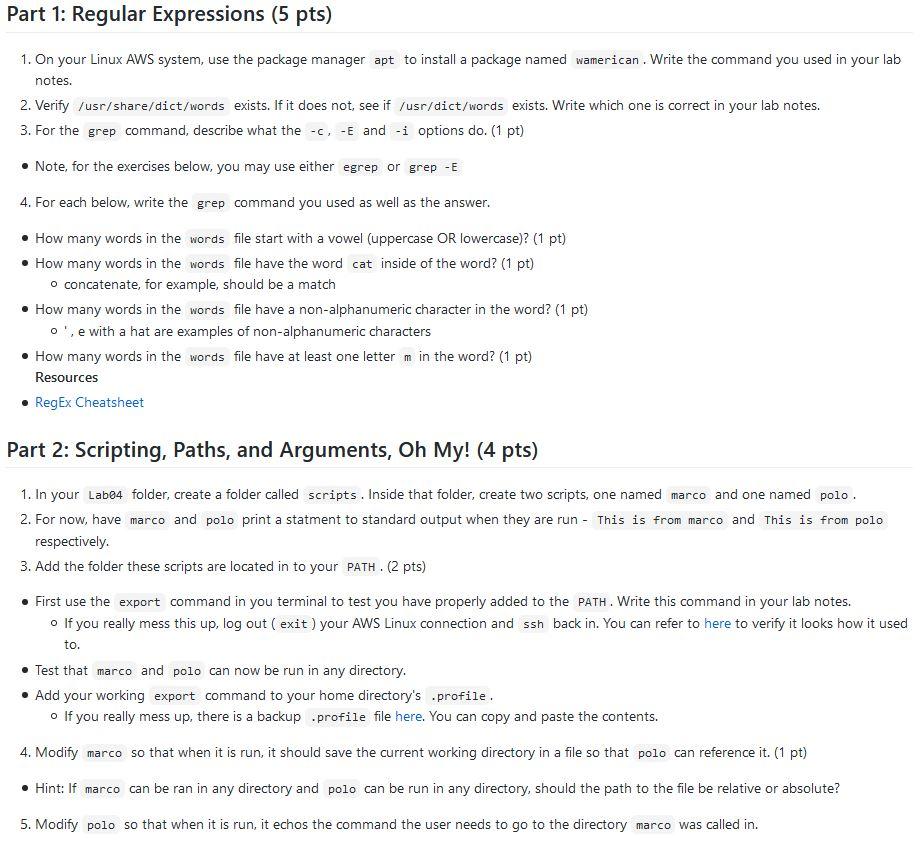
Part 1: Regular Expressions (5 pts) 1. On your Linux AWS system, use the package manager apt to install a package named wamerican. Write the command you used in your lab notes. 2. Verify /usr/share/dict/words exists. If it does not see if /usr/dict/words exists. Write which one is correct in your lab notes. 3. For the grep command, describe what the -c, -E and -i options do. (1 pt) Note, for the exercises below, you may use either egrep or grep - E 4. For each below, write the grep command you used as well as the answer. How many words in the words file start with a vowel (uppercase OR lowercase)? (1 pt) How many words in the words file have the word cat inside of the word? (1 pt) o concatenate, for example, should be a match How many words in the words file have a non-alphanumeric character in the word? (1 pt) o', e with a hat are examples of non-alphanumeric characters How many words in the words file have at least one letter m in the word? (1 pt) Resources RegEx Cheatsheet Part 2: Scripting, Paths, and Arguments, Oh My! (4 pts) 1. In your Lab4 folder, create a folder called scripts. Inside that folder, create two scripts, one named marco and one named polo. 2. For now, have marco and polo print a statment to standard output when they are run - This is from marco and This is from polo respectively. 3. Add the folder these scripts are located in to your PATH. (2 pts) First use the export command in you terminal to test you have properly added to the PATH. Write this command in your lab notes. o If you really mess this up, log out ( exit ) your AWS Linux connection and ssh back in. You can refer to here to verify it looks how it used to. Test that marco and polo can now be run in any directory. Add your working export command to your home directory's .profile. o If you really mess up, there is a backup .profile file here. You can copy and paste the contents. 4. Modify marca rco so that when it is run, it should save the current working directory in a file so that polo can reference it. (1 pt) Hint: If marco can be ran in any directory and polo can be run in any directory, should the path to the file be relative or absolute? 5. Modify polo so that when it is run, it echos the command the user needs to go to the directory marco was called in. Part 1: Regular Expressions (5 pts) 1. On your Linux AWS system, use the package manager apt to install a package named wamerican. Write the command you used in your lab notes. 2. Verify /usr/share/dict/words exists. If it does not see if /usr/dict/words exists. Write which one is correct in your lab notes. 3. For the grep command, describe what the -c, -E and -i options do. (1 pt) Note, for the exercises below, you may use either egrep or grep - E 4. For each below, write the grep command you used as well as the answer. How many words in the words file start with a vowel (uppercase OR lowercase)? (1 pt) How many words in the words file have the word cat inside of the word? (1 pt) o concatenate, for example, should be a match How many words in the words file have a non-alphanumeric character in the word? (1 pt) o', e with a hat are examples of non-alphanumeric characters How many words in the words file have at least one letter m in the word? (1 pt) Resources RegEx Cheatsheet Part 2: Scripting, Paths, and Arguments, Oh My! (4 pts) 1. In your Lab4 folder, create a folder called scripts. Inside that folder, create two scripts, one named marco and one named polo. 2. For now, have marco and polo print a statment to standard output when they are run - This is from marco and This is from polo respectively. 3. Add the folder these scripts are located in to your PATH. (2 pts) First use the export command in you terminal to test you have properly added to the PATH. Write this command in your lab notes. o If you really mess this up, log out ( exit ) your AWS Linux connection and ssh back in. You can refer to here to verify it looks how it used to. Test that marco and polo can now be run in any directory. Add your working export command to your home directory's .profile. o If you really mess up, there is a backup .profile file here. You can copy and paste the contents. 4. Modify marca rco so that when it is run, it should save the current working directory in a file so that polo can reference it. (1 pt) Hint: If marco can be ran in any directory and polo can be run in any directory, should the path to the file be relative or absolute? 5. Modify polo so that when it is run, it echos the command the user needs to go to the directory marco was called in
Step by Step Solution
There are 3 Steps involved in it

Get step-by-step solutions from verified subject matter experts
 Study Help