







Question: ELEN 306 Microprocessor Interfacing Laboratory Spring 2017 Lab 5A INTRODUCTION To ASSEMBLY LANGUAGE PROGRAMMING Fundamentals of Assembly Language An assembler (program) is required to execute
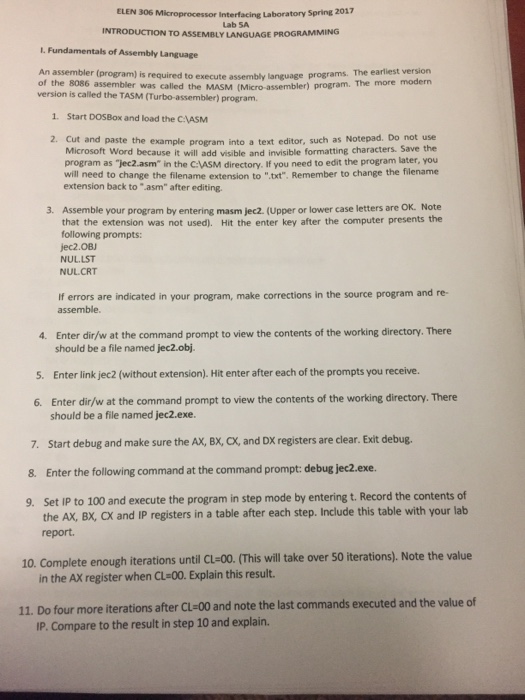
ELEN 306 Microprocessor Interfacing Laboratory Spring 2017 Lab 5A INTRODUCTION To ASSEMBLY LANGUAGE PROGRAMMING Fundamentals of Assembly Language An assembler (program) is required to execute assembly language programs. The earliest version of the 8086 assembler was called the (Micro assembler) program. The more modern MASM version is called the TASM (Turbo assembler) program. 1. Start DOSBox and load the CNASM 2. Cut and paste the example program into a text editor, such as Notepad. Do not use Microsoft Word because it will add visible and invisible formatting characters. Save the program as Tec2 asm" in the CAASM directory if you need to edit the program later, you will need to change the filename extension to ".txt". Remember to change the filename extension back to "asm" after editing. 3. Assemble your program by entering masm (Upper or lower case letters are OK. Note jec2. that the extension was not used). Hit the enter key after the computer presents the following prompts: jec2.OBJ NULLST NUL CRT errors are indicated in your program, make corrections in the source program and re- assemble. 4. Enter dir/w at the command prompt to view the contents of the working directory. There should be a file named jec2.obj. 5. Enter link jec2 (without extension). Hit enter after each of the prompts you receive. 6. Enter dir/w at the command prompt to view the contents of the working directory. There should be a file named jec2.exe. 7. Start debug and make sure the Ax, Bx, o, and Dx registers are clear. Exit debug. 8. Enter the following command at the command prompt: debug jec2.exe. 9. Set IP to 100 and execute the program in step mode by entering t. Record the contents of the Ax, Bx, ox and IP registers in a table after each step. Include this table with your lab report. 10. Complete enough iterations until cu 00. This will take over 50 iterations). Note the value in the Ax register when CL 00. Explain this result. 11. Do four more iterations after cu 00 and note the last commands executed and the value of IP. Compare to the result in step 10 and explain. ELEN 306 Microprocessor Interfacing Laboratory Spring 2017 Lab 5A INTRODUCTION To ASSEMBLY LANGUAGE PROGRAMMING Fundamentals of Assembly Language An assembler (program) is required to execute assembly language programs. The earliest version of the 8086 assembler was called the (Micro assembler) program. The more modern MASM version is called the TASM (Turbo assembler) program. 1. Start DOSBox and load the CNASM 2. Cut and paste the example program into a text editor, such as Notepad. Do not use Microsoft Word because it will add visible and invisible formatting characters. Save the program as Tec2 asm" in the CAASM directory if you need to edit the program later, you will need to change the filename extension to ".txt". Remember to change the filename extension back to "asm" after editing. 3. Assemble your program by entering masm (Upper or lower case letters are OK. Note jec2. that the extension was not used). Hit the enter key after the computer presents the following prompts: jec2.OBJ NULLST NUL CRT errors are indicated in your program, make corrections in the source program and re- assemble. 4. Enter dir/w at the command prompt to view the contents of the working directory. There should be a file named jec2.obj. 5. Enter link jec2 (without extension). Hit enter after each of the prompts you receive. 6. Enter dir/w at the command prompt to view the contents of the working directory. There should be a file named jec2.exe. 7. Start debug and make sure the Ax, Bx, o, and Dx registers are clear. Exit debug. 8. Enter the following command at the command prompt: debug jec2.exe. 9. Set IP to 100 and execute the program in step mode by entering t. Record the contents of the Ax, Bx, ox and IP registers in a table after each step. Include this table with your lab report. 10. Complete enough iterations until cu 00. This will take over 50 iterations). Note the value in the Ax register when CL 00. Explain this result. 11. Do four more iterations after cu 00 and note the last commands executed and the value of IP. Compare to the result in step 10 and explain
Step by Step Solution
There are 3 Steps involved in it

Get step-by-step solutions from verified subject matter experts
 Study Help