







Question: Employee Sales Summary sheet (Note: Do not make any changes to the Employee Sales October, November, or December sheets). 1. Replace the Sales value for
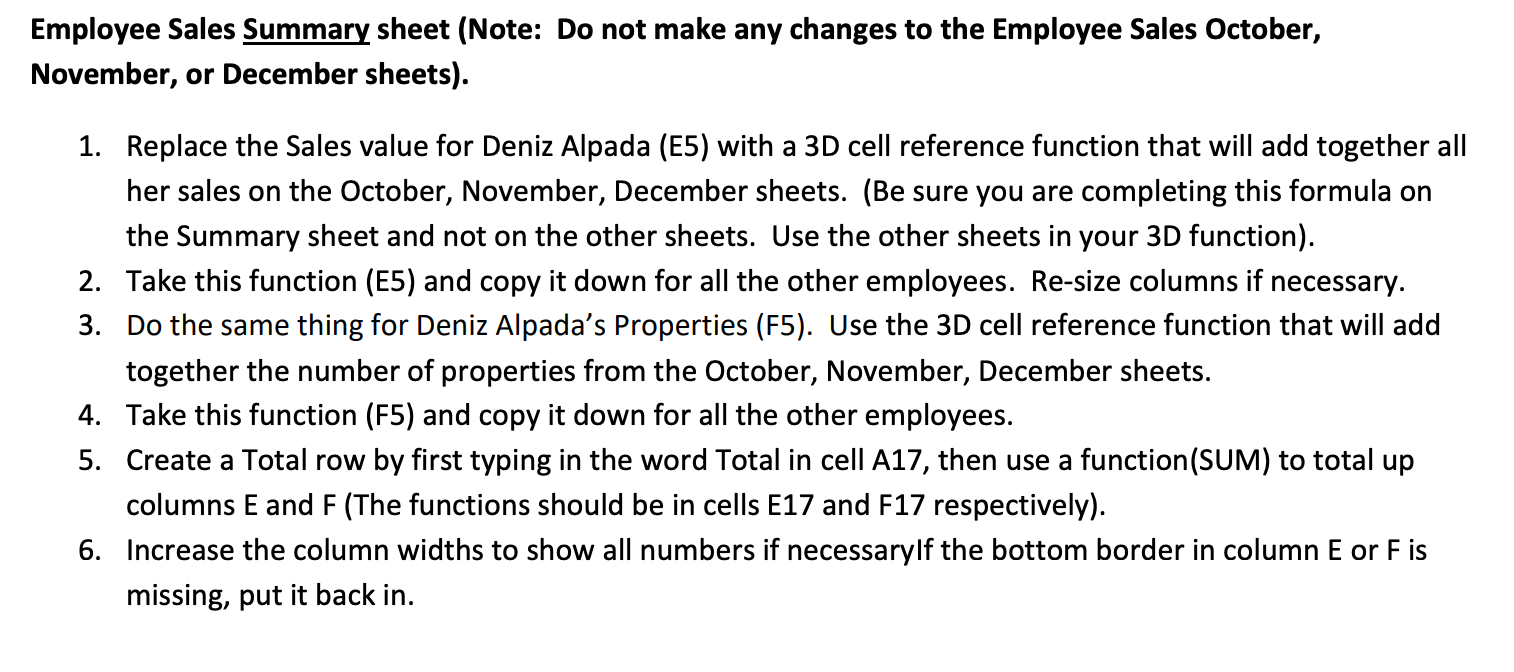
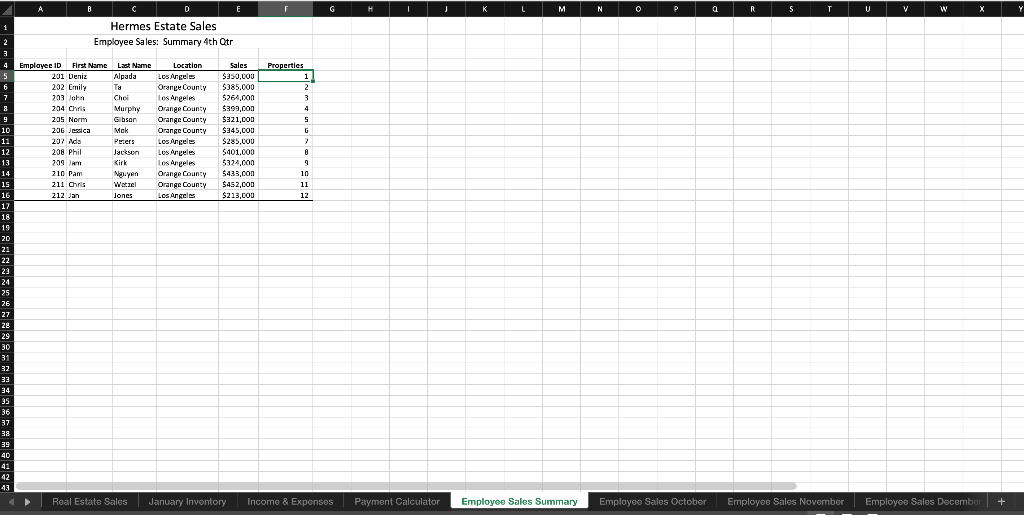
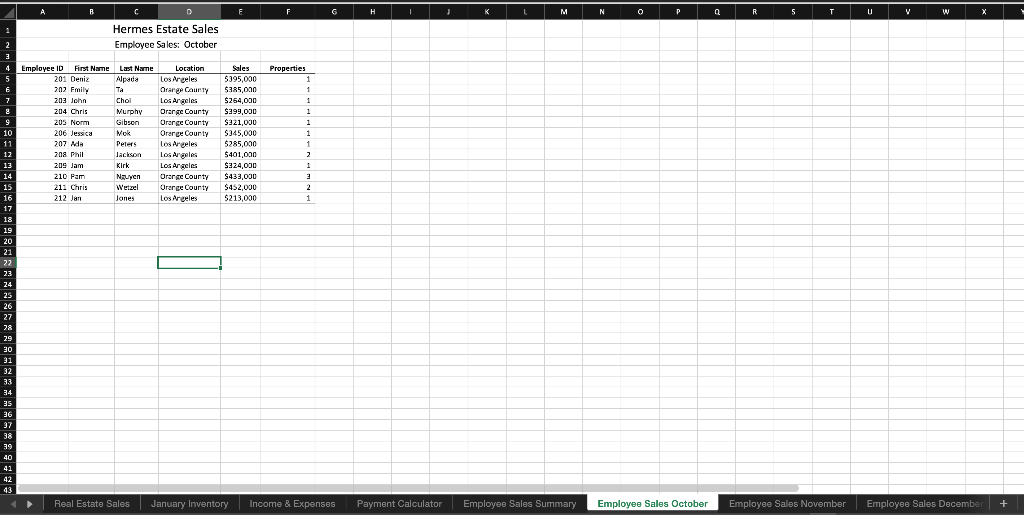
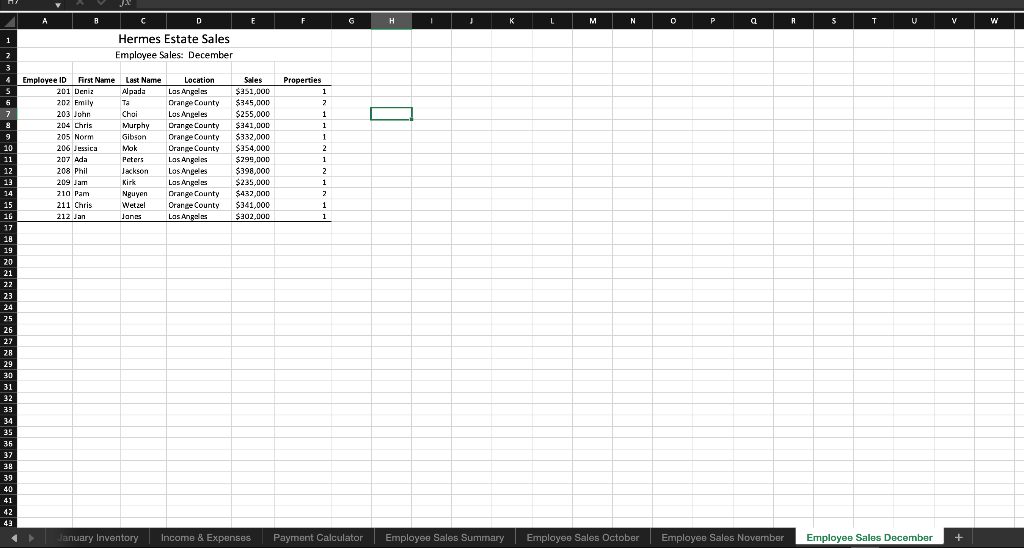
Employee Sales Summary sheet (Note: Do not make any changes to the Employee Sales October, November, or December sheets). 1. Replace the Sales value for Deniz Alpada (E5) with a 3D cell reference function that will add together all her sales on the October, November, December sheets. (Be sure you are completing this formula on the Summary sheet and not on the other sheets. Use the other sheets in your 3D function). 2. Take this function (E5) and copy it down for all the other employees. Re-size columns if necessary. 3. Do the same thing for Deniz Alpada's Properties (F5). Use the 3D cell reference function that will add together the number of properties from the October, November, December sheets. 4. Take this function (F5) and copy it down for all the other employees. 5. Create a Total row by first typing in the word Total in cell A17, then us a function(SUM) to total up columns E and F (The functions should be in cells E17 and F17 respectively). 6. Increase the column widths to show all numbers if necessarylf the bottom border in column E or F is missing, put it back in. B D L M N 0 P a R 5 U V W Hermes Estate Sales Employee Sales: Summary 4th Otr Properties 1 2 3 4 5 Employee ID ec ID First Name Last Name 201 Deniz Alpada 202 Emily 203 John Chel 204 Chris Murphy 205 Norm Gibson 206 Jessica Mok 207 Ada Peters 208 Phil Jackson 209 Ant Kirk 210 Pam Nguyer zil Chris Wetzel 212 Jan Jones 6 7 8 9 10 11 12 13 14 15 16 17 18 19 20 21 22 23 24 25 26 Location Los Angels Orange County Los Angeles Orange County Orange County Orange County Los Angeles Los Angeles Los Angeles Orange County Orange County Los Angeles Sales $350,000 $385.000 $264,000 $399,000 $321,000 $245,000 $285,000 $401,000 101.600 $324,000 $433,con $ $452,con $213,000 G 2 A 9 10 11 12 27 28 29 30 31 32 33 34 35 36 37 38 39 40 42 43 Real Estate Sales January Inventory Income & Expenses Payment Calculator Employee Sales Summary Employee Sales October Employee Sales November Employoo Sales December + Hermes Estate Sale Employee Sales: October Employee Sales S Employee Sales October Hermes Estate Sales Employee Sales: November A D F G H L M N o P Q R S T V w Hermes Estate Sales Employee Sales: December Properties 1 2 6 1 1 1 Employee ID First Name Last Name 201 Deniz Alpada 202 Emily Ta 203 John Choi 204 Chris Murphy 205 Norr Gibson 206 Jessica Mok 207 Ada Peters 208 Phil Jackson 209 Jam Kirk 210 Pam | Nguoi 211 Chris Wetzel 212 Jan Janes Location Los Angeles Orange County Los Angeles Orange County Orange County Orange County Los Angeles Los Angeles Los Angeles Orange County Orange County Los Angeles Sales $351,000 $345,000 $255,000 $ $341,000 $332,000 $354,000 $299,000 $398,000 $235.000 $432,000 $341,000 $302.000 2 1 2 1 2 1 1 9 10 11 12 13 14 15 16 17 18 19 20 21 22 23 24 25 26 27 28 29 30 31 32 33 34 35 35 37 38 39 40 41 42 43 January Inventory Income & Expenses Payment Calculator Employee Sales Summary Employee Sales October Employee Sales November Employee Sales December + Employee Sales Summary sheet (Note: Do not make any changes to the Employee Sales October, November, or December sheets). 1. Replace the Sales value for Deniz Alpada (E5) with a 3D cell reference function that will add together all her sales on the October, November, December sheets. (Be sure you are completing this formula on the Summary sheet and not on the other sheets. Use the other sheets in your 3D function). 2. Take this function (E5) and copy it down for all the other employees. Re-size columns if necessary. 3. Do the same thing for Deniz Alpada's Properties (F5). Use the 3D cell reference function that will add together the number of properties from the October, November, December sheets. 4. Take this function (F5) and copy it down for all the other employees. 5. Create a Total row by first typing in the word Total in cell A17, then us a function(SUM) to total up columns E and F (The functions should be in cells E17 and F17 respectively). 6. Increase the column widths to show all numbers if necessarylf the bottom border in column E or F is missing, put it back in. B D L M N 0 P a R 5 U V W Hermes Estate Sales Employee Sales: Summary 4th Otr Properties 1 2 3 4 5 Employee ID ec ID First Name Last Name 201 Deniz Alpada 202 Emily 203 John Chel 204 Chris Murphy 205 Norm Gibson 206 Jessica Mok 207 Ada Peters 208 Phil Jackson 209 Ant Kirk 210 Pam Nguyer zil Chris Wetzel 212 Jan Jones 6 7 8 9 10 11 12 13 14 15 16 17 18 19 20 21 22 23 24 25 26 Location Los Angels Orange County Los Angeles Orange County Orange County Orange County Los Angeles Los Angeles Los Angeles Orange County Orange County Los Angeles Sales $350,000 $385.000 $264,000 $399,000 $321,000 $245,000 $285,000 $401,000 101.600 $324,000 $433,con $ $452,con $213,000 G 2 A 9 10 11 12 27 28 29 30 31 32 33 34 35 36 37 38 39 40 42 43 Real Estate Sales January Inventory Income & Expenses Payment Calculator Employee Sales Summary Employee Sales October Employee Sales November Employoo Sales December + Hermes Estate Sale Employee Sales: October Employee Sales S Employee Sales October Hermes Estate Sales Employee Sales: November A D F G H L M N o P Q R S T V w Hermes Estate Sales Employee Sales: December Properties 1 2 6 1 1 1 Employee ID First Name Last Name 201 Deniz Alpada 202 Emily Ta 203 John Choi 204 Chris Murphy 205 Norr Gibson 206 Jessica Mok 207 Ada Peters 208 Phil Jackson 209 Jam Kirk 210 Pam | Nguoi 211 Chris Wetzel 212 Jan Janes Location Los Angeles Orange County Los Angeles Orange County Orange County Orange County Los Angeles Los Angeles Los Angeles Orange County Orange County Los Angeles Sales $351,000 $345,000 $255,000 $ $341,000 $332,000 $354,000 $299,000 $398,000 $235.000 $432,000 $341,000 $302.000 2 1 2 1 2 1 1 9 10 11 12 13 14 15 16 17 18 19 20 21 22 23 24 25 26 27 28 29 30 31 32 33 34 35 35 37 38 39 40 41 42 43 January Inventory Income & Expenses Payment Calculator Employee Sales Summary Employee Sales October Employee Sales November Employee Sales December +
Step by Step Solution
There are 3 Steps involved in it

Get step-by-step solutions from verified subject matter experts
 Study Help