







Question: Employee Sales Summary sheet (Note: Do not make any changes to the Employee Sales October, November, or December sheets). 1. Replace the Sales value for
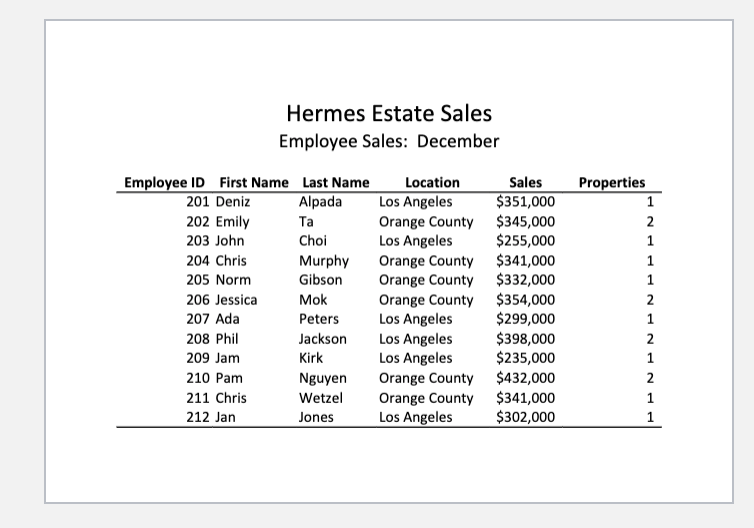
Employee Sales Summary sheet (Note: Do not make any changes to the Employee Sales October, November, or December sheets). 1. Replace the Sales value for Deniz Alpada (E5) with a 3D cell reference function that will add together all her sales on the October, November, December sheets. (Be sure you are completing this formula on the Summary sheet and not on the other sheets. Use the other sheets in your 3D function). 2. Take this function (E5) and copy it down for all the other employees. Re-size columns if necessary. 3. Do the same thing for Deniz Alpadas Properties (F5). Use the 3D cell reference function that will add together the number of properties from the October, November, December sheets. 4. Take this function (F5) and copy it down for all the other employees. 5. Create a Total row by first typing in the word Total in cell A17, then use a function(SUM) to total up columns E and F (The functions should be in cells E17 and F17 respectively). 6. Increase the column widths to show all numbers if necessaryIf the bottom border in column E or F is missing, put it back in. 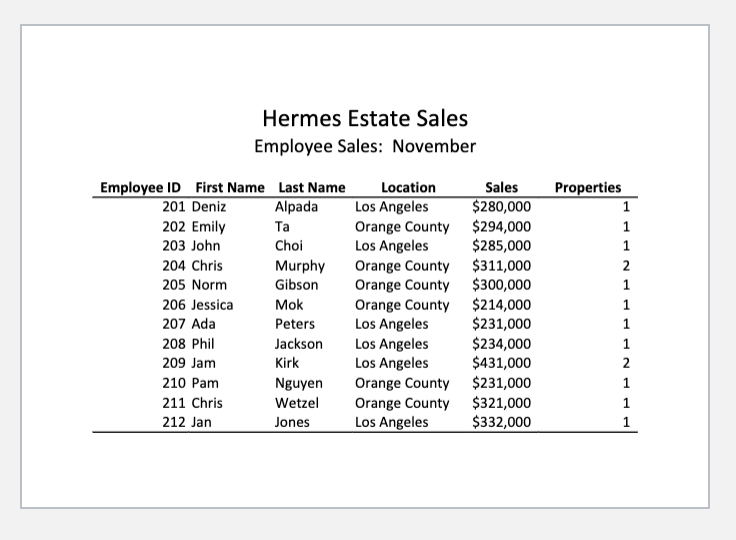
Step by Step Solution
There are 3 Steps involved in it

Get step-by-step solutions from verified subject matter experts
 Study Help