



Question: END OF CHAPTER SUMMARY You can create and modify the text in a Word outline, and then import the outline into PowerPoint. You can customize
END OF CHAPTER
SUMMARY
You can create and modify the text in a Word outline, and then import the outline into
PowerPoint. You can customize a PowerPoint presentation by inserting and deleting slides,
changing text formats, and modifying the theme. Insert SmartArt graphics, pictures, and
shapes to add interest to your presentations. You can save a PowerPoint presentation as an
outline in Rich Text Format. The RTF outline can be modified in Word.
KEY TERMS
Black slide
Outline view
Speaker's notes.
Character spacing.
Placeholder.
Minus outline symbol.
Plus outline symbol
SmartArt
Rich Text Format RTF
Status bar
Slide pane.
Text pane.
Slide Show view
Theme
Outline symbol
SlidesOutline pane
View buttons.
Zooming
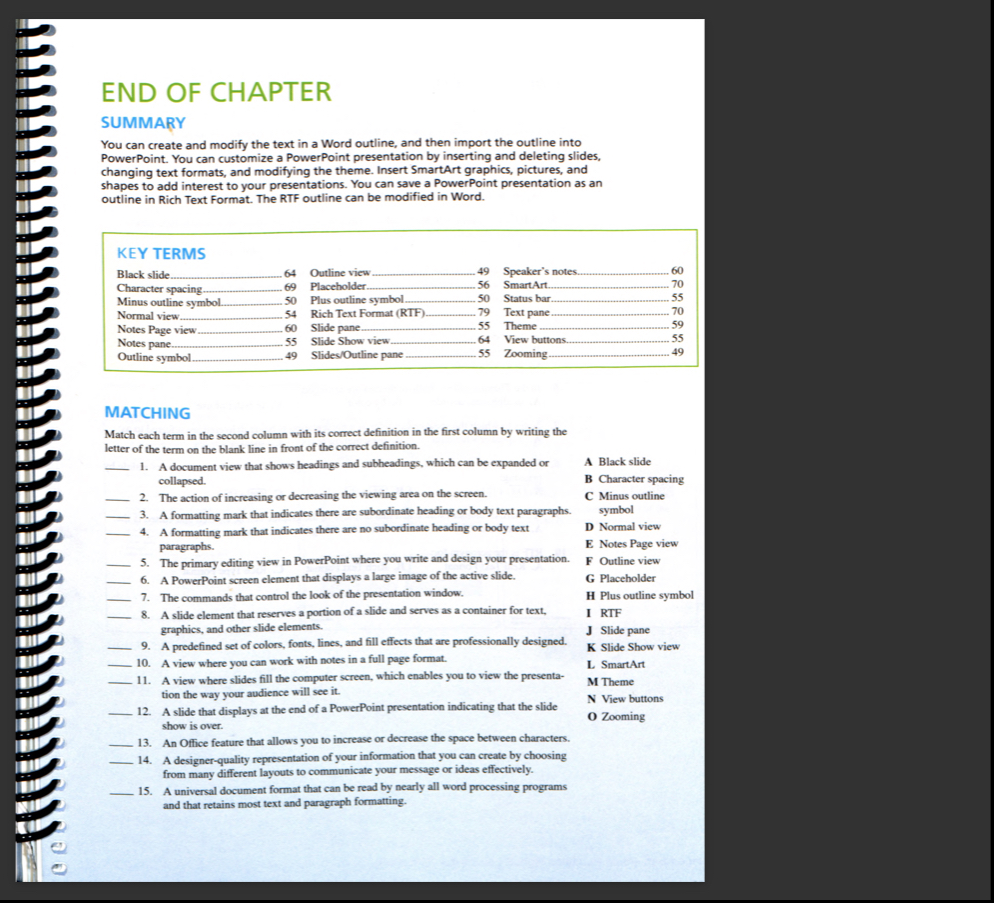
MATCHING
Match each term in the second column with its correct definition in the first column by writing the
letter of the term on the blank line in front of the correct definition.
A document view that shows headings and subheadings, which can be expanded or
collapsed.
The action of increasing or decreasing the viewing area on the screen.
A formatting mark that indicates there are subordinate heading or body text paragraphs.
A Black slide
A formatting mark that indicates there are no subordinate heading or body text
paragraphs.
The primary editing view in PowerPoint where you write and design your presentation.
A PowerPoint screen element that displays a large image of the active slide.
The commands that control the look of the presentation window.
A slide element that reserves a portion of a slide and serves as a container for text,
graphics, and other slide elements.
A predefined set of colors, fonts, lines, and fill effects that are professionally designed.
A view where you can work with notes in a full page format.
A view where slides fill the computer screen, which enables you to view the presenta
tion the way your audience will see it
A slide that displays at the end of a PowerPoint presentation indicating that the slide
show is over.
B Character spacing
C Minus outline
symbol
D Normal view
E Notes Page view
F Outline view
G Placeholder
H Plus outline symbol
I RTF
J Slide pane
K Slide Show view
L SmartArt
M Theme
N View buttons
O Zooming
An Office feature that allows you to increase or decrease the space between characters.
A designerquality representation of your information that you can create by choosing
from many different layouts to communicate your message or ideas effectively.
A universal document format that can be read by nearly all word processing programs
and that retains most text and paragraph formatting.
Step by Step Solution
There are 3 Steps involved in it
1 Expert Approved Answer
Step: 1 Unlock

Question Has Been Solved by an Expert!
Get step-by-step solutions from verified subject matter experts
Step: 2 Unlock
Step: 3 Unlock